
Firefox 28 - X 64-bit Download
Popular x64 Tags
- mozilla firefox x64 download
- internet browser x64 download
- rss x64 download
- mozilla x64 download
- firefox x64 download
- download x64 download
- explorer x64 download
- internet x64 download
- firefox 3 2 x64 download
- mozilla explorer x64 download
- internet explorer x64 download
- browser x64 download
- download manager x64 download
- web browser x64 download
- windows x64 download
- pages x64 download
- sites x64 download
- popup blocker x64 download
- offline x64 download
- rss reader x64 download
- movies x64 download
- downloader x64 download
- offline browser x64 download
- kill popup x64 download
- web x64 download
- browser html x64 download
- review x64 download
- web downloader x64 download
- html x64 download
- filter x64 download
Firefox 28 28.0
Sponsored links:
license: Freeware
downloads: 774
size: 24.00 MB
updated: 2014-03-18
tags: firefox, internet explorer, mozilla, mozilla explorer, mozilla firefox, internet browser, Mozilla browser, web browser, browser, internet
Add to Basket

Mozilla Foundation

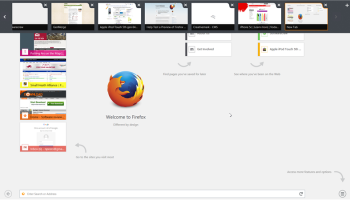
Mozilla Firefox is a free and open source web browser developed for Windows, OS X, and Linux, with a mobile version for Android, by the Mozilla Foundation and its subsidiary, the Mozilla Corporation. Firefox uses the Gecko layout engine to render web pages, which implements current and anticipated web standards.
- Proudly non-profit
- Innovating for you
- Fast, flexible, secure
Bringing together all kinds of awesomeness to make browsing better for you. The Firefox browser is created by Mozilla, a non-profit organization whose mission is to promote openness, innovation and opportunity on the Web.
Firefox is available in over 70 languages, thanks to the contributions from Mozilla community members around the world.
Features:
Bringing together all kinds of awesomeness to make browsing better for you.
Awesome Bar
Get to your favorite sites quickly – even if you don’t remember the URLs. Type your term into the location bar (aka the Awesome Bar) and the autocomplete function will include possible matches from your browsing history, bookmarked sites and open tabs.
The Awesome Bar learns as you use it—over time, it adapts to your preferences and offers better-fitting matches. We’ve tweaked it to give you greater control over the results (including privacy settings) and increased performance so you find what you need even faster.
Improved Interface
We’re always looking for ways to make your browsing easier and more efficient.
Read on for our latest improvements
Tabs on Top
Tabs are above the Awesome Bar to make it easier to focus on the content of the sites you visit.
Firefox Button (Windows and Linux)
All your menu items are now found in a single button for easy access.
Bookmark Button
Manage your bookmarks in a single button. Find your favorite links without getting bogged down!
Simplified Reload/Stop Button
Your Awesome Bar now features one easy button to stop loading pages or reload pages.
Home Button
The Home button has been moved to the right side of the search-field.
Tabs
Browse multiple sites at once, simply and easily. Each new site appears as a new tab
(not a new window) and can be accessed in one click.
App Tabs
Take sites you always keep open—like Web mail—off your tab bar and give them a permanent home in your browser.
Switch-to-Tab
As you’re opening a new tab or typing in the Awesome Bar, Firefox will check to see if you already have that site open. If you do, you’ll be directed to the existing tab so you don’t open a duplicate.
Organize your Tabs with Panorama
Too many tabs? Reclaim your browser from tab clutter! Panorama lets you drag and drop your tabs into manageable groups that you can organize, name and arrange in a fun and visual way. To get started with Panorama, simply select the Tab Groups icon when you customize your Navigation Toolbar or right click any tab to Move to Group.
Reopen Closed Tabs and Windows
If you accidentally close a tab or window, you can reopen it in one click. Just view Recently Closed Tabs or Recently Closed Windows in the History menu and select the tab or window you’d like to reopen.
Smooth Scrolling
Like to have all 20 of your favorite pages open at once? An elegant new feature lets you scroll through tabs easily to see them all and access the one you want quickly.
- Proudly non-profit
- Innovating for you
- Fast, flexible, secure
Bringing together all kinds of awesomeness to make browsing better for you. The Firefox browser is created by Mozilla, a non-profit organization whose mission is to promote openness, innovation and opportunity on the Web.
Firefox is available in over 70 languages, thanks to the contributions from Mozilla community members around the world.
Features:
Bringing together all kinds of awesomeness to make browsing better for you.
Awesome Bar
Get to your favorite sites quickly – even if you don’t remember the URLs. Type your term into the location bar (aka the Awesome Bar) and the autocomplete function will include possible matches from your browsing history, bookmarked sites and open tabs.
The Awesome Bar learns as you use it—over time, it adapts to your preferences and offers better-fitting matches. We’ve tweaked it to give you greater control over the results (including privacy settings) and increased performance so you find what you need even faster.
Improved Interface
We’re always looking for ways to make your browsing easier and more efficient.
Read on for our latest improvements
Tabs on Top
Tabs are above the Awesome Bar to make it easier to focus on the content of the sites you visit.
Firefox Button (Windows and Linux)
All your menu items are now found in a single button for easy access.
Bookmark Button
Manage your bookmarks in a single button. Find your favorite links without getting bogged down!
Simplified Reload/Stop Button
Your Awesome Bar now features one easy button to stop loading pages or reload pages.
Home Button
The Home button has been moved to the right side of the search-field.
Tabs
Browse multiple sites at once, simply and easily. Each new site appears as a new tab
(not a new window) and can be accessed in one click.
App Tabs
Take sites you always keep open—like Web mail—off your tab bar and give them a permanent home in your browser.
Switch-to-Tab
As you’re opening a new tab or typing in the Awesome Bar, Firefox will check to see if you already have that site open. If you do, you’ll be directed to the existing tab so you don’t open a duplicate.
Organize your Tabs with Panorama
Too many tabs? Reclaim your browser from tab clutter! Panorama lets you drag and drop your tabs into manageable groups that you can organize, name and arrange in a fun and visual way. To get started with Panorama, simply select the Tab Groups icon when you customize your Navigation Toolbar or right click any tab to Move to Group.
Reopen Closed Tabs and Windows
If you accidentally close a tab or window, you can reopen it in one click. Just view Recently Closed Tabs or Recently Closed Windows in the History menu and select the tab or window you’d like to reopen.
Smooth Scrolling
Like to have all 20 of your favorite pages open at once? An elegant new feature lets you scroll through tabs easily to see them all and access the one you want quickly.
OS: Windows XP, Windows Vista, Windows Vista x64, Windows 7, Windows 7 x64, Windows 8, Windows 8 x64
Add Your Review or 64-bit Compatibility Report
Top Browsers 64-bit downloads


TheWorld Browser 7.0.0.108
A tiny, fast, safe, powerful, multi-tabbed with multi-threaded frame web browser
Freeware

SeaMonkey 2.53.23
All-in-one internet suite with a browser, email, and web development tools.
Open Source

Dooble 2024.12.31
Dooble: A secure, user-friendly web browser with privacy-focused features.
Open Source

Blisk 25.0.115.28
Blisk: A powerful browser for web developers with live reloading and testing tools.
Demo


Thorium Browser 138.0.7204.300 Win 1
Thorium Browser: A fast, privacy-focused web experience with sleek design.
Open Source

Internet Explorer 8 for Windows Vista 64-bit and Windows Server 2008 64-bit
Internet Explorer 8 final is now platform and feature complete
Freeware


Google Chrome 146.0.7680.80

Fast, secure, and user-friendly web browser that offers a range of features
Freeware

32bit Web Browser 16.08.01
Browse the web fast easy fun profitably while suppressing annoying advertisement
Shareware | $29.99
Members area
Top 64-bit Downloads
-
Adobe Flash Player 10
for 64-bit Windows Preview 2
x64 freeware download -
SoftPerfect Bandwidth
Manager 3.3.0
x64 shareware download -
Internet Explorer 8 for
Windows Vista 64-bit and
Windows Server 2008
64-bit
x64 freeware download -
FileZilla Server 1.8.1
x64 open source download -
SoftPerfect Connection
Emulator 1.9
x64 shareware download -
Angry IP Scanner 64bit 3.9.1
x64 open source download -
Google Chrome x64 bit 126.0.6478.127
x64 freeware download -
HTTPNetworkSniffer
64-bit 1.63
x64 freeware download -
WatchFTP x64 4.2.1.0
x64 trialware download -
DameWare Mini Remote
Control 64bit 12.3.0.12
x64 trialware download
Top Downloads
-
TheWorld Browser 7.0.0.108
freeware download -
MusicFab 1.0.6.6
demo download -
Adobe Flash Player 10
for 64-bit Windows Preview 2
freeware download -
Open With Photoshop 63.0
open source download -
BiglyBT 4.0.0.0
open source download -
NetShareWatcher 1.5.8
shareware download -
Profile Migrator 1.1
trialware download -
Stylebot 1.2.1
freeware download -
MetaMask for Chrome 13.22.0
open source download -
Web Archives for Opera 7.3.0
open source download -
SeaMonkey 2.53.23
open source download -
Dooble 2024.12.31
open source download -
GetRight 6.5
shareware download -
MP4 Downloader 6.2.3
trialware download -
Vuze 5.7.7.0
freeware download