
GIMP for Windows - X 64-bit Download
Popular x64 Tags
- photo editor x64 download
- software x64 download
- image editor x64 download
- image editing x64 download
- photos x64 download
- photoshop x64 download
- color x64 download
- design x64 download
- jpeg x64 download
- editor x64 download
- plugin x64 download
- image enhancement x64 download
- watermark x64 download
- exif x64 download
- rotate x64 download
- batch x64 download
- pictures x64 download
- graphics x64 download
- image x64 download
- digital camera x64 download
- photo x64 download
- graphic x64 download
- images x64 download
- resize x64 download
- paint x64 download
- camera x64 download
- digital x64 download
- digital imaging x64 download
- picture x64 download
- jpg x64 download
GIMP for Windows 2.10.38
Sponsored links:
license: Open Source
downloads: 53
size: 297.00 MB
updated: 2024-05-04
tags: free 3d animation software, gimp, gimp animator, mac paint, paint, photo, photo brush, photo editor, photo impression, photo retouching, photo space, photoshop, photoshop cs3, system, the gimp
Add to Basket

Gimp

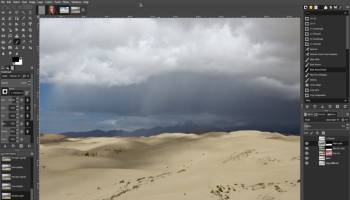
The Gimp is the open source reference in image manipulation. This free application will allow you to retouch, author and edit your photos thanks to a wide set of tools.
Let’s quickly go through what you can do with the Gimp. The painting function has the essential clone, airbrush or pencil tools and a powerful gradient and blend tool. You can also create and save your own brushes and patterns for later use. The program lets you manipulate your photos, adding layers, doing Bezier and polygonal selections or setting text. Load and save animations in a frame-as-layer format and batch process all your photos for quick editing. The multi-windowed interface can be moved around to fit your needs and resized according to your desktop space.
While the Gimp is user friendly, the installation process can result a bit hairy. Because the application works under the GTK Runtime Environment, you will have to install this kit to successfully launch the program. The process is fairly lengthy and some error messages tend to pop up, however if you persist, you will be able to install the Gimp properly on your PC
Despite this fairly hazardous installation process, the Gimp is a program we recommend. Whether you’re out of dough or are looking for a free alternative to Photoshop, the Gimp is excellent image manipulation software with all the tools you’d expect. The friendly interface and expandability make this a program of choice.
Features:
Painting:
· Full suite of painting tools including Brush, Pencil, Airbrush, Clone,
· etc.
· Sub-pixel sampling for all paint tools for high quality anti-aliasing
· Extremely powerful gradient editor and blend tool
· Supports custom brushes and patterns
System:
· Tile based memory management so image size is limited only by available disk space
· Virtually unlimited number of images open at one time
Advanced Manipulation:
· Full alpha channel support
· Layers and channels
· Multiple Undo/Redo (limited only by diskspace)
· Editable text layers
· Transformation tools including rotate, scale, shear and flip
· Selection tools including rectangle, ellipse, free, fuzzy and intelligent
· Advanced path tool doing bezier and polygonal selections.
· Transformable paths, transformable selections.
· Quickmask to paint a selection.
Extensible:
· A Procedural Database for calling internal GIMP functions from
· external programs as in Script-fu
· Advanced scripting capabilities (Scheme, Python, Perl)
· Plug-ins which allow for the easy addition of new file formats and new
· effect filters
· Over 100 plug-ins already available
Animation:
· Load and save animations in a convenient frame-as-layer format
· MNG support
· Frame Navigator (in GAP, the GIMP Animation Package)
· Onion Skin (in GAP, the GIMP Animation Package)
· Bluebox (in GAP, the GIMP Animation Package)
File Handling:
· File formats supported include bmp, gif, jpeg, mng, pcx, pdf, png, ps, psd, svg, tiff, tga, xpm, and many others
· Load, display, convert, save to many file formats
· SVG path import/export
Let’s quickly go through what you can do with the Gimp. The painting function has the essential clone, airbrush or pencil tools and a powerful gradient and blend tool. You can also create and save your own brushes and patterns for later use. The program lets you manipulate your photos, adding layers, doing Bezier and polygonal selections or setting text. Load and save animations in a frame-as-layer format and batch process all your photos for quick editing. The multi-windowed interface can be moved around to fit your needs and resized according to your desktop space.
While the Gimp is user friendly, the installation process can result a bit hairy. Because the application works under the GTK Runtime Environment, you will have to install this kit to successfully launch the program. The process is fairly lengthy and some error messages tend to pop up, however if you persist, you will be able to install the Gimp properly on your PC
Despite this fairly hazardous installation process, the Gimp is a program we recommend. Whether you’re out of dough or are looking for a free alternative to Photoshop, the Gimp is excellent image manipulation software with all the tools you’d expect. The friendly interface and expandability make this a program of choice.
Features:
Painting:
· Full suite of painting tools including Brush, Pencil, Airbrush, Clone,
· etc.
· Sub-pixel sampling for all paint tools for high quality anti-aliasing
· Extremely powerful gradient editor and blend tool
· Supports custom brushes and patterns
System:
· Tile based memory management so image size is limited only by available disk space
· Virtually unlimited number of images open at one time
Advanced Manipulation:
· Full alpha channel support
· Layers and channels
· Multiple Undo/Redo (limited only by diskspace)
· Editable text layers
· Transformation tools including rotate, scale, shear and flip
· Selection tools including rectangle, ellipse, free, fuzzy and intelligent
· Advanced path tool doing bezier and polygonal selections.
· Transformable paths, transformable selections.
· Quickmask to paint a selection.
Extensible:
· A Procedural Database for calling internal GIMP functions from
· external programs as in Script-fu
· Advanced scripting capabilities (Scheme, Python, Perl)
· Plug-ins which allow for the easy addition of new file formats and new
· effect filters
· Over 100 plug-ins already available
Animation:
· Load and save animations in a convenient frame-as-layer format
· MNG support
· Frame Navigator (in GAP, the GIMP Animation Package)
· Onion Skin (in GAP, the GIMP Animation Package)
· Bluebox (in GAP, the GIMP Animation Package)
File Handling:
· File formats supported include bmp, gif, jpeg, mng, pcx, pdf, png, ps, psd, svg, tiff, tga, xpm, and many others
· Load, display, convert, save to many file formats
· SVG path import/export
OS: Windows 7, Windows 7 x64, Windows 8, Windows 8 x64, Windows 10, Windows 10 x64, Windows 11
Add Your Review or 64-bit Compatibility Report
Top Editors 64-bit downloads


CorelDRAW X5 2026 v27.0.0.121
Versatile graphic design suite for vector illustration and layout creation.
Trialware | $269.00


FreeFotoWorks 2026 26.1.4

Photo editing software for beginners and pro. All well-known photo effects.
Freeware


Photo Ninja 64-bit 1.4.0c
A professional-grade RAW converter that delivers exceptional detail
Trialware | $129.00

Members area
Top 64-bit Downloads
-
Fluid Mask for Mac 3.3.14
x64 trialware download -
ICO file format x64 2.1f1
x64 open source download -
Archicad 64bit 27 B3001
x64 demo download -
TopSpice 10.26a
x64 demo download -
Potrace for Windows (x64
bit) 1.16
x64 open source download -
Photo Ninja 64-bit 1.4.0c
x64 trialware download -
WellCAD x64 5.3 B625
x64 demo download -
Embird x64 2023 B10.86
x64 trialware download -
Portable MicroDicom x64 2024.2
x64 freeware download -
Adobe Photoshop Elements 2024.3
x64 trialware download
Top Downloads
-
CorelDRAW X5 2026 v27.0.0.121
trialware download -
Tracfoil 4.12.07
trialware download -
oCam 428.0
freeware download -
Gyazo 5.9.1
demo download -
MarvinSketch 23.16.0
freeware download -
Scanahand 8.0.0.320
demo download -
VueScan 9.8.53
demo download -
nanoCAD 5.1.2524.2017
freeware download -
MapInfo Professional 17.0.4
trialware download -
iWisdom 0.0.0+2107~ga0785ce1
open source download -
CodeLoader 4.19.0
freeware download -
SeiSee 2.22.6
freeware download -
XnConvert 1.106.0
shareware download -
GIMP 3.2.2
open source download -
Screenpresso 2.2.9
shareware download