
HDR Expose 64bit - X 64-bit Download
Popular x64 Tags
- photo editor x64 download
- software x64 download
- image editor x64 download
- image editing x64 download
- photos x64 download
- photoshop x64 download
- color x64 download
- design x64 download
- jpeg x64 download
- editor x64 download
- plugin x64 download
- image enhancement x64 download
- watermark x64 download
- exif x64 download
- rotate x64 download
- batch x64 download
- pictures x64 download
- graphics x64 download
- image x64 download
- digital camera x64 download
- photo x64 download
- graphic x64 download
- images x64 download
- resize x64 download
- paint x64 download
- camera x64 download
- digital x64 download
- digital imaging x64 download
- picture x64 download
- jpg x64 download
HDR Expose 64bit 2.1.1 build 9804
Sponsored links:

Unified Color

HDR Photography Beyond Your Imagination – HDR Expose and 32 Float
Capturing a high contrast scene has always vexed photographers. We’ve all tried neutral density filters for landscapes and lighting equipment for interior shots in order to balance the wide range of light levels in our scenes. The results could be good but the work to get to the final image was intense. No longer!
Capturing high contrast scenes is now as simple as shooting three or more images of varying exposures and then merging those images into one high dynamic range file that reveals all your all shadows and highlights. The magic is done with HDR software. But, not all HDR software is created equal.
Previously, HDR applications performed their contrast manipulation or "tone-mapping" by creating an 8-bit or 16-bit image. Using an 8-bit or 16-bit file to create a large, high dynamic range file significantly reduces the file’s dynamic range, clips its color range and degrades the precision of image data.
That’s why we created our stand-alone HDR application HDR Expose and the Photoshop plug-in 32 Float. These are the only HDR applications that merge multiple exposures into a full 32-bit file using our patented Beyond RGB™ color model. And, most importantly, these are the only HDR photo editing applications where all tools and operations work in 32-bit, floating-point precision.
Creating an HDR Image – One Click or Total Control
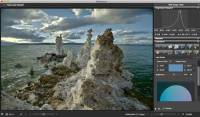
HDR Expose x64 uses powerful image alignment algorithms to create an HDR image from multiple exposures. The resulting 32-bit image is then ready to have its wide contrast range adjusted to fit into the contrast range of your output device. Unlike other HDR applications which "tone-map" their 8-bit or 16-bit image into a useable range, HDR Expose takes all the valuable data in your HDR image and "dynamic range maps" it into a file that retains naturally clear highlights, vibrant mid-tones and beautifully open shadows.
HDR Expose x64 can do this for you with a single click using the Dynamic Range Mapping tool. You can also choose to have full control over the mapping process by individually adjusting the image’s dynamic range, brightness, highlight power and shadow power. And, HDR Expose gives you the ability to tweak colors, saturation and noise levels as well. With these powerful tools you can dial in a beautifully natural HDR image or a highly stylized image depending on your artistic vision.
Capturing a high contrast scene has always vexed photographers. We’ve all tried neutral density filters for landscapes and lighting equipment for interior shots in order to balance the wide range of light levels in our scenes. The results could be good but the work to get to the final image was intense. No longer!
Capturing high contrast scenes is now as simple as shooting three or more images of varying exposures and then merging those images into one high dynamic range file that reveals all your all shadows and highlights. The magic is done with HDR software. But, not all HDR software is created equal.
Previously, HDR applications performed their contrast manipulation or "tone-mapping" by creating an 8-bit or 16-bit image. Using an 8-bit or 16-bit file to create a large, high dynamic range file significantly reduces the file’s dynamic range, clips its color range and degrades the precision of image data.
That’s why we created our stand-alone HDR application HDR Expose and the Photoshop plug-in 32 Float. These are the only HDR applications that merge multiple exposures into a full 32-bit file using our patented Beyond RGB™ color model. And, most importantly, these are the only HDR photo editing applications where all tools and operations work in 32-bit, floating-point precision.
Creating an HDR Image – One Click or Total Control
HDR Expose x64 uses powerful image alignment algorithms to create an HDR image from multiple exposures. The resulting 32-bit image is then ready to have its wide contrast range adjusted to fit into the contrast range of your output device. Unlike other HDR applications which "tone-map" their 8-bit or 16-bit image into a useable range, HDR Expose takes all the valuable data in your HDR image and "dynamic range maps" it into a file that retains naturally clear highlights, vibrant mid-tones and beautifully open shadows.
HDR Expose x64 can do this for you with a single click using the Dynamic Range Mapping tool. You can also choose to have full control over the mapping process by individually adjusting the image’s dynamic range, brightness, highlight power and shadow power. And, HDR Expose gives you the ability to tweak colors, saturation and noise levels as well. With these powerful tools you can dial in a beautifully natural HDR image or a highly stylized image depending on your artistic vision.
OS: Windows Vista x64, Windows 7 x64, Windows 8 x64
Add Your Review or 64-bit Compatibility Report
Top Editors 64-bit downloads


CorelDRAW X5 2026 v27.0.0.121
Versatile graphic design suite for vector illustration and layout creation.
Trialware | $269.00


FreeFotoWorks 2026 26.1.4

Photo editing software for beginners and pro. All well-known photo effects.
Freeware


Photo Ninja 64-bit 1.4.0c
A professional-grade RAW converter that delivers exceptional detail
Trialware | $129.00

Members area
Top 64-bit Downloads
-
Fluid Mask for Mac 3.3.14
x64 trialware download -
ICO file format x64 2.1f1
x64 open source download -
Archicad 64bit 27 B3001
x64 demo download -
TopSpice 10.26a
x64 demo download -
Potrace for Windows (x64
bit) 1.16
x64 open source download -
Photo Ninja 64-bit 1.4.0c
x64 trialware download -
WellCAD x64 5.3 B625
x64 demo download -
Embird x64 2023 B10.86
x64 trialware download -
Portable MicroDicom x64 2024.2
x64 freeware download -
Adobe Photoshop Elements 2024.3
x64 trialware download
Top Downloads
-
CorelDRAW X5 2026 v27.0.0.121
trialware download -
Tracfoil 4.12.07
trialware download -
oCam 428.0
freeware download -
Gyazo 5.9.1
demo download -
MarvinSketch 23.16.0
freeware download -
Scanahand 8.0.0.320
demo download -
VueScan 9.8.53
demo download -
nanoCAD 5.1.2524.2017
freeware download -
MapInfo Professional 17.0.4
trialware download -
iWisdom 0.0.0+2107~ga0785ce1
open source download -
CodeLoader 4.19.0
freeware download -
sigTOOL 0.95
open source download -
SeiSee 2.22.6
freeware download -
XnConvert 1.106.0
shareware download -
GIMP 3.2.2
open source download