
iBackupBot - X 64-bit Download
Popular x64 Tags
- mozilla firefox x64 download
- internet browser x64 download
- rss x64 download
- mozilla x64 download
- firefox x64 download
- download x64 download
- explorer x64 download
- internet x64 download
- firefox 3 2 x64 download
- mozilla explorer x64 download
- internet explorer x64 download
- browser x64 download
- download manager x64 download
- web browser x64 download
- windows x64 download
- pages x64 download
- sites x64 download
- popup blocker x64 download
- offline x64 download
- rss reader x64 download
- movies x64 download
- downloader x64 download
- offline browser x64 download
- kill popup x64 download
- web x64 download
- browser html x64 download
- review x64 download
- web downloader x64 download
- html x64 download
- filter x64 download
iBackupBot 5.6.3
Sponsored links:
license: Shareware
downloads: 41
size: 38.10 MB
updated: 2024-09-22
tags: backup, iBackupBot, download iBackupBot, iPhone, iBackupBot free download, iOS management, backup manager, iTunes backup, manager, software tool, data recovery, iPhone backup, iPod backup, iPod, VOWSoft Ltd
Add to Basket

VOWSoft Ltd

**iBackupBot: Your Ultimate iTunes Backup Manager**
iBackupBot, developed by VOWSoft Ltd, is a powerful and versatile tool designed to manage and manipulate iTunes backups with ease and precision. Whether you're an iOS enthusiast, a tech-savvy user, or someone who simply wants more control over their device backups, iBackupBot offers a comprehensive suite of features that cater to a wide range of needs.
**Key Features:**
1. **Detailed Backup Management:**
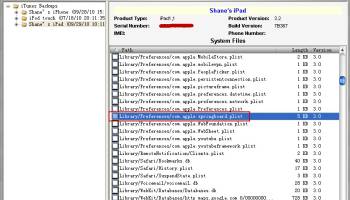
iBackupBot allows users to explore and manage iTunes backups with an intuitive interface. You can view detailed information about each backup, including device name, iOS version, and backup date, making it easy to keep track of multiple backups.
2. **Selective Data Restoration:**
One of the standout features of iBackupBot is its ability to selectively restore data. Instead of restoring an entire backup, you can choose specific data types such as contacts, messages, call history, notes, and more. This granular control ensures that you only restore what you need, saving time and storage space.
3. **File Editing and Exporting:**
iBackupBot provides advanced file editing capabilities, allowing users to modify backup files directly. This is particularly useful for developers and power users who need to tweak specific settings or data. Additionally, the software supports exporting data to various formats, including text, Excel, and HTML, making it easy to share and analyze information.
4. **App Data Management:**
The software excels in managing app data, enabling users to view and extract app-specific files and documents. This feature is invaluable for those who want to back up game progress, app settings, or other important data tied to specific applications.
5. **User-Friendly Interface:**
Despite its robust feature set, iBackupBot is designed with user-friendliness in mind. The clean and organized interface ensures that even less tech-savvy users can navigate and utilize the software effectively. Comprehensive guides and support are also available to assist users in making the most of the tool.
6. **Cross-Platform Compatibility:**
iBackupBot is compatible with both Windows and macOS, ensuring that users across different operating systems can benefit from its capabilities. This cross-platform support makes it a versatile solution for a wide audience.
**Performance and Reliability:**
iBackupBot is known for its reliable performance and efficiency. The software handles large backups with ease and performs tasks quickly, minimizing downtime and ensuring that your data is always accessible when you need it. Regular updates from VOWSoft Ltd ensure that the software remains compatible with the latest iOS versions and devices, providing peace of mind to users.
**Conclusion:**
In a world where data is invaluable, iBackupBot stands out as a must-have tool for anyone looking to take control of their iTunes backups. Its combination of detailed backup management, selective restoration, file editing, and user-friendly design makes it a top choice for iOS users. Whether you're looking to safeguard your data, manage app files, or simply have more control over your backups, iBackupBot delivers with precision and reliability.
iBackupBot, developed by VOWSoft Ltd, is a powerful and versatile tool designed to manage and manipulate iTunes backups with ease and precision. Whether you're an iOS enthusiast, a tech-savvy user, or someone who simply wants more control over their device backups, iBackupBot offers a comprehensive suite of features that cater to a wide range of needs.
**Key Features:**
1. **Detailed Backup Management:**
iBackupBot allows users to explore and manage iTunes backups with an intuitive interface. You can view detailed information about each backup, including device name, iOS version, and backup date, making it easy to keep track of multiple backups.
2. **Selective Data Restoration:**
One of the standout features of iBackupBot is its ability to selectively restore data. Instead of restoring an entire backup, you can choose specific data types such as contacts, messages, call history, notes, and more. This granular control ensures that you only restore what you need, saving time and storage space.
3. **File Editing and Exporting:**
iBackupBot provides advanced file editing capabilities, allowing users to modify backup files directly. This is particularly useful for developers and power users who need to tweak specific settings or data. Additionally, the software supports exporting data to various formats, including text, Excel, and HTML, making it easy to share and analyze information.
4. **App Data Management:**
The software excels in managing app data, enabling users to view and extract app-specific files and documents. This feature is invaluable for those who want to back up game progress, app settings, or other important data tied to specific applications.
5. **User-Friendly Interface:**
Despite its robust feature set, iBackupBot is designed with user-friendliness in mind. The clean and organized interface ensures that even less tech-savvy users can navigate and utilize the software effectively. Comprehensive guides and support are also available to assist users in making the most of the tool.
6. **Cross-Platform Compatibility:**
iBackupBot is compatible with both Windows and macOS, ensuring that users across different operating systems can benefit from its capabilities. This cross-platform support makes it a versatile solution for a wide audience.
**Performance and Reliability:**
iBackupBot is known for its reliable performance and efficiency. The software handles large backups with ease and performs tasks quickly, minimizing downtime and ensuring that your data is always accessible when you need it. Regular updates from VOWSoft Ltd ensure that the software remains compatible with the latest iOS versions and devices, providing peace of mind to users.
**Conclusion:**
In a world where data is invaluable, iBackupBot stands out as a must-have tool for anyone looking to take control of their iTunes backups. Its combination of detailed backup management, selective restoration, file editing, and user-friendly design makes it a top choice for iOS users. Whether you're looking to safeguard your data, manage app files, or simply have more control over your backups, iBackupBot delivers with precision and reliability.
OS: Windows 10 64 bit, Windows 8 64 bit, Windows 7 64 bit
Add Your Review or 64-bit Compatibility Report
Top Browsers 64-bit downloads


Internet Explorer 8 for Windows Vista 64-bit and Windows Server 2008 64-bit
Internet Explorer 8 final is now platform and feature complete
Freeware

TheWorld Browser 7.0.0.108
A tiny, fast, safe, powerful, multi-tabbed with multi-threaded frame web browser
Freeware

Dooble 2024.12.31
Dooble: A secure, user-friendly web browser with privacy-focused features.
Open Source

Blisk 25.0.115.28
Blisk: A powerful browser for web developers with live reloading and testing tools.
Demo


Thorium Browser 138.0.7204.300 Win 1
Thorium Browser: A fast, privacy-focused web experience with sleek design.
Open Source


SeaMonkey 2.53.23
All-in-one internet suite with a browser, email, and web development tools.
Open Source

Polarity Browser 10.0.4
An intuitive web browser based on two engines: Chromium V8 and Trident
Open Source

Members area
Top 64-bit Downloads
-
Adobe Flash Player 10
for 64-bit Windows Preview 2
x64 freeware download -
Internet Explorer 8 for
Windows Vista 64-bit and
Windows Server 2008
64-bit
x64 freeware download -
FileZilla Server 1.8.1
x64 open source download -
Firefox 64bit x64 127.0.2
x64 open source download -
SSuite NetSurfer Extreme
x64 2.10.16.1
x64 freeware download -
Google Chrome x64 bit 126.0.6478.127
x64 freeware download -
SSuite NetSurfer Browser
x64 2.30.16.10
x64 freeware download -
AlternaTIFF x64 2.0.8
x64 freeware download -
WatchFTP x64 4.2.1.0
x64 trialware download -
Heroix Longitude for
VMware x64 10.0.1
x64 trialware download
Top Downloads
-
Adobe Flash Player 10
for 64-bit Windows Preview 2
freeware download -
MiraxTV 2024.5
freeware download -
Internet Explorer 8 for
Windows Vista 64-bit and
Windows Server 2008
64-bit
freeware download -
Xftp Free 7.0 B0155
freeware download -
FileZilla Server 1.8.1
open source download -
Profile Migrator 1.1
trialware download -
Chrono Download Manager 0.13.10
freeware download -
Web Archives for Opera 7.3.0
open source download -
TheWorld Browser 7.0.0.108
freeware download -
MusicFab 1.0.6.6
demo download -
Virtual World 4.7.4
commercial download -
Open With Photoshop 63.0
open source download -
NetSpeed 1.1
freeware download -
NetShareWatcher 1.5.8
shareware download -
Dooble 2024.12.31
open source download