
Xftp Free - X 64-bit Download
Popular x64 Tags
- ftprush x64 download
- sftp x64 download
- auto ftp x64 download
- ftp synchronize x64 download
- ftp software x64 download
- ftp program x64 download
- secure x64 download
- ftp client x64 download
- server x64 download
- fxp client x64 download
- ftp scripts x64 download
- ftp download x64 download
- ftp client software x64 download
- ssh x64 download
- ftp list x64 download
- download x64 download
- ftps x64 download
- ftp x64 download
- ftp backup x64 download
- upload x64 download
- ftp transfer x64 download
- secure ftp x64 download
- client x64 download
- ftp command x64 download
- resume x64 download
- scheduler x64 download
- ssl x64 download
- ftp commands x64 download
- transfer x64 download
- ftp pasv x64 download
Xftp Free 7.0 B0155
Sponsored links:

NetSarang, Inc.

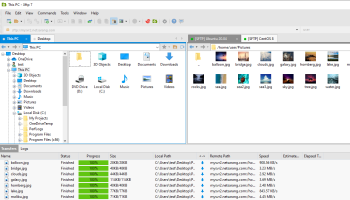
Xftp is a flexible and lightweight SFTP/FTP client for users who need to transfer files securely over a network. It offers powerful features such as direct edit, multiple panes, folder synchronization, FXP support, server-to-server transfer and 3rd party editor integration. Xftp will save you time and effort when working with remote files.
Xftp is free for home and school use. Please read our free for home and school use license agreement for terms and conditions.
Packed with User convenient features to Maximize productivity
Xftp is packed with powerful features that can maximize user productivity. For example, Session tab allows users to create and manage multiple sessions within a single Xftp window and direct edit allows editing the contents of a file without downloading files. Users can also decide on the number of simultaneous download and upload connections so that transfer can be done at maximum performance.
Interoperable with Terminal Emulator (Xshell)
Xftp can interoperate with our terminal emulator tools, Xshell to access the command line interface of FTP/SFTP servers. Users can simply click on the Xshell button on Xftp and it will start the terminal session from the current connection automatically without authentication process. It is also possible to open Xftp sessions from Xshell with a click of a button.
Protect Sensitive Corporate Data
Xftp supports SFTP that is based on Secure Shell protocol. By using SFTP, all network traffic is encrypted securely with industry proven SSH encryption methods. Xftp also supports public key authentication and keyboard interactive authentication methods to prevent unauthorized users and hackers from accessing user's data.
FEATURES:
Synchronizing:
· The synchronizing feature in Xftp supports synchronizing files and folders from and to the remote with the local folders. Once you are on the remote folder you want to sync, click the Sync button and synchronization will start painlessly.
Multiple panes:
· Xftp supports more than 2 panes and each pane can have multiple tabs. You can transfer files to multiple destinations without going through each tabs. Also, the "Send to All Remote Session" feature allows you to send files to multiple locations at once.
FXP support:
· With FXP can dramatically reduce the time to take transfer files between the remote servers. FXP eliminates the data routing to local PC transferring data directly between two remote FTP servers.
Open multiple sessions within a single window:
· The Session tab feature allows users to open multiple sessions within a single Xftp window. All open sessions are accessible via simple Session tab interface and files on different servers can be easily transferred between open sessions. It not only reduces the system resource usage but also provides more organized work environment to increase user productivity.
Use Notepad to directly edit the remote file:
· The Direct edit feature allows users to edit the remote files with Windows Notepad directly without downloading the file. Users can increase productivity by eliminating the need for downloading the file for edit and uploading it when done editing. Xftp also provides an option for users to choose their favorite editors instead of using the default Windows Notepad.
Start a terminal session with click of a button:
· Xftp can interoperate with Xshell, a secure terminal emulator by NetSarang. By clicking a Xshell button, Xftp starts a terminal session from the open connection without having to go through the authentication process again.
Increase download/upload speed:
· The Multiple Transfer feature allows making multiple connections to upload/download files faster. This feature can increase the users' productivity by allowing the maximum usage of users’ bandwidth even when there is a download/upload speed limit for each network connection.
Xftp is free for home and school use. Please read our free for home and school use license agreement for terms and conditions.
Packed with User convenient features to Maximize productivity
Xftp is packed with powerful features that can maximize user productivity. For example, Session tab allows users to create and manage multiple sessions within a single Xftp window and direct edit allows editing the contents of a file without downloading files. Users can also decide on the number of simultaneous download and upload connections so that transfer can be done at maximum performance.
Interoperable with Terminal Emulator (Xshell)
Xftp can interoperate with our terminal emulator tools, Xshell to access the command line interface of FTP/SFTP servers. Users can simply click on the Xshell button on Xftp and it will start the terminal session from the current connection automatically without authentication process. It is also possible to open Xftp sessions from Xshell with a click of a button.
Protect Sensitive Corporate Data
Xftp supports SFTP that is based on Secure Shell protocol. By using SFTP, all network traffic is encrypted securely with industry proven SSH encryption methods. Xftp also supports public key authentication and keyboard interactive authentication methods to prevent unauthorized users and hackers from accessing user's data.
FEATURES:
Synchronizing:
· The synchronizing feature in Xftp supports synchronizing files and folders from and to the remote with the local folders. Once you are on the remote folder you want to sync, click the Sync button and synchronization will start painlessly.
Multiple panes:
· Xftp supports more than 2 panes and each pane can have multiple tabs. You can transfer files to multiple destinations without going through each tabs. Also, the "Send to All Remote Session" feature allows you to send files to multiple locations at once.
FXP support:
· With FXP can dramatically reduce the time to take transfer files between the remote servers. FXP eliminates the data routing to local PC transferring data directly between two remote FTP servers.
Open multiple sessions within a single window:
· The Session tab feature allows users to open multiple sessions within a single Xftp window. All open sessions are accessible via simple Session tab interface and files on different servers can be easily transferred between open sessions. It not only reduces the system resource usage but also provides more organized work environment to increase user productivity.
Use Notepad to directly edit the remote file:
· The Direct edit feature allows users to edit the remote files with Windows Notepad directly without downloading the file. Users can increase productivity by eliminating the need for downloading the file for edit and uploading it when done editing. Xftp also provides an option for users to choose their favorite editors instead of using the default Windows Notepad.
Start a terminal session with click of a button:
· Xftp can interoperate with Xshell, a secure terminal emulator by NetSarang. By clicking a Xshell button, Xftp starts a terminal session from the open connection without having to go through the authentication process again.
Increase download/upload speed:
· The Multiple Transfer feature allows making multiple connections to upload/download files faster. This feature can increase the users' productivity by allowing the maximum usage of users’ bandwidth even when there is a download/upload speed limit for each network connection.
OS: Windows XP, Windows Vista, Windows Vista x64, Windows 7, Windows 7 x64, Windows 8, Windows 8 x64, Windows 10, Windows 10 x64, Windows 11
Add Your Review or 64-bit Compatibility Report
Top FTP Clients 64-bit downloads


WinSCP 6.5.5
WinSCP is a free file manager for Windows supporting FTP, SFTP, S3 and WebDAV.
Freeware


SecureFX 9.7.0 Build 3761
SecureFX: Robust file transfer software with advanced security features.
Trialware | $59.95


FileZilla Portable 3.67.0
Features multiple connections support and a dual-pane interface
Open Source
tags: app, client, drive, filezilla, filezilla ftp client, flash, ftp, ftp client, hard drive, ipod, list, popular, portable, server list, settings, File Zilla


Xlight FTP Server Standart x64 3.9.4.2
A powerful ftp server with very small program size
Trialware | $39.95
Members area
Top 64-bit Downloads
-
Internet Explorer 8 for
Windows Vista 64-bit and
Windows Server 2008
64-bit
x64 freeware download -
Adobe Flash Player 10
for 64-bit Windows Preview 2
x64 freeware download -
Firefox 64bit x64 127.0.2
x64 open source download -
SoftPerfect Bandwidth
Manager 3.3.0
x64 shareware download -
Google Chrome x64 bit 126.0.6478.127
x64 freeware download -
SSuite NetSurfer Extreme
x64 2.10.16.1
x64 freeware download -
Radio Downloader 64-bit 0.32
x64 open source download -
SSuite NetSurfer Browser
x64 2.30.16.8
x64 freeware download -
SSuite NetSurfer E-Gamer
x64 2.10.16.2
x64 freeware download -
DameWare Mini Remote
Control 64bit 12.3.0.12
x64 trialware download
Top Downloads
-
Internet Explorer 8 for
Windows Vista 64-bit and
Windows Server 2008
64-bit
freeware download -
Adobe Flash Player 10
for 64-bit Windows Preview 2
freeware download -
X-Browser 1.4
freeware download -
Google Chrome 145.0.7632.117
freeware download -
Yandex Browser 24.6.1.766
freeware download -
Firefox 64bit x64 127.0.2
open source download -
Clockify Time Tracker
for Chrome 2.11.46
trialware download -
BrowseEmAll 9.7.0
trialware download -
uTorrent (µTorrent) 3.6.0 B47124
open source download -
Simplify Media 2.5.0.1519
freeware download -
NTP Server Tool 1.0
freeware download -
Portable iReasoning MIB
Browser Enterprise 14.0 B4717
trialware download -
vcf2xml 24.04
freeware download -
LanguageTool for Chrome 10.1.1
shareware download -
Teleparty (formerly
Netflix Party) 5.5.7
trialware download