
IncrediMail 2 - X 64-bit Download
Popular x64 Tags
- email client x64 download
- email x64 download
- attachments x64 download
- outlook x64 download
- mailer x64 download
- e mail x64 download
- imap x64 download
- mail x64 download
- remailer x64 download
- download x64 download
- free x64 download
- sql x64 download
- mass x64 download
- address x64 download
- html x64 download
- bulk x64 download
- pop3 x64 download
- portable email client x64 download
- mailing x64 download
- marketing x64 download
- client x64 download
- sender x64 download
- smtp x64 download
- email marketing x64 download
- newsletter x64 download
- calendar x64 download
- pop x64 download
- usb based portable email x64 download
- bomber x64 download
- email verifier x64 download
IncrediMail 2 2.5 Build 6605344
Sponsored links:

IncrediMail Ltd

The IncrediMail Team is excited to introduce you to IncrediMail 2. We’ve been working hard to make the IncrediMail you know and love even better. With new improvements like a new design, powerful email search, enhanced stability and major upgrades to performance and speed, IncrediMail 2 makes your email experience more productive even while you're having fun.
New & Improved Design
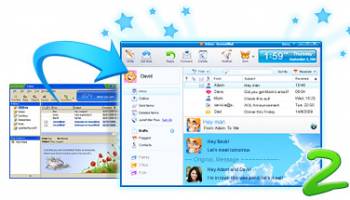
IncrediMail 2 introduces a better, more attractive and user-friendly design. We made the main application windows easier to use by enlarging the buttons, and reorganized the menus so that more relevant options are easily accessible. Mail folders can now be customized to your color of choice. The email list window and preview pane now feature a new design that makes browsing through your email easier and more productive. Plus, for your convenience, a direct button to the Gallery was added to the main taskbar.
FastSearch
IncrediMail 2 introduces FastSearch. Searching through your email is now faster and more powerful than ever before. Search results are shown as quickly as you type - It takes less than a second for IncrediMail 2 to search through 10,000’s of emails. Also, the terms you are searching for are conveniently highlighted. Advanced search has been upgraded with snappier performance, and is now a more powerful tool than before. FastSearch also includes “Search Filters”, a new tool allowing you to filter emails and attachments including Images, Videos, Word documents, Power Point documents, and many more file types.
Emoticons
Enjoy a huge gallery filled with 1000’s of emoticons.
Place cool emoticons in your email messages.
Email Notifiers (animated)
Enjoy tons of fun animated characters (Notifiers) – they will appear on your
screen to tell you that new mail arrived.
Note: To stay updated on the arrival of new email, IncrediMail
will automatically launch on startup.
Email Backgrounds
IncrediMail has 1000’s of email backgrounds you can use in your email
messages. Simply select your favorite background from our ever-growing
collection and make your email incredible.
Everyone receiving your email will be amazed.
Ecards
Enjoy Ecards for every occasion. IncrediMail has a huge collection
of beautiful and fun Ecards that make your special greetings all
the more spectacular.
Experience 3D Effects
See your messages change into exciting 3D objects like a sailing boat or flying
helicopter when sending, receiving and even deleting your email.
You’ll feel the thrill every time!
Animations
Choose from tons of lively animations and
add them to your email messages.
New & Improved Design
IncrediMail 2 introduces a better, more attractive and user-friendly design. We made the main application windows easier to use by enlarging the buttons, and reorganized the menus so that more relevant options are easily accessible. Mail folders can now be customized to your color of choice. The email list window and preview pane now feature a new design that makes browsing through your email easier and more productive. Plus, for your convenience, a direct button to the Gallery was added to the main taskbar.
FastSearch
IncrediMail 2 introduces FastSearch. Searching through your email is now faster and more powerful than ever before. Search results are shown as quickly as you type - It takes less than a second for IncrediMail 2 to search through 10,000’s of emails. Also, the terms you are searching for are conveniently highlighted. Advanced search has been upgraded with snappier performance, and is now a more powerful tool than before. FastSearch also includes “Search Filters”, a new tool allowing you to filter emails and attachments including Images, Videos, Word documents, Power Point documents, and many more file types.
Emoticons
Enjoy a huge gallery filled with 1000’s of emoticons.
Place cool emoticons in your email messages.
Email Notifiers (animated)
Enjoy tons of fun animated characters (Notifiers) – they will appear on your
screen to tell you that new mail arrived.
Note: To stay updated on the arrival of new email, IncrediMail
will automatically launch on startup.
Email Backgrounds
IncrediMail has 1000’s of email backgrounds you can use in your email
messages. Simply select your favorite background from our ever-growing
collection and make your email incredible.
Everyone receiving your email will be amazed.
Ecards
Enjoy Ecards for every occasion. IncrediMail has a huge collection
of beautiful and fun Ecards that make your special greetings all
the more spectacular.
Experience 3D Effects
See your messages change into exciting 3D objects like a sailing boat or flying
helicopter when sending, receiving and even deleting your email.
You’ll feel the thrill every time!
Animations
Choose from tons of lively animations and
add them to your email messages.
OS: Windows XP, Windows Vista, Windows Vista x64, Windows 7, Windows 7 x64, Windows 8, Windows 8 x64, Windows 10, Windows 10 x64
Requirements: MS Internet Explorer 5.5 or higher.
Add Your Review or 64-bit Compatibility Report
Top E-Mail Clients 64-bit downloads


Wavebox 10.146.26.2
Wavebox: Unified workspace for web apps, email, and productivity tools.
Demo | $8.33


Microsoft Outlook 2016 16.0.6741
Stay connected to your world with our most up-to-date e-mail and calendar tools
Trialware | $109.99

Convert Auto-Complete Files 5.0.0
Easily convert and manage Outlook auto-complete files with this tool.
Shareware

Public Categories for Outlook 1.0
Use Outlook categories together in the network and manage them centrally.
Shareware | $47.00

SnapMail 5.2.1
Cross-platform private messaging & file transfer utility. Internal email.
Shareware | $30.00
tags: messaging, chat, file-transfer, cross-platform, peer-to-peer, reminders, alerts, LAN, email, internal, private


Foxmail 7.2.25 Build 528
Effortless email management with a sleek interface and powerful features.
Freeware

eM Client 10.4.4867
eM Client: Best email client for Windows and macOS, for businesses and home users
Freeware
Members area
Top 64-bit Downloads
-
Linphone 5.0.8
x64 freeware download -
WeChat 3.9.6
x64 freeware download -
NK2Edit x64 3.46
x64 freeware download -
MAPIViewer 64-bit 3.4
x64 freeware download -
MOBILedit Forensic
Express 7.4.1.21502
x64 demo download -
AdiIRC 64bit 4.4
x64 freeware download -
SIP Communicator for
Windows (x64 bit) 2.10.5550
x64 open source download -
OutlookAddressBookView
x64 2.44
x64 freeware download -
KeyLemon 4.0.3
x64 trialware download -
Funambol x64 10.0.3
x64 open source download
Top Downloads
-
Skype 8.150.0.125
freeware download -
Find Unused Contacts 4.11
freeware download -
VSee 4.28 (52330)
shareware download -
Paltalk 2.4.0 Build 112318
shareware download -
PC SMS Software 8.0.1.3
shareware download -
Beeper 4.2.653
open source download -
Clyton 37.0
shareware download -
Windows Communicator 3.1
shareware download -
cwtch 1.16.2
open source download -
Wavebox 10.146.26.2
demo download -
Total Webmail Converter 1.4
shareware download -
Linphone 5.0.8
freeware download -
LINE 9.9.0 Build 3633
freeware download -
Mail.dll 3.0
shareware download -
Microsoft Outlook 2016 16.0.6741
trialware download