
Maxsurf - X 64-bit Download
Popular x64 Tags
- autocad x64 download
- solidworks x64 download
- intellicad x64 download
- dxf x64 download
- dwg x64 download
- architectural x64 download
- visualization x64 download
- cad x64 download
- home x64 download
- design x64 download
- hpgl x64 download
- progecad x64 download
- animation x64 download
- fence x64 download
- cam x64 download
- dwg to pdf x64 download
- architect x64 download
- viz x64 download
- vrml x64 download
- convert x64 download
- gear x64 download
- landscape x64 download
- deck x64 download
- strength check x64 download
- batch x64 download
- garden x64 download
- yard x64 download
- gardening x64 download
- landscaping x64 download
- backyard x64 download
Maxsurf 17.07
Sponsored links:

Bentley Systems

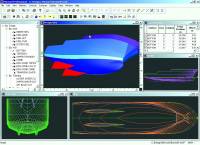
Maxsurf provides fast, flexible and intuitive modelling of all types of hulls, superstructures and appendages. An unlimited number of trimmed NURB surfaces can be used to model any vessel from yachts to workboats to the largest ships.
The core of the Maxsurf range, the Maxsurf design module, provides the naval architect with the design tools necessary to create fair, optimised hull forms quickly, accurately and with limited training time. Any number of NURB surfaces can be joined, trimmed and manipulated to create a complete model ready for hydrostatic analysis or construction detailing.
A range of commands provide direct interactive manipulation of the surface shape by mouse or keyboard. Maxsurf provides automated transformation of the hull form to match desired dimensions and hydrostatic properties. Control points can be dragged with the mouse, adjusted numerically, or manipulated by a range of fairing commands.
FEATURES:
· Fast to learn and easy to master graphical interface
· Model complex hull geometry with trimmed surfaces
· Create fair surfaces using a wide range of fairness evaluation tools
· Visualise hull shape changes with dynamic updating
· Match required hull parameters using parametric transformation
· Extract key design data via lines, offsets, hydrostatic properties or curve of areas
Fair and accurate surfaces are critical for optimal vessel performance and ease of construction. Maxsurf provides a range of flexible tools for evaluating curvature of the entire surface as well as curvature along a particular surface contour such as a waterline or diagonal. Curvature displays are automatically and interactively updated as you modify the surface.
All Maxsurf designs are stored in an common file structure which is accessed directly by other modules for analysis, construction and performance prediction. Changes made in Maxsurf will automatically flow through when the design is opened in other modules. Designs in the database file are extremely compact making them ideal for transmission to designers or builders via email.
The interactive graphical environment in Maxsurf complies with Microsoft Windows standards and allows you to very quickly learn and master the many design tools provided. Multiple windows can be used to view and change the model as well as provide a tabular view of design data. Other windows provide on-the-fly checks of curve of areas, upright hydrostatic calculations and tables of offsets.
Data exchange is a key requirement in the modern design office and Maxsurf supports a wide range of industry standard formats. Copy and paste of numerical tables to and from Microsoft Excel allows for custom calculations and formatting. Copy and paste of all graphical views also helps you create presentation materials and reports. Import and export of industry standard DXF and IGES files, allows you to seamlessly exchange point, line or surface data with other CAD and CAM systems.
Maxsurf's unique dynamic surface trimming capabilities allow you to model complex surface edges while maintaining fairness throughout the rest of the hull. An interactive display of surface/surface intersections lets you create the shapes you require even with complex configurations such as curved transoms, stepped sheerlines and appendages and bow thrusters. Surface trimming is automatically updated as you adjust the surfaces in the design letting you concentrate on creating the highest quality surface model possible.
Maxsurf provides all the hull, appendage and superstructure modelling capabilities you require. For users with a limited budget, the Maxsurf Plus, Maxsurf/T and Maxsurf/S versions provide the same surface modelling capabilities with fewer surfaces at a reduced cost. The parametric transformation function is only available in Maxsurf Pro.
The core of the Maxsurf range, the Maxsurf design module, provides the naval architect with the design tools necessary to create fair, optimised hull forms quickly, accurately and with limited training time. Any number of NURB surfaces can be joined, trimmed and manipulated to create a complete model ready for hydrostatic analysis or construction detailing.
A range of commands provide direct interactive manipulation of the surface shape by mouse or keyboard. Maxsurf provides automated transformation of the hull form to match desired dimensions and hydrostatic properties. Control points can be dragged with the mouse, adjusted numerically, or manipulated by a range of fairing commands.
FEATURES:
· Fast to learn and easy to master graphical interface
· Model complex hull geometry with trimmed surfaces
· Create fair surfaces using a wide range of fairness evaluation tools
· Visualise hull shape changes with dynamic updating
· Match required hull parameters using parametric transformation
· Extract key design data via lines, offsets, hydrostatic properties or curve of areas
Fair and accurate surfaces are critical for optimal vessel performance and ease of construction. Maxsurf provides a range of flexible tools for evaluating curvature of the entire surface as well as curvature along a particular surface contour such as a waterline or diagonal. Curvature displays are automatically and interactively updated as you modify the surface.
All Maxsurf designs are stored in an common file structure which is accessed directly by other modules for analysis, construction and performance prediction. Changes made in Maxsurf will automatically flow through when the design is opened in other modules. Designs in the database file are extremely compact making them ideal for transmission to designers or builders via email.
The interactive graphical environment in Maxsurf complies with Microsoft Windows standards and allows you to very quickly learn and master the many design tools provided. Multiple windows can be used to view and change the model as well as provide a tabular view of design data. Other windows provide on-the-fly checks of curve of areas, upright hydrostatic calculations and tables of offsets.
Data exchange is a key requirement in the modern design office and Maxsurf supports a wide range of industry standard formats. Copy and paste of numerical tables to and from Microsoft Excel allows for custom calculations and formatting. Copy and paste of all graphical views also helps you create presentation materials and reports. Import and export of industry standard DXF and IGES files, allows you to seamlessly exchange point, line or surface data with other CAD and CAM systems.
Maxsurf's unique dynamic surface trimming capabilities allow you to model complex surface edges while maintaining fairness throughout the rest of the hull. An interactive display of surface/surface intersections lets you create the shapes you require even with complex configurations such as curved transoms, stepped sheerlines and appendages and bow thrusters. Surface trimming is automatically updated as you adjust the surfaces in the design letting you concentrate on creating the highest quality surface model possible.
Maxsurf provides all the hull, appendage and superstructure modelling capabilities you require. For users with a limited budget, the Maxsurf Plus, Maxsurf/T and Maxsurf/S versions provide the same surface modelling capabilities with fewer surfaces at a reduced cost. The parametric transformation function is only available in Maxsurf Pro.
OS: Windows XP, Windows Vista, Windows Vista x64, Windows 7, Windows 7 x64, Windows 8, Windows 8 x64, Windows 10, Windows 10 x64, Windows 11
Add Your Review or 64-bit Compatibility Report
Top CAD 64-bit downloads


Tracfoil 4.12.07
Edit and print your ribs and airfoils templates from data
Trialware
tags: Cad, model, aircraft, plane, airfoil plotting, rib plotting, airfoil to DXF, airfoil, plot, rib

nanoCAD 5.1.2524.2017
nanoCAD - easy-to-use free CAD software delivering great user experience.
Freeware


MapInfo Professional 17.0.4
Location-based decisions: Explore, model and act with confidence
Trialware | $1 995.00
DICOMscope 3.5.1
A free DICOM viewer which can display uncompressed, monochrome DICOM images
Freeware


CrystalMaker 11.1.0
A full-featured scientific program, supporting the major database file formats
Demo | $499.00

Members area
Top 64-bit Downloads
-
Fluid Mask for Mac 3.3.14
x64 trialware download -
ICO file format x64 2.1f1
x64 open source download -
Archicad 64bit 27 B3001
x64 demo download -
TopSpice 10.26a
x64 demo download -
Photo Ninja 64-bit 1.4.0c
x64 trialware download -
WellCAD x64 5.3 B625
x64 demo download -
Portable MicroDicom x64 2024.2
x64 freeware download -
Adobe Photoshop Elements 2024.3
x64 trialware download -
Potrace for Windows (x64
bit) 1.16
x64 open source download -
delaboratory x64 0.8
x64 open source download
Top Downloads
-
CorelDRAW X5 2026 v27.0.0.121
trialware download -
Tracfoil 4.12.07
trialware download -
oCam 428.0
freeware download -
Gyazo 5.9.1
demo download -
VueScan 9.8.53
demo download -
nanoCAD 5.1.2524.2017
freeware download -
MarvinSketch 23.16.0
freeware download -
MapInfo Professional 17.0.4
trialware download -
Scanahand 8.0.0.320
demo download -
iWisdom 0.0.0+2107~ga0785ce1
open source download -
CodeLoader 4.19.0
freeware download -
SeiSee 2.22.6
freeware download -
XnConvert 1.106.0
shareware download -
GIMP 3.2.2
open source download -
Screenpresso 2.2.9
shareware download