
Monosnap - X 64-bit Download
Popular x64 Tags
- snapshot x64 download
- video screen capture x64 download
- print screen x64 download
- software x64 download
- screen capture tool x64 download
- video capture x64 download
- free screen capture x64 download
- screen capture x64 download
- capture x64 download
- desktop x64 download
- picture x64 download
- print x64 download
- video x64 download
- screen recorder x64 download
- screen capture software x64 download
- wmv x64 download
- screen x64 download
- image x64 download
- screen capture program x64 download
- clipboard x64 download
- screenshot x64 download
- screencapture x64 download
- record x64 download
- screen shot x64 download
- avi x64 download
- screen recording x64 download
- printscreen x64 download
- flash x64 download
- window x64 download
- recorder x64 download
Monosnap 5.3.0
Sponsored links:
license: Shareware ($2.50)
downloads: 449
size: 73.40 MB
updated: 2025-12-21
tags: Monosnap, download Monosnap, Monosnap free download, take screenshot, capture snapshot, capture screen, screenshot, snapshot, capture, screen
Add to Basket

Farminers Limited

Monosnap, developed by Farminers Limited, is a versatile and user-friendly screen capture and recording tool that caters to a wide range of users, from professionals to casual users seeking an efficient way to capture, annotate, and share their screen content. This software stands out for its simplicity, yet it packs a punch with a robust set of features designed to enhance productivity and streamline workflows.
At its core, Monosnap offers intuitive screen capturing capabilities, allowing users to take full-screen, window, or custom area screenshots with ease. The software's precision is further enhanced by its ability to capture pixel-perfect images, ensuring that every detail is preserved. For those who require more than just static images, Monosnap includes a powerful screen recording feature. Users can record high-quality videos of their entire screen or specific regions, complete with audio, making it an excellent tool for creating tutorials, presentations, or simply documenting processes.
One of Monosnap's standout features is its comprehensive annotation toolkit. Once a screenshot is captured, users can quickly annotate it with text, arrows, shapes, and highlights, providing clarity and context to the captured content. This feature is particularly useful for educators, designers, and team collaborators who need to convey information effectively and efficiently.
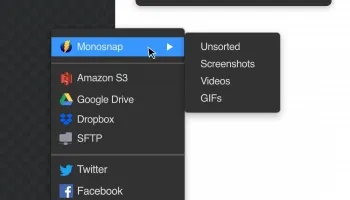
Monosnap also excels in its sharing capabilities. It seamlessly integrates with cloud storage services, allowing users to upload their captures directly to platforms like Dropbox, Google Drive, and AWS S3. This integration not only facilitates easy sharing but also ensures that users can access their content from anywhere, at any time. Additionally, Monosnap provides users with the option to generate shareable links, making it simple to distribute content via email or social media.
The software's user interface is clean and intuitive, designed to minimize distractions and maximize productivity. Users can customize keyboard shortcuts to streamline their workflow further, ensuring that Monosnap adapts to their specific needs and preferences.
Monosnap also prioritizes user privacy and security. The software includes options to blur sensitive information within screenshots, safeguarding personal or confidential data. This feature is particularly beneficial for professionals who handle sensitive information and need to ensure compliance with privacy standards.
Overall, Monosnap by Farminers Limited is a powerful, reliable, and versatile tool that simplifies the process of capturing, annotating, and sharing screen content. Its blend of functionality, ease of use, and integration capabilities make it an indispensable tool for anyone looking to enhance their digital communication and documentation efforts. Whether you're a teacher, designer, developer, or business professional, Monosnap offers the tools you need to capture your screen with precision and share your insights with clarity.
At its core, Monosnap offers intuitive screen capturing capabilities, allowing users to take full-screen, window, or custom area screenshots with ease. The software's precision is further enhanced by its ability to capture pixel-perfect images, ensuring that every detail is preserved. For those who require more than just static images, Monosnap includes a powerful screen recording feature. Users can record high-quality videos of their entire screen or specific regions, complete with audio, making it an excellent tool for creating tutorials, presentations, or simply documenting processes.
One of Monosnap's standout features is its comprehensive annotation toolkit. Once a screenshot is captured, users can quickly annotate it with text, arrows, shapes, and highlights, providing clarity and context to the captured content. This feature is particularly useful for educators, designers, and team collaborators who need to convey information effectively and efficiently.
Monosnap also excels in its sharing capabilities. It seamlessly integrates with cloud storage services, allowing users to upload their captures directly to platforms like Dropbox, Google Drive, and AWS S3. This integration not only facilitates easy sharing but also ensures that users can access their content from anywhere, at any time. Additionally, Monosnap provides users with the option to generate shareable links, making it simple to distribute content via email or social media.
The software's user interface is clean and intuitive, designed to minimize distractions and maximize productivity. Users can customize keyboard shortcuts to streamline their workflow further, ensuring that Monosnap adapts to their specific needs and preferences.
Monosnap also prioritizes user privacy and security. The software includes options to blur sensitive information within screenshots, safeguarding personal or confidential data. This feature is particularly beneficial for professionals who handle sensitive information and need to ensure compliance with privacy standards.
Overall, Monosnap by Farminers Limited is a powerful, reliable, and versatile tool that simplifies the process of capturing, annotating, and sharing screen content. Its blend of functionality, ease of use, and integration capabilities make it an indispensable tool for anyone looking to enhance their digital communication and documentation efforts. Whether you're a teacher, designer, developer, or business professional, Monosnap offers the tools you need to capture your screen with precision and share your insights with clarity.
OS: Windows 11, Windows 10 32/64 bit
Add Your Review or 64-bit Compatibility Report
Top Screen Capture 64-bit downloads


VueScan 9.8.53

VueScan: Powerful scanning software for enhanced image quality and versatility.
Demo | $29.96

Screenpresso 2.2.9
Screenpresso: Capture, edit, and share screenshots and videos effortlessly.
Shareware | $29.99


iTop Screenshot 1.2.3.544
iTop Screenshot is a free, lightweight, yet powerful screenshot tool.
Freeware
tags: Screenshot, screen capture


SD Snap Studio 1.0
First-class screen capture application with an advanced image editor
Shareware | $20.95

HyperSnap 9.7.3
Capture and edit screenshots effortlessly with powerful tools and features.
Demo | $49.95
Members area
Top 64-bit Downloads
-
Fluid Mask for Mac 3.3.14
x64 trialware download -
ICO file format x64 2.1f1
x64 open source download -
Archicad 64bit 27 B3001
x64 demo download -
TopSpice 10.26a
x64 demo download -
Photo Ninja 64-bit 1.4.0c
x64 trialware download -
WellCAD x64 5.3 B625
x64 demo download -
Portable MicroDicom x64 2024.2
x64 freeware download -
Adobe Photoshop Elements 2024.3
x64 trialware download -
Potrace for Windows (x64
bit) 1.16
x64 open source download -
delaboratory x64 0.8
x64 open source download
Top Downloads
-
CorelDRAW X5 2026 v27.0.0.121
trialware download -
Tracfoil 4.12.07
trialware download -
oCam 428.0
freeware download -
Gyazo 5.9.1
demo download -
VueScan 9.8.53
demo download -
nanoCAD 5.1.2524.2017
freeware download -
MarvinSketch 23.16.0
freeware download -
MapInfo Professional 17.0.4
trialware download -
Scanahand 8.0.0.320
demo download -
iWisdom 0.0.0+2107~ga0785ce1
open source download -
CodeLoader 4.19.0
freeware download -
SeiSee 2.22.6
freeware download -
XnConvert 1.106.0
shareware download -
GIMP 3.2.2
open source download -
Screenpresso 2.2.9
shareware download