
PhotoFiltre Portable - X 64-bit Download
Popular x64 Tags
- photo editor x64 download
- software x64 download
- image editor x64 download
- image editing x64 download
- photos x64 download
- photoshop x64 download
- color x64 download
- design x64 download
- jpeg x64 download
- editor x64 download
- plugin x64 download
- image enhancement x64 download
- exif x64 download
- watermark x64 download
- rotate x64 download
- batch x64 download
- pictures x64 download
- graphics x64 download
- image x64 download
- digital camera x64 download
- photo x64 download
- graphic x64 download
- images x64 download
- paint x64 download
- resize x64 download
- camera x64 download
- digital x64 download
- digital imaging x64 download
- picture x64 download
- jpg x64 download
PhotoFiltre Portable 7.2.1 Rev 3
Sponsored links:

Portableapps

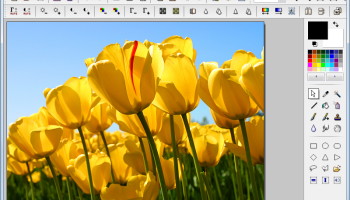
PhotoFiltre is a complete image retouching program. It allows you to do simple or advanced adjustments to an image and apply a vast range of filters on it. It is simple and intuitive to use, and has an easy learning curve. PhotoFiltre is free for personal and educational use.
Features
Filters - Its wide range of filters allows novice users to familiarize themselves with the world of graphics. You can find the standard adjustment functions (Brightness, contrast, dyed, saturation, gamma correction) and also artistic filters (watercolor, pastels, Indian ink, pointillism, puzzle effect). There are more than 100 filters to be discovered!
Vectorial selections - PhotoFiltre uses two types of vectorial selections. The first type uses automatic shapes (rectangle, ellipse, triangle, rhombus, rounded rectangle). The second type corresponds to the lasso and polygon. They both allow a customized form by drawing a shape by hand or using a series of lines. Every selection can be saved into a seperate file, to be used later on.
Tool bar - The toolbar is primarily made up of drawing tools, such as pipette, displacement cursor, fill bucket, aerosol, brush, drop of water (blur), cloning stamp, smudge (finger) and magic wand.
Brushes - PhotoFiltre has some standard brushes (round and square in different sizes), but also some more varied forms (oblique line, leave, star, etc...)
PhotoMasque module - With PhotoMasque you can create advanced effects of contour and transparency on your images by using preset masks. These masks are grayscale images, where white is the transparancy color, while opacity increases as the shades of gray become darker. Black means complete opacity. PhotoMasque comes with several basic masks to inspire you to create your own masks.
Automatisation module - This module allows you to apply basic functions/corrections (conversion, image size, framing) to a group of images.
Other functions - Image browser, Plug-in management, Scanning of images using a TWAIN compatible device (scanner, webcam, photocamera), Transparency management for GIF images and exporting them to icons (16, 256 or 16 millions of colors), Advanced text effects (rotation, shading, bevel), Serveral types of contours and textures, Blending and assembling of images and more
Features
Filters - Its wide range of filters allows novice users to familiarize themselves with the world of graphics. You can find the standard adjustment functions (Brightness, contrast, dyed, saturation, gamma correction) and also artistic filters (watercolor, pastels, Indian ink, pointillism, puzzle effect). There are more than 100 filters to be discovered!
Vectorial selections - PhotoFiltre uses two types of vectorial selections. The first type uses automatic shapes (rectangle, ellipse, triangle, rhombus, rounded rectangle). The second type corresponds to the lasso and polygon. They both allow a customized form by drawing a shape by hand or using a series of lines. Every selection can be saved into a seperate file, to be used later on.
Tool bar - The toolbar is primarily made up of drawing tools, such as pipette, displacement cursor, fill bucket, aerosol, brush, drop of water (blur), cloning stamp, smudge (finger) and magic wand.
Brushes - PhotoFiltre has some standard brushes (round and square in different sizes), but also some more varied forms (oblique line, leave, star, etc...)
PhotoMasque module - With PhotoMasque you can create advanced effects of contour and transparency on your images by using preset masks. These masks are grayscale images, where white is the transparancy color, while opacity increases as the shades of gray become darker. Black means complete opacity. PhotoMasque comes with several basic masks to inspire you to create your own masks.
Automatisation module - This module allows you to apply basic functions/corrections (conversion, image size, framing) to a group of images.
Other functions - Image browser, Plug-in management, Scanning of images using a TWAIN compatible device (scanner, webcam, photocamera), Transparency management for GIF images and exporting them to icons (16, 256 or 16 millions of colors), Advanced text effects (rotation, shading, bevel), Serveral types of contours and textures, Blending and assembling of images and more
OS: Windows 2000, Windows 2003, Windows XP, Windows Vista, Windows Vista x64, Windows 7, Windows 7 x64, Windows 8, Windows 8 x64, Windows 10, Windows 10 x64
Add Your Review or 64-bit Compatibility Report
Top Editors 64-bit downloads


CorelDRAW X5 2025 26.2.0.29
Versatile graphic design suite for vector illustration and layout creation.
Trialware | $30.75


Batch It Ultra 7.44
Batch It: Efficient bulk image resizing, renaming, and conversion tool.
Trialware | $16.95

RoboGEO 6.3.2
Geotag EXIF photos for Google Earth, Google Maps, Flickr, SHP or DXF files
Demo | $79.95

FreeFotoWorks 2026 26.0.4

Photo editing software for beginners and pro. All well-known photo effects.
Freeware

iWatermark Pro for Windows 2.5.25
The Most Popular Watermarking App for iPhone/iPad, Mac, Android and Windows
Shareware | $30.00

Real-DRAW PRO 5.2.4
Graphic editor that combines vector, 2D, 3D and bitmap processing in one package
Trialware | $25.00

Wings 3D 2.3
You can use this software when you want to create 3D models and customize them
Freeware

Emjysoft ID Photo 2026 19.2
Create professional ID photos effortlessly with customizable templates.
Shareware | $29.99
Members area
Top 64-bit Downloads
-
VisualMILL 2012 7.0.084
x64 demo download -
Webots PRO R2023a
x64 open source download -
HDR Darkroom x64 3 1.1.3.106
x64 demo download -
Wings 3D 2.3
x64 freeware download -
Fluid Mask for Mac 3.3.14
x64 trialware download -
uDig x64 1.4.0
x64 open source download -
TopSpice 10.26a
x64 demo download -
Automesher 64-bit 2.4.8
x64 trialware download -
AKVIS Refocus 11.7
x64 trialware download -
BlackInk 2023.1
x64 demo download
Top Downloads
-
CorelDRAW X5 2025 26.2.0.29
trialware download -
CorelDRAW 2017 19.1.0.419
trialware download -
TinyPDF 3.00
freeware download -
CorelDRAW X6 16.4.0.1280
trialware download -
Easy Cut Studio 6 for
Windows 6.006
shareware download -
Photopia Director 2.1.1232
trialware download -
ImageFinder 1.005
freeware download -
Balancer 2.1.0.448
demo download -
VisualMILL 2012 7.0.084
demo download -
Webots PRO R2023a
open source download -
SeiSee 2.22.6
freeware download -
Batch It Ultra 7.44
trialware download -
RoboGEO 6.3.2
demo download -
FreeFotoWorks 2026 26.0.4
freeware download -
iWatermark Pro for
Windows 2.5.25
shareware download