
Pinta - X 64-bit Download
Popular x64 Tags
- photo editor x64 download
- software x64 download
- image editor x64 download
- image editing x64 download
- photos x64 download
- photoshop x64 download
- color x64 download
- design x64 download
- jpeg x64 download
- editor x64 download
- plugin x64 download
- image enhancement x64 download
- watermark x64 download
- exif x64 download
- rotate x64 download
- batch x64 download
- pictures x64 download
- graphics x64 download
- image x64 download
- digital camera x64 download
- photo x64 download
- graphic x64 download
- images x64 download
- resize x64 download
- paint x64 download
- camera x64 download
- digital x64 download
- digital imaging x64 download
- picture x64 download
- jpg x64 download
Pinta 3.1.1
Sponsored links:
license: Open Source
downloads: 57
size: 57.30 MB
updated: 2026-01-10
tags: Pinta, download Pinta, Pinta free download, edit image, image editor, drawing application, enhance, editor, draw, effect
Add to Basket

Jonathan Pobst

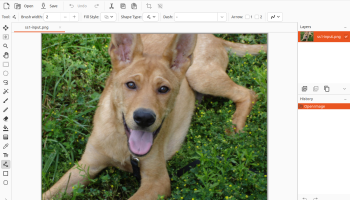
Pinta, developed by Jonathan Pobst, is a versatile and user-friendly open-source drawing and image editing software that caters to both novice and experienced users. Inspired by Paint.NET, Pinta aims to provide a simple yet powerful platform for creating and editing images, making it an ideal choice for those who need a lightweight alternative to more complex graphic design tools.
One of Pinta's standout features is its intuitive interface, which is designed to be accessible without sacrificing functionality. The layout is clean and straightforward, allowing users to focus on their creative tasks without being overwhelmed by unnecessary clutter. This simplicity is complemented by a robust set of tools that include drawing, painting, and editing capabilities. Users can easily access a variety of brushes, shapes, and text tools, making it easy to create detailed and polished images.
Pinta also offers a comprehensive suite of image manipulation features. Users can work with layers, adjust colors, and apply a range of effects to enhance their images. The software supports multiple file formats, ensuring compatibility with other graphic design applications. Additionally, Pinta's support for unlimited undo history is a significant advantage, allowing users to experiment freely without the fear of making irreversible changes.
Another noteworthy aspect of Pinta is its cross-platform compatibility. Available for Windows, macOS, and Linux, Pinta ensures a consistent experience across different operating systems, making it a versatile choice for users who work on multiple platforms. The software's open-source nature encourages community involvement, with users able to contribute to its development and suggest new features or improvements.
Pinta's performance is commendable, with a lightweight footprint that ensures smooth operation even on older hardware. This efficiency makes it an attractive option for users who require a reliable image editor without the need for high-end system specifications.
In summary, Pinta is an excellent choice for anyone seeking a straightforward yet powerful image editing tool. Its combination of ease of use, comprehensive features, and cross-platform support makes it a valuable addition to any creative toolkit. Whether you're a hobbyist looking to explore digital art or a professional in need of a quick and efficient editing solution, Pinta offers the tools you need to bring your ideas to life.
One of Pinta's standout features is its intuitive interface, which is designed to be accessible without sacrificing functionality. The layout is clean and straightforward, allowing users to focus on their creative tasks without being overwhelmed by unnecessary clutter. This simplicity is complemented by a robust set of tools that include drawing, painting, and editing capabilities. Users can easily access a variety of brushes, shapes, and text tools, making it easy to create detailed and polished images.
Pinta also offers a comprehensive suite of image manipulation features. Users can work with layers, adjust colors, and apply a range of effects to enhance their images. The software supports multiple file formats, ensuring compatibility with other graphic design applications. Additionally, Pinta's support for unlimited undo history is a significant advantage, allowing users to experiment freely without the fear of making irreversible changes.
Another noteworthy aspect of Pinta is its cross-platform compatibility. Available for Windows, macOS, and Linux, Pinta ensures a consistent experience across different operating systems, making it a versatile choice for users who work on multiple platforms. The software's open-source nature encourages community involvement, with users able to contribute to its development and suggest new features or improvements.
Pinta's performance is commendable, with a lightweight footprint that ensures smooth operation even on older hardware. This efficiency makes it an attractive option for users who require a reliable image editor without the need for high-end system specifications.
In summary, Pinta is an excellent choice for anyone seeking a straightforward yet powerful image editing tool. Its combination of ease of use, comprehensive features, and cross-platform support makes it a valuable addition to any creative toolkit. Whether you're a hobbyist looking to explore digital art or a professional in need of a quick and efficient editing solution, Pinta offers the tools you need to bring your ideas to life.
OS: Windows 11, Windows 10 64 bit
Add Your Review or 64-bit Compatibility Report
Top Editors 64-bit downloads


CorelDRAW X5 2026 v27.0.0.121
Versatile graphic design suite for vector illustration and layout creation.
Trialware | $269.00


jMonkeyEngine 3.9.0
jMonkeyEngine: Open-source 3D game development engine for Java developers.
Open Source


PTGui 13.7

Create stunning panoramas effortlessly with PTGui's powerful stitching tools.
Demo | $175.00


StarSpikes Pro 4.3.1
StarSpikes Pro 4 is an 8bf plug-in - Digital Diffraction Effects for Astroimages
Shareware | $49.95

Fotografix Portable 1.5 Rev 2
Image editor with support for many common features as well as a few advanced one
Freeware
Members area
Top 64-bit Downloads
-
ICO file format x64 2.1f1
x64 open source download -
Fluid Mask for Mac 3.3.14
x64 trialware download -
Portable MicroDicom x64 2024.2
x64 freeware download -
CAD6 Industry 2022.1.8.16
x64 trialware download -
Archicad 64bit 27 B3001
x64 demo download -
Blue Cat's Protector x64 2.31
x64 demo download -
AstroTortilla x64 0.7.0.0
x64 open source download -
Potrace for Windows (x64
bit) 1.16
x64 open source download -
AcroPDF 6.2
x64 shareware download -
Neat Image plug-in for
Photoshop x64 9.2.0
x64 demo download
Top Downloads
-
CorelDRAW X5 2026 v27.0.0.121
trialware download -
Tracfoil 4.12.07
trialware download -
MarvinSketch 23.16.0
freeware download -
SeiSee 2.22.6
freeware download -
oCam 428.0
freeware download -
Texmod 0.9b
freeware download -
iWisdom 0.0.0+2107~ga0785ce1
open source download -
MapInfo Professional 17.0.4
trialware download -
ToandFromWebP 1.0.0.0
freeware download -
CodeLoader 4.19.0
freeware download -
sigTOOL 0.95
open source download -
LTpowerCAD 2.7.2
freeware download -
Cool Resizer 2016
shareware download -
ImageConvertPro 2.01.07
shareware download -
Video to GIF 5.3
shareware download