
POPFile - X 64-bit Download
Popular x64 Tags
- email client x64 download
- email x64 download
- attachments x64 download
- outlook x64 download
- mailer x64 download
- e mail x64 download
- imap x64 download
- mail x64 download
- remailer x64 download
- download x64 download
- free x64 download
- sql x64 download
- mass x64 download
- address x64 download
- html x64 download
- bulk x64 download
- pop3 x64 download
- portable email client x64 download
- mailing x64 download
- marketing x64 download
- client x64 download
- sender x64 download
- smtp x64 download
- email marketing x64 download
- newsletter x64 download
- calendar x64 download
- pop x64 download
- usb based portable email x64 download
- bomber x64 download
- email verifier x64 download
POPFile 1.1.3
Sponsored links:

John Graham-Cumming

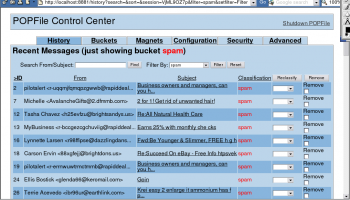
POPFile automatically sorts your email messages and fights spam.
POPFile is an email classification tool with a Naive Bayes classifier, POP3, SMTP, NNTP proxies and IMAP filter and a web interface. It runs on most platforms and with most email clients.
This upgrade introduces some new features and fixes some bugs. The minimal Perl used by the Windows version has been upgraded and as a result Windows 9x, Windows Millennium and Windows NT are no longer officially supported.
New features:
You can now customize Subject Header modification placement (head or tail) by changing the new option bayes_subject_mod_pos'. (ticket #74) NNTP module now caches articles received with the message number specified.
You can now jump to message header/message body/quick magnets/scores in the single message view by clicking links on the head of the page.
You can now filter messages shown in the history using 'reclassified' option.
Windows version improvements:
The minimal Perl has been updated to the most recent 5.8 release. Since this release of Perl only officially supports Windows 2000 or later POPFile 1.1.1 may not work on Windows 95, Windows 98, Windows Millennium or Windows NT. The installer will display a warning message explaining that POPFile may not work properly on these old systems.
The Windows system tray icon's menu now offers options to visit the support website and check for new versions of POPFile.
If the automatic version check feature has been turned on (via the Security tab in the User Interface) then the system tray icon will change and a message box will be displayed. This check is performed once per day.
Now that all known problems with the system tray icon have been fixed it will be enabled by default in new installations.
The Windows installer now preselects the relevant components when upgrading or modifying an existing installation.
The Windows installer can now display the UI properly even if the database is very large (tens of MB).
Fixed a problem that POPFile does not work on Japanese Windows when the path of the data directory contains non-ASCII characters (e.g. the user name is written in Japanese).
Mac OS X version improvements:
The installer for Mac OS X 10.6 (Snow Leopard) has come. Since Snow Leopard includes Perl v5.10.0, the Perl modules which are supplied with the POPFile installer v1.1.0 or earlier aren't compatible with it. Starting with this version, two versions of installer will be released. One is for Snow Leopard, and another is for the former versions of Mac OS X. The name of Snow Leopard installer will have '-sl' suffix.
Other improvements:
The users who are using very large database (tens of MB) will be able to reclassify messages faster.
POPFile is an email classification tool with a Naive Bayes classifier, POP3, SMTP, NNTP proxies and IMAP filter and a web interface. It runs on most platforms and with most email clients.
This upgrade introduces some new features and fixes some bugs. The minimal Perl used by the Windows version has been upgraded and as a result Windows 9x, Windows Millennium and Windows NT are no longer officially supported.
New features:
You can now customize Subject Header modification placement (head or tail) by changing the new option bayes_subject_mod_pos'. (ticket #74) NNTP module now caches articles received with the message number specified.
You can now jump to message header/message body/quick magnets/scores in the single message view by clicking links on the head of the page.
You can now filter messages shown in the history using 'reclassified' option.
Windows version improvements:
The minimal Perl has been updated to the most recent 5.8 release. Since this release of Perl only officially supports Windows 2000 or later POPFile 1.1.1 may not work on Windows 95, Windows 98, Windows Millennium or Windows NT. The installer will display a warning message explaining that POPFile may not work properly on these old systems.
The Windows system tray icon's menu now offers options to visit the support website and check for new versions of POPFile.
If the automatic version check feature has been turned on (via the Security tab in the User Interface) then the system tray icon will change and a message box will be displayed. This check is performed once per day.
Now that all known problems with the system tray icon have been fixed it will be enabled by default in new installations.
The Windows installer now preselects the relevant components when upgrading or modifying an existing installation.
The Windows installer can now display the UI properly even if the database is very large (tens of MB).
Fixed a problem that POPFile does not work on Japanese Windows when the path of the data directory contains non-ASCII characters (e.g. the user name is written in Japanese).
Mac OS X version improvements:
The installer for Mac OS X 10.6 (Snow Leopard) has come. Since Snow Leopard includes Perl v5.10.0, the Perl modules which are supplied with the POPFile installer v1.1.0 or earlier aren't compatible with it. Starting with this version, two versions of installer will be released. One is for Snow Leopard, and another is for the former versions of Mac OS X. The name of Snow Leopard installer will have '-sl' suffix.
Other improvements:
The users who are using very large database (tens of MB) will be able to reclassify messages faster.
OS: Windows 2000, Windows 2003, Windows XP, Windows Vista, Windows Vista x64, Windows 7, Windows 7 x64, Windows 8, Windows 8 x64, Windows 10, Windows 10 x64
Add Your Review or 64-bit Compatibility Report
Top E-Mail Clients 64-bit downloads


Wavebox 10.146.26.2
Wavebox: Unified workspace for web apps, email, and productivity tools.
Demo | $8.33


Microsoft Outlook 2016 16.0.6741
Stay connected to your world with our most up-to-date e-mail and calendar tools
Trialware | $109.99

Convert Auto-Complete Files 5.0.0
Easily convert and manage Outlook auto-complete files with this tool.
Shareware

Public Categories for Outlook 1.0
Use Outlook categories together in the network and manage them centrally.
Shareware | $47.00

SnapMail 5.2.1
Cross-platform private messaging & file transfer utility. Internal email.
Shareware | $30.00
tags: messaging, chat, file-transfer, cross-platform, peer-to-peer, reminders, alerts, LAN, email, internal, private


Foxmail 7.2.25 Build 528
Effortless email management with a sleek interface and powerful features.
Freeware

eM Client 10.4.4867
eM Client: Best email client for Windows and macOS, for businesses and home users
Freeware
Members area
Top 64-bit Downloads
-
Linphone 5.0.8
x64 freeware download -
WeChat 3.9.6
x64 freeware download -
NK2Edit x64 3.46
x64 freeware download -
MAPIViewer 64-bit 3.4
x64 freeware download -
MOBILedit Forensic
Express 7.4.1.21502
x64 demo download -
AdiIRC 64bit 4.4
x64 freeware download -
SIP Communicator for
Windows (x64 bit) 2.10.5550
x64 open source download -
OutlookAddressBookView
x64 2.44
x64 freeware download -
KeyLemon 4.0.3
x64 trialware download -
Funambol x64 10.0.3
x64 open source download
Top Downloads
-
Skype 8.150.0.125
freeware download -
Find Unused Contacts 4.11
freeware download -
VSee 4.28 (52330)
shareware download -
Paltalk 2.4.0 Build 112318
shareware download -
PC SMS Software 8.0.1.3
shareware download -
Beeper 4.2.653
open source download -
Clyton 37.0
shareware download -
Windows Communicator 3.1
shareware download -
cwtch 1.16.2
open source download -
Wavebox 10.146.26.2
demo download -
Total Webmail Converter 1.4
shareware download -
Linphone 5.0.8
freeware download -
LINE 9.9.0 Build 3633
freeware download -
Mail.dll 3.0
shareware download -
Microsoft Outlook 2016 16.0.6741
trialware download