
Postbox - X 64-bit Download
Popular x64 Tags
- email client x64 download
- email x64 download
- attachments x64 download
- outlook x64 download
- mailer x64 download
- e mail x64 download
- imap x64 download
- mail x64 download
- remailer x64 download
- download x64 download
- free x64 download
- sql x64 download
- mass x64 download
- address x64 download
- html x64 download
- bulk x64 download
- pop3 x64 download
- portable email client x64 download
- mailing x64 download
- marketing x64 download
- client x64 download
- sender x64 download
- smtp x64 download
- email marketing x64 download
- newsletter x64 download
- calendar x64 download
- pop x64 download
- usb based portable email x64 download
- bomber x64 download
- email verifier x64 download
Postbox 7.0.45
Sponsored links:

Postbox, Inc.

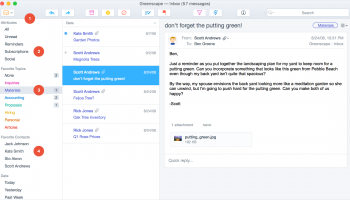
Postbox is powerful, intuitive, ultra-customizable, speedy, and dead set on saving you time. See why Postbox’s features make it the best email client for Mac and PC.
Powerful, intuitive, and faster than a scalded monkey, Postbox will help you stay on task, find information quickly and act, not react.
Postbox's Conversation Views are powerful, actionable, and easy to use. It works by gathering conversation fragments from multiple folders and presenting them in a unified view. So the rumors are true, Postbox will actually make you smarter.
Postbox gives you fast access to documents and images hiding within your email messages. No more digging through email messages to find what you need! It's easy to save or send what you've found. Simply select a file or image, and click an action button.
Summarize in Compose creates a beautifully formatted who-said-what-when digest that cleans up messy email threads. Format your replies with profile photos, or just text for business use. Either way, you'll look like a hero on each and every message send.
* Gmail Label support makes organizing easy
* Dedicated Important view for high-priority messages
* Send and Archive your messages in just one step
* Add detected dates to your Google Calendar
* Support for Gmail keyboard shortcuts for the power user
FEATURES
Powerful Message Search:
Postbox makes it easy to search for almost anything across all of your email accounts. Use the Search Panel to quickly search by message criteria, or for the power user, use search operators such "from:Mary" or "subject:vacation" directly within the search box. Postbox even understands search terms such as such as "after last Monday" or "before June 2008." And if you want to find a specific word or a phrase, there’s a Text Preview mode that helps you zero in on exactly what you're looking for.
Search Tabs:
Use Postbox’s Search Tabs to instantly find attachments, images, links, and contacts – without having to dig through messages to find what you need. The Action Bar at the bottom of each search tab let’s you do useful things from your searches, like create a new message from a document you’ve found.
Compose Sidebar:
Get fast access to your email content when you need it most - writing messages. A handy Compose Sidebar let’s you find attachments, images, and links directly within a new message window, which makes it easy to do things like resend project documents or incriminating photos from the company party. No more saving to the desktop, moving windows around, or other tedious actions that take up valuable time.
Use the Compose Sidebar to find and share links to online resources in new email messages. Just select a content type, enter a search term, and then drop what you’ve found into your message. Share links, places, and images (and much more coming soon), without switching to a browser, cutting and pasting content, and the rest of that nonsense.
Inspector Pane:
Postbox looks for interesting content within each message, then highlights what it finds in the Inspector Pane. It's like a discovery engine built right into email. And if you’re looking at an entire conversation, Postbox summarizes everything that that has been shared so far - all in one place.
Contacts Panel:
The inline Contacts Panel provides fast access to address book data and a palette of useful searches and actions. Use the Contacts Panel to send an email, dial a phone number, initiate an IM chat, or lookup an address. You can even search for recent messages, attachments, images, or links from any contact, anytime.
Simplified Folder Views:
Postbox lets you slice and dice your account and folder views in ways that reduce clutter and simplify your life. When you select an account, only the most relevant folders are displayed, which helps to minimize distractions from activity in other accounts. And since the location of your common folders is always preserved, it makes switching from one inbox to another a breeze.
Powerful, intuitive, and faster than a scalded monkey, Postbox will help you stay on task, find information quickly and act, not react.
Postbox's Conversation Views are powerful, actionable, and easy to use. It works by gathering conversation fragments from multiple folders and presenting them in a unified view. So the rumors are true, Postbox will actually make you smarter.
Postbox gives you fast access to documents and images hiding within your email messages. No more digging through email messages to find what you need! It's easy to save or send what you've found. Simply select a file or image, and click an action button.
Summarize in Compose creates a beautifully formatted who-said-what-when digest that cleans up messy email threads. Format your replies with profile photos, or just text for business use. Either way, you'll look like a hero on each and every message send.
* Gmail Label support makes organizing easy
* Dedicated Important view for high-priority messages
* Send and Archive your messages in just one step
* Add detected dates to your Google Calendar
* Support for Gmail keyboard shortcuts for the power user
FEATURES
Powerful Message Search:
Postbox makes it easy to search for almost anything across all of your email accounts. Use the Search Panel to quickly search by message criteria, or for the power user, use search operators such "from:Mary" or "subject:vacation" directly within the search box. Postbox even understands search terms such as such as "after last Monday" or "before June 2008." And if you want to find a specific word or a phrase, there’s a Text Preview mode that helps you zero in on exactly what you're looking for.
Search Tabs:
Use Postbox’s Search Tabs to instantly find attachments, images, links, and contacts – without having to dig through messages to find what you need. The Action Bar at the bottom of each search tab let’s you do useful things from your searches, like create a new message from a document you’ve found.
Compose Sidebar:
Get fast access to your email content when you need it most - writing messages. A handy Compose Sidebar let’s you find attachments, images, and links directly within a new message window, which makes it easy to do things like resend project documents or incriminating photos from the company party. No more saving to the desktop, moving windows around, or other tedious actions that take up valuable time.
Use the Compose Sidebar to find and share links to online resources in new email messages. Just select a content type, enter a search term, and then drop what you’ve found into your message. Share links, places, and images (and much more coming soon), without switching to a browser, cutting and pasting content, and the rest of that nonsense.
Inspector Pane:
Postbox looks for interesting content within each message, then highlights what it finds in the Inspector Pane. It's like a discovery engine built right into email. And if you’re looking at an entire conversation, Postbox summarizes everything that that has been shared so far - all in one place.
Contacts Panel:
The inline Contacts Panel provides fast access to address book data and a palette of useful searches and actions. Use the Contacts Panel to send an email, dial a phone number, initiate an IM chat, or lookup an address. You can even search for recent messages, attachments, images, or links from any contact, anytime.
Simplified Folder Views:
Postbox lets you slice and dice your account and folder views in ways that reduce clutter and simplify your life. When you select an account, only the most relevant folders are displayed, which helps to minimize distractions from activity in other accounts. And since the location of your common folders is always preserved, it makes switching from one inbox to another a breeze.
OS: Windows 7, Windows 7 x64, Windows 8, Windows 8 x64, Windows 10, Windows 10 x64
Add Your Review or 64-bit Compatibility Report
Top E-Mail Clients 64-bit downloads


Wavebox 10.146.26.2
Wavebox: Unified workspace for web apps, email, and productivity tools.
Demo | $8.33


Microsoft Outlook 2016 16.0.6741
Stay connected to your world with our most up-to-date e-mail and calendar tools
Trialware | $109.99

Convert Auto-Complete Files 5.0.0
Easily convert and manage Outlook auto-complete files with this tool.
Shareware

Foxmail 7.2.25 Build 528
Effortless email management with a sleek interface and powerful features.
Freeware

Public Categories for Outlook 1.0
Use Outlook categories together in the network and manage them centrally.
Shareware | $47.00

SnapMail 5.2.1
Cross-platform private messaging & file transfer utility. Internal email.
Shareware | $30.00
tags: messaging, chat, file-transfer, cross-platform, peer-to-peer, reminders, alerts, LAN, email, internal, private


Members area
Top 64-bit Downloads
-
Linphone 5.0.8
x64 freeware download -
WeChat 3.9.6
x64 freeware download -
MAPIViewer 64-bit 3.4
x64 freeware download -
MOBILedit Forensic
Express 7.4.1.21502
x64 demo download -
NK2Edit x64 3.46
x64 freeware download -
OutlookAddressBookView
x64 2.44
x64 freeware download -
Funambol x64 10.0.3
x64 open source download -
CodeTwo Exchange Rules
2010 3.16.0.0
x64 trialware download -
AdiIRC 64bit 4.4
x64 freeware download -
SIP Communicator for
Windows (x64 bit) 2.10.5550
x64 open source download
Top Downloads
-
Skype 8.150.0.125
freeware download -
Find Unused Contacts 4.11
freeware download -
VSee 4.28 (52330)
shareware download -
Paltalk 2.4.0 Build 112318
shareware download -
Clyton 37.0
shareware download -
PC SMS Software 8.0.1.3
shareware download -
Windows Communicator 3.1
shareware download -
Beeper 4.2.653
open source download -
Wavebox 10.146.26.2
demo download -
AnyCam 6.0.9.4
shareware download -
LINE 9.9.0 Build 3633
freeware download -
cwtch 1.16.2
open source download -
Mail.dll 3.0
shareware download -
Microsoft Outlook 2016 16.0.6741
trialware download -
Total Webmail Converter 1.4
shareware download