
Quickfile for Outlook - X 64-bit Download
Popular x64 Tags
- email client x64 download
- email x64 download
- attachments x64 download
- outlook x64 download
- mailer x64 download
- e mail x64 download
- imap x64 download
- mail x64 download
- remailer x64 download
- download x64 download
- free x64 download
- sql x64 download
- mass x64 download
- address x64 download
- html x64 download
- bulk x64 download
- pop3 x64 download
- portable email client x64 download
- mailing x64 download
- marketing x64 download
- client x64 download
- sender x64 download
- smtp x64 download
- email marketing x64 download
- newsletter x64 download
- calendar x64 download
- pop x64 download
- usb based portable email x64 download
- bomber x64 download
- email verifier x64 download
Quickfile for Outlook 6.1.8994
Sponsored links:
license: Trialware
downloads: 44
size: 94.20 MB
updated: 2024-10-08
tags: Outlook, software, organizer, productivity, email management, Quickfile, organize, download Quickfile for Outlook, Quickfile for Outlook, Quickfile for Outlook free download, Outlook add-in, email, Standss, email sorter, organize email
Add to Basket

Standss (South Pacific) Limited

"Quickfile for Outlook" by Standss (South Pacific) Limited is a robust email management solution designed to streamline your Outlook experience by simplifying the process of organizing and filing emails. This software is particularly beneficial for professionals who handle a high volume of emails and need an efficient way to maintain order and accessibility in their inbox.
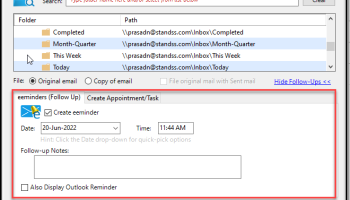
At its core, Quickfile for Outlook offers an intuitive interface that seamlessly integrates with Microsoft Outlook, allowing users to file emails into designated folders with just a few clicks. The software intelligently predicts the most appropriate folder for filing based on your past filing habits, which significantly reduces the time spent on email management. This predictive filing feature is a standout, as it learns and adapts to your unique filing patterns, ensuring that your workflow becomes more efficient over time.
One of the key strengths of Quickfile for Outlook is its ability to enhance productivity by minimizing the clutter in your inbox. It provides a structured way to manage emails, making it easier to locate important messages when needed. The software supports both manual and automatic filing, giving users the flexibility to choose how they want to organize their emails. For those who prefer automation, Quickfile can be set to automatically file sent and received emails into the appropriate folders, ensuring that your inbox remains tidy without requiring constant attention.
Additionally, Quickfile for Outlook includes features such as Quick Jump, which allows users to quickly navigate to any folder, and Quick Find, which helps locate emails across multiple folders with ease. These features are particularly useful for users who manage numerous projects or clients and need to access specific emails swiftly.
Security and privacy are also prioritized in Quickfile for Outlook. The software operates entirely within your Outlook environment, meaning that your emails are not stored or processed on external servers, which is a crucial consideration for users concerned about data privacy.
Overall, Quickfile for Outlook is an indispensable tool for anyone looking to optimize their email management process. Its user-friendly design, coupled with powerful features, makes it an excellent choice for professionals seeking to enhance their productivity and maintain a well-organized email system. Whether you're a solo entrepreneur or part of a larger organization, Quickfile for Outlook can help you take control of your inbox and focus on what truly matters.
At its core, Quickfile for Outlook offers an intuitive interface that seamlessly integrates with Microsoft Outlook, allowing users to file emails into designated folders with just a few clicks. The software intelligently predicts the most appropriate folder for filing based on your past filing habits, which significantly reduces the time spent on email management. This predictive filing feature is a standout, as it learns and adapts to your unique filing patterns, ensuring that your workflow becomes more efficient over time.
One of the key strengths of Quickfile for Outlook is its ability to enhance productivity by minimizing the clutter in your inbox. It provides a structured way to manage emails, making it easier to locate important messages when needed. The software supports both manual and automatic filing, giving users the flexibility to choose how they want to organize their emails. For those who prefer automation, Quickfile can be set to automatically file sent and received emails into the appropriate folders, ensuring that your inbox remains tidy without requiring constant attention.
Additionally, Quickfile for Outlook includes features such as Quick Jump, which allows users to quickly navigate to any folder, and Quick Find, which helps locate emails across multiple folders with ease. These features are particularly useful for users who manage numerous projects or clients and need to access specific emails swiftly.
Security and privacy are also prioritized in Quickfile for Outlook. The software operates entirely within your Outlook environment, meaning that your emails are not stored or processed on external servers, which is a crucial consideration for users concerned about data privacy.
Overall, Quickfile for Outlook is an indispensable tool for anyone looking to optimize their email management process. Its user-friendly design, coupled with powerful features, makes it an excellent choice for professionals seeking to enhance their productivity and maintain a well-organized email system. Whether you're a solo entrepreneur or part of a larger organization, Quickfile for Outlook can help you take control of your inbox and focus on what truly matters.
OS: Windows 11, Windows 10 32/64 bit
Add Your Review or 64-bit Compatibility Report
Top E-Mail Clients 64-bit downloads


Wavebox 10.146.26.2
Wavebox: Unified workspace for web apps, email, and productivity tools.
Demo | $8.33


Microsoft Outlook 2016 16.0.6741
Stay connected to your world with our most up-to-date e-mail and calendar tools
Trialware | $109.99

Convert Auto-Complete Files 5.0.0
Easily convert and manage Outlook auto-complete files with this tool.
Shareware

Public Categories for Outlook 1.0
Use Outlook categories together in the network and manage them centrally.
Shareware | $47.00

SnapMail 5.2.1
Cross-platform private messaging & file transfer utility. Internal email.
Shareware | $30.00
tags: messaging, chat, file-transfer, cross-platform, peer-to-peer, reminders, alerts, LAN, email, internal, private


Foxmail 7.2.25 Build 528
Effortless email management with a sleek interface and powerful features.
Freeware

eM Client 10.4.4867
eM Client: Best email client for Windows and macOS, for businesses and home users
Freeware
Members area
Top 64-bit Downloads
-
Linphone 5.0.8
x64 freeware download -
WeChat 3.9.6
x64 freeware download -
NK2Edit x64 3.46
x64 freeware download -
MAPIViewer 64-bit 3.4
x64 freeware download -
MOBILedit Forensic
Express 7.4.1.21502
x64 demo download -
AdiIRC 64bit 4.4
x64 freeware download -
SIP Communicator for
Windows (x64 bit) 2.10.5550
x64 open source download -
OutlookAddressBookView
x64 2.44
x64 freeware download -
KeyLemon 4.0.3
x64 trialware download -
Funambol x64 10.0.3
x64 open source download
Top Downloads
-
Skype 8.150.0.125
freeware download -
Find Unused Contacts 4.11
freeware download -
VSee 4.28 (52330)
shareware download -
Paltalk 2.4.0 Build 112318
shareware download -
PC SMS Software 8.0.1.3
shareware download -
Beeper 4.2.653
open source download -
Clyton 37.0
shareware download -
Windows Communicator 3.1
shareware download -
cwtch 1.16.2
open source download -
Wavebox 10.146.26.2
demo download -
Total Webmail Converter 1.4
shareware download -
Linphone 5.0.8
freeware download -
LINE 9.9.0 Build 3633
freeware download -
Mail.dll 3.0
shareware download -
Microsoft Outlook 2016 16.0.6741
trialware download