
RoboForm for Chrome - X 64-bit Download
Popular x64 Tags
- mozilla x64 download
- internet explorer toolbar x64 download
- browser x64 download
- netscape x64 download
- toolbar x64 download
- ie toolbar x64 download
- firefox x64 download
- free toolbar x64 download
- favorites organizer x64 download
- internet explorer x64 download
- favorites x64 download
- internet x64 download
- bookmarks x64 download
- add ons x64 download
- browser toolbar x64 download
- bookmark manager x64 download
- theme x64 download
- explorer x64 download
- addons x64 download
- cache x64 download
- skin x64 download
- web x64 download
- backup x64 download
- golf x64 download
- anarchy bar anarchy x64 download
- golf pro x64 download
- mhfs rss rss feed reader x64 download
- golf leader x64 download
- womens golf x64 download
- ladies golf x64 download
RoboForm for Chrome 9.9.3.0
Sponsored links:
license: Shareware ($1.66)
downloads: 53
size: 6.90 MB
updated: 2026-03-13
tags: RoboForm for Chrome, download RoboForm for Chrome, RoboForm for Chrome free download, RoboForm Add-on, Chrome Extension, password manager, RoboForm, Chrome, extension, password
Add to Basket

Siber Systems Inc

RoboForm for Chrome, developed by Siber Systems Inc., is a robust and intuitive password manager designed to streamline your digital life. This Chrome extension stands out for its comprehensive feature set, user-friendly interface, and strong security measures, making it an essential tool for anyone looking to enhance their online security and productivity.
One of the key strengths of RoboForm for Chrome is its ability to securely store and manage passwords. The extension automatically captures and saves login credentials as you browse, ensuring that you never have to remember or manually enter passwords again. With its one-click login feature, accessing your favorite websites becomes a seamless experience. Additionally, RoboForm supports multi-step logins, making it versatile enough to handle even the most complex authentication processes.
Security is at the forefront of RoboForm's design. The extension uses AES 256-bit encryption to protect your data, ensuring that your information remains secure from unauthorized access. Furthermore, RoboForm offers two-factor authentication (2FA) for an added layer of security, giving you peace of mind that your accounts are well-protected.
Beyond password management, RoboForm for Chrome excels in form filling. The extension can store and autofill personal information, payment details, and addresses, significantly speeding up the process of completing online forms. This feature is particularly useful for frequent online shoppers and those who regularly fill out lengthy forms.
RoboForm also includes a secure password generator, which creates strong, unique passwords for each of your accounts. This helps to mitigate the risk of password reuse, a common security vulnerability. The generated passwords are automatically saved and can be easily accessed when needed.
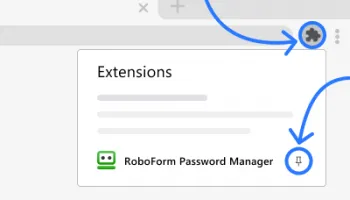
The user interface of RoboForm for Chrome is clean and intuitive, making it accessible even for those who are not tech-savvy. The extension integrates seamlessly with the Chrome browser, providing a smooth and unobtrusive user experience. The toolbar icon offers quick access to all features, and the organized folder system allows for easy management of your stored data.
Synchronization across devices is another standout feature of RoboForm. Whether you're using a desktop, laptop, tablet, or smartphone, your data is consistently updated and available. This cross-platform compatibility ensures that you have access to your passwords and other information no matter where you are.
Customer support from Siber Systems Inc. is reliable and responsive. The company offers a range of support options, including a comprehensive online knowledge base, email support, and live chat. This ensures that users can quickly resolve any issues they encounter.
In summary, RoboForm for Chrome by Siber Systems Inc. is a powerful and secure password manager that offers a wealth of features designed to enhance your online experience. Its strong security measures, ease of use, and cross-platform synchronization make it a top choice for anyone looking to improve their digital security and efficiency. Whether you're a casual internet user or a professional managing multiple accounts, RoboForm for Chrome is a valuable tool that can simplify and secure your online activities.
One of the key strengths of RoboForm for Chrome is its ability to securely store and manage passwords. The extension automatically captures and saves login credentials as you browse, ensuring that you never have to remember or manually enter passwords again. With its one-click login feature, accessing your favorite websites becomes a seamless experience. Additionally, RoboForm supports multi-step logins, making it versatile enough to handle even the most complex authentication processes.
Security is at the forefront of RoboForm's design. The extension uses AES 256-bit encryption to protect your data, ensuring that your information remains secure from unauthorized access. Furthermore, RoboForm offers two-factor authentication (2FA) for an added layer of security, giving you peace of mind that your accounts are well-protected.
Beyond password management, RoboForm for Chrome excels in form filling. The extension can store and autofill personal information, payment details, and addresses, significantly speeding up the process of completing online forms. This feature is particularly useful for frequent online shoppers and those who regularly fill out lengthy forms.
RoboForm also includes a secure password generator, which creates strong, unique passwords for each of your accounts. This helps to mitigate the risk of password reuse, a common security vulnerability. The generated passwords are automatically saved and can be easily accessed when needed.
The user interface of RoboForm for Chrome is clean and intuitive, making it accessible even for those who are not tech-savvy. The extension integrates seamlessly with the Chrome browser, providing a smooth and unobtrusive user experience. The toolbar icon offers quick access to all features, and the organized folder system allows for easy management of your stored data.
Synchronization across devices is another standout feature of RoboForm. Whether you're using a desktop, laptop, tablet, or smartphone, your data is consistently updated and available. This cross-platform compatibility ensures that you have access to your passwords and other information no matter where you are.
Customer support from Siber Systems Inc. is reliable and responsive. The company offers a range of support options, including a comprehensive online knowledge base, email support, and live chat. This ensures that users can quickly resolve any issues they encounter.
In summary, RoboForm for Chrome by Siber Systems Inc. is a powerful and secure password manager that offers a wealth of features designed to enhance your online experience. Its strong security measures, ease of use, and cross-platform synchronization make it a top choice for anyone looking to improve their digital security and efficiency. Whether you're a casual internet user or a professional managing multiple accounts, RoboForm for Chrome is a valuable tool that can simplify and secure your online activities.
OS: Windows 11, Windows 10 64 bit
Add Your Review or 64-bit Compatibility Report
Top Browser Tools 64-bit downloads


Web Archives for Opera 7.3.0
Effortlessly save and manage web pages with this intuitive Opera extension.
Open Source


TagSpaces Web Clipper for Chrome 4.1.2
Organize your files effortlessly with TagSpaces' intuitive tagging system.
Freeware


Ghostery for Opera 10.5.34

Ghostery for Opera: Enhance privacy by blocking trackers and speeding up browsing.
Shareware

Mailtrack for Chrome 12.68.4
Mailtrack for Chrome: Email tracking with read receipts for Gmail users.
Shareware | $9.99

MetaMask for Chrome 13.23.0
Seamlessly manage your Ethereum assets and interact with decentralized apps.
Open Source
Members area
Top 64-bit Downloads
-
Adobe Flash Player 10
for 64-bit Windows Preview 2
x64 freeware download -
SSuite NetSurfer Extreme
x64 2.10.16.1
x64 freeware download -
FileZilla Server 1.8.1
x64 open source download -
Firefox 64bit x64 127.0.2
x64 open source download -
SoftPerfect Bandwidth
Manager 3.3.0
x64 shareware download -
Internet Explorer 8 for
Windows Vista 64-bit and
Windows Server 2008
64-bit
x64 freeware download -
Google Chrome x64 bit 126.0.6478.127
x64 freeware download -
HTTPNetworkSniffer
64-bit 1.63
x64 freeware download -
SoftPerfect Connection
Emulator 1.9
x64 shareware download -
iFolder x64 3.8.0.3
x64 freeware download
Top Downloads
-
Adobe Flash Player 10
for 64-bit Windows Preview 2
freeware download -
Web Archives for Opera 7.3.0
open source download -
TheWorld Browser 7.0.0.108
freeware download -
MusicFab 1.0.6.6
demo download -
Profile Migrator 1.1
trialware download -
Vuze 5.7.7.0
freeware download -
LocalSend 1.17.0
open source download -
NetSpeed 1.1
freeware download -
NetShareWatcher 1.5.8
shareware download -
Virtual World 4.7.4
commercial download -
Dooble 2024.12.31
open source download -
GetRight 6.5
shareware download -
MP4 Downloader 6.2.5
trialware download -
BiglyBT 4.0.0.0
open source download -
FTP! 1.0.10.30
freeware download