
SpamBully for Outlook Express / Windows Mail - X 64-bit Download
Popular x64 Tags
- email client x64 download
- email x64 download
- attachments x64 download
- outlook x64 download
- mailer x64 download
- e mail x64 download
- imap x64 download
- mail x64 download
- remailer x64 download
- download x64 download
- free x64 download
- sql x64 download
- mass x64 download
- address x64 download
- html x64 download
- bulk x64 download
- pop3 x64 download
- portable email client x64 download
- mailing x64 download
- marketing x64 download
- client x64 download
- sender x64 download
- smtp x64 download
- email marketing x64 download
- newsletter x64 download
- calendar x64 download
- pop x64 download
- usb based portable email x64 download
- bomber x64 download
- email verifier x64 download
You are here: X-64-bit Download
\ Communications
\ E-Mail Clients \ SpamBully for Outlook Express / Windows Mail
SpamBully for Outlook Express / Windows Mail 4.4.0.51
Sponsored links:

Vitalie Esanu

Spam Bully is a tool that utilizes an advanced Bayesian filter system based on thousands of spam messages. Spam Bully learns from every email message you send and receive. This way it learns what you consider spam and what you consider acceptable email. There's a special Friends/Spammers list; so your friend's emails are never blocked and messages of known spammers are automatically designated as spam.
Query emails can be sent to unfamiliar emailers with a special message requiring them to respond before they are added as an accepted users. All features are fully customizable to meet your own needs.
Spam Bully WILL BE compatible with any pop3 mail program. There is no need to learn a new email program. Regardless of what email program you use, Spam Bully will work with it. If you use Outlook we have designed a special version of spambully that completely integrates with Outlook.
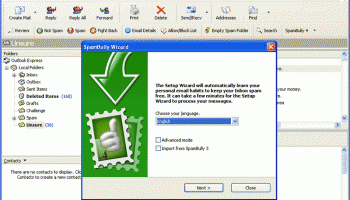
For Outlook Express, Spam Bully has wizards to automatically import all the settings it needs to get started. For other email clients, it provides easy to follow help to get you up and running quickly.
The program can also bounce messages from known spammers, query emails sent from unfamiliar emailers (require confirmation), block selected attachments types and more.
In addition, Spam Bully produces a nice graph view that you can use to view your daily, weekly or yearly spam statistics. An excellent choice for Outlook users, and from what we have tested so far, it is definitely the most sophisticated one. A must-try for any Outlook user!
FEATURES:
Bayesian Spam Filter:
· The very first time you start SpamBully, its Bayesian spam filter will intelligently learn from your own personal email habits, identifying good and spam messages. Everytime you download your email, SpamBully will make sure good emails make it to your Inbox. Spam emails are sent to the "Spam" folder. Emails SpamBully may have difficulty classifying, go to a special "Unsure" folder. You can always adjust emails in these folders by using the Spam and Not Spam buttons in the SpamBully toolbar.
Allow/Block List:
· Decide who and what makes it into your Inbox. Choose which email addresses,words/phrases, countries, and IP's are allowed or blocked from your Inbox. You do not need to add emails in your address book to your Allow/Block list. SpamBully already makes sure these addresses always make it to your Inbox.
Auto-Delete:
· Optionally you can just delete spam messages instead of sorting them to a spam folder. You never have to see a spam message again.
Bounce, Report and Punish:
· Get back at spammers by increasing their costs, returning their spam, and reporting them to the servers they came from and the FTC.
Cellphone Forwarding:
· Forward only good email to your cell phone.
Review:
· Safely review your spam messages.
Fraudulent link detection:
· Detect links in phishing email messages that are from potentially fraudulent sources.
Challenge Emails:
· Email a special password to an unfamiliar sender that they must correctly type in before their email is allowed to your Inbox.
Statistics:
· See how well SpamBully is performing for you. Provides daily, weekly, monthly, and yearly graphs.
User Friendly Interface:
· Easy to use toolbar buttons easily manage your email, view message details, maintain your Allow/Block list, train SpamBully, and customize it.
Email Details:
· Detailed information about each email you receive including: IP address, country, character set, and how SpamBully filtered it. Tells you why a message was or was not blocked and how to correct this in the future.
Simplified Help:
· Detailed easy to use help files including interactive tutorials show you how to most effectively use SpamBully.
BlackLists:
· Checks Realtime Blackhole Lists for internet domains that are responsible for sending massive amounts of spam and automatically filters them from your Inbox.
Query emails can be sent to unfamiliar emailers with a special message requiring them to respond before they are added as an accepted users. All features are fully customizable to meet your own needs.
Spam Bully WILL BE compatible with any pop3 mail program. There is no need to learn a new email program. Regardless of what email program you use, Spam Bully will work with it. If you use Outlook we have designed a special version of spambully that completely integrates with Outlook.
For Outlook Express, Spam Bully has wizards to automatically import all the settings it needs to get started. For other email clients, it provides easy to follow help to get you up and running quickly.
The program can also bounce messages from known spammers, query emails sent from unfamiliar emailers (require confirmation), block selected attachments types and more.
In addition, Spam Bully produces a nice graph view that you can use to view your daily, weekly or yearly spam statistics. An excellent choice for Outlook users, and from what we have tested so far, it is definitely the most sophisticated one. A must-try for any Outlook user!
FEATURES:
Bayesian Spam Filter:
· The very first time you start SpamBully, its Bayesian spam filter will intelligently learn from your own personal email habits, identifying good and spam messages. Everytime you download your email, SpamBully will make sure good emails make it to your Inbox. Spam emails are sent to the "Spam" folder. Emails SpamBully may have difficulty classifying, go to a special "Unsure" folder. You can always adjust emails in these folders by using the Spam and Not Spam buttons in the SpamBully toolbar.
Allow/Block List:
· Decide who and what makes it into your Inbox. Choose which email addresses,words/phrases, countries, and IP's are allowed or blocked from your Inbox. You do not need to add emails in your address book to your Allow/Block list. SpamBully already makes sure these addresses always make it to your Inbox.
Auto-Delete:
· Optionally you can just delete spam messages instead of sorting them to a spam folder. You never have to see a spam message again.
Bounce, Report and Punish:
· Get back at spammers by increasing their costs, returning their spam, and reporting them to the servers they came from and the FTC.
Cellphone Forwarding:
· Forward only good email to your cell phone.
Review:
· Safely review your spam messages.
Fraudulent link detection:
· Detect links in phishing email messages that are from potentially fraudulent sources.
Challenge Emails:
· Email a special password to an unfamiliar sender that they must correctly type in before their email is allowed to your Inbox.
Statistics:
· See how well SpamBully is performing for you. Provides daily, weekly, monthly, and yearly graphs.
User Friendly Interface:
· Easy to use toolbar buttons easily manage your email, view message details, maintain your Allow/Block list, train SpamBully, and customize it.
Email Details:
· Detailed information about each email you receive including: IP address, country, character set, and how SpamBully filtered it. Tells you why a message was or was not blocked and how to correct this in the future.
Simplified Help:
· Detailed easy to use help files including interactive tutorials show you how to most effectively use SpamBully.
BlackLists:
· Checks Realtime Blackhole Lists for internet domains that are responsible for sending massive amounts of spam and automatically filters them from your Inbox.
OS: Windows XP, Windows Vista, Windows Vista x64, Windows 7, Windows 7 x64
Add Your Review or 64-bit Compatibility Report
Top E-Mail Clients 64-bit downloads


Convert Auto-Complete Files 5.0.0
Easily convert and manage Outlook auto-complete files with this tool.
Shareware

Wavebox 10.145.41.2
Wavebox: Unified workspace for web apps, email, and productivity tools.
Demo | $8.33


Public Categories for Outlook 1.0
Use Outlook categories together in the network and manage them centrally.
Shareware | $47.00


eM Client 10.4.4867
eM Client: Best email client for Windows and macOS, for businesses and home users
Freeware

Opera Mail to Outlook Transfer 5.3.3.2
Opera Mail to Outlook Transfer automatically converts unlimited size MBS files
Shareware | $19.99


Microsoft Outlook 2016 16.0.6741
Stay connected to your world with our most up-to-date e-mail and calendar tools
Trialware | $109.99

SnapMail 5.2.1
Cross-platform private messaging & file transfer utility. Internal email.
Shareware | $30.00
tags: messaging, chat, file-transfer, cross-platform, peer-to-peer, reminders, alerts, LAN, email, internal, private
Members area
Top 64-bit Downloads
-
Linphone 5.0.8
x64 freeware download -
NK2Edit x64 3.46
x64 freeware download -
Tweetings x64 1.4.5.0
x64 freeware download -
WeChat 3.9.6
x64 freeware download -
CodeTwo Exchange Rules
2010 3.16.0.0
x64 trialware download -
AdiIRC 64bit 4.4
x64 freeware download -
Yahoo! Zimbra Desktop 7.3.3
x64 freeware download -
ActiveXperts SendSMS x64 6.5
x64 freeware download -
OutlookAddressBookView
x64 2.44
x64 freeware download -
MAPIViewer 64-bit 3.4
x64 freeware download
Top Downloads
-
VSee 4.27.0 Build 52182
shareware download -
Skype 8.150.0.125
freeware download -
Paltalk 2.3.2 Build 112254
shareware download -
Windows Communicator 3.1
shareware download -
cwtch 1.16.2
open source download -
Convert Auto-Complete
Files 5.0.0
shareware download -
iNETPHONE 1.2.1.3
freeware download -
msmtp 1.8.7
open source download -
Export Messages to MBOX
File 4.11
freeware download -
Find Unused Contacts 4.11
freeware download -
Mass SMS 9.0.1.3
shareware download -
Wavebox 10.145.41.2
demo download -
TNGLive 1.1.0.5
demo download -
AnyCam 6.0.8.0
shareware download -
PlunkIt 1.0
shareware download