
TatukGIS Editor - X 64-bit Download
Popular x64 Tags
- photo editor x64 download
- software x64 download
- image editor x64 download
- image editing x64 download
- photos x64 download
- photoshop x64 download
- color x64 download
- design x64 download
- jpeg x64 download
- editor x64 download
- plugin x64 download
- image enhancement x64 download
- watermark x64 download
- exif x64 download
- rotate x64 download
- batch x64 download
- pictures x64 download
- graphics x64 download
- image x64 download
- digital camera x64 download
- photo x64 download
- graphic x64 download
- images x64 download
- resize x64 download
- paint x64 download
- camera x64 download
- digital x64 download
- digital imaging x64 download
- picture x64 download
- jpg x64 download
TatukGIS Editor 5.94.0.3539
Sponsored links:
license: Trialware ($390.00)
downloads: 48
size: 247.00 MB
updated: 2026-01-30
tags: TatukGIS Editor, download TatukGIS Editor, TatukGIS Editor free download, GIS Editor, Map Creator, Add Layer, GIS, Map, Layer, Coordinate
Add to Basket

TatukGIS

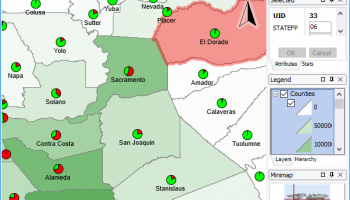
TatukGIS Editor, developed by TatukGIS, is a robust and versatile GIS (Geographic Information System) software designed to meet the diverse needs of geospatial professionals. This powerful tool is tailored for those who require advanced GIS editing capabilities without compromising on ease of use or performance.
At its core, TatukGIS Editor is built to handle a wide array of GIS data formats, making it an ideal choice for professionals who work with various types of spatial data. The software supports numerous vector, raster, and database formats, ensuring seamless integration with existing workflows and data sources. This extensive compatibility is one of the key strengths of TatukGIS Editor, allowing users to import, edit, and export data with remarkable flexibility.
One of the standout features of TatukGIS Editor is its comprehensive set of editing tools. Users can perform a multitude of tasks, from basic map creation and data visualization to complex spatial analysis and geoprocessing. The software offers advanced editing capabilities such as topology correction, attribute editing, and spatial querying, empowering users to manipulate and refine their geospatial data with precision.
The intuitive user interface of TatukGIS Editor is designed to enhance productivity and streamline the GIS editing process. The layout is clean and well-organized, with customizable toolbars and panels that allow users to tailor the workspace to their specific needs. This user-centric design ensures that both novice and experienced GIS professionals can navigate the software with ease and efficiency.
TatukGIS Editor also boasts impressive performance, capable of handling large datasets and complex operations without lag or crashes. This reliability is crucial for professionals who rely on the software for critical projects and decision-making processes. Additionally, the software includes powerful scripting capabilities, enabling users to automate repetitive tasks and extend the functionality of the application through custom scripts.
Collaboration and data sharing are made simple with TatukGIS Editor. The software supports various file formats and web services, allowing users to share their work with colleagues and stakeholders effortlessly. Whether it's exporting maps to popular formats like PDF and JPEG or publishing data to web services, TatukGIS Editor ensures that your geospatial information is accessible and shareable.
In summary, TatukGIS Editor by TatukGIS is a comprehensive and reliable GIS software solution that excels in data compatibility, editing capabilities, and user experience. Its powerful features, combined with an intuitive interface and robust performance, make it an indispensable tool for geospatial professionals seeking to manage, analyze, and visualize their spatial data effectively. Whether you're a seasoned GIS expert or a newcomer to the field, TatukGIS Editor provides the tools and flexibility needed to achieve your geospatial objectives with confidence.
At its core, TatukGIS Editor is built to handle a wide array of GIS data formats, making it an ideal choice for professionals who work with various types of spatial data. The software supports numerous vector, raster, and database formats, ensuring seamless integration with existing workflows and data sources. This extensive compatibility is one of the key strengths of TatukGIS Editor, allowing users to import, edit, and export data with remarkable flexibility.
One of the standout features of TatukGIS Editor is its comprehensive set of editing tools. Users can perform a multitude of tasks, from basic map creation and data visualization to complex spatial analysis and geoprocessing. The software offers advanced editing capabilities such as topology correction, attribute editing, and spatial querying, empowering users to manipulate and refine their geospatial data with precision.
The intuitive user interface of TatukGIS Editor is designed to enhance productivity and streamline the GIS editing process. The layout is clean and well-organized, with customizable toolbars and panels that allow users to tailor the workspace to their specific needs. This user-centric design ensures that both novice and experienced GIS professionals can navigate the software with ease and efficiency.
TatukGIS Editor also boasts impressive performance, capable of handling large datasets and complex operations without lag or crashes. This reliability is crucial for professionals who rely on the software for critical projects and decision-making processes. Additionally, the software includes powerful scripting capabilities, enabling users to automate repetitive tasks and extend the functionality of the application through custom scripts.
Collaboration and data sharing are made simple with TatukGIS Editor. The software supports various file formats and web services, allowing users to share their work with colleagues and stakeholders effortlessly. Whether it's exporting maps to popular formats like PDF and JPEG or publishing data to web services, TatukGIS Editor ensures that your geospatial information is accessible and shareable.
In summary, TatukGIS Editor by TatukGIS is a comprehensive and reliable GIS software solution that excels in data compatibility, editing capabilities, and user experience. Its powerful features, combined with an intuitive interface and robust performance, make it an indispensable tool for geospatial professionals seeking to manage, analyze, and visualize their spatial data effectively. Whether you're a seasoned GIS expert or a newcomer to the field, TatukGIS Editor provides the tools and flexibility needed to achieve your geospatial objectives with confidence.
OS: Windows 11, Windows Server 2022, Windows Server 2019, Windows Server 2016, Windows 10 32/64 bit, Windows Server 2012, Windows 2008 32/64 bit, Windows 2003, Windows 8 32/64 bit, Windows 7 32/64 bit, Windows Vista
Add Your Review or 64-bit Compatibility Report
Top Editors 64-bit downloads


CorelDRAW X5 2026 v27.0.0.121
Versatile graphic design suite for vector illustration and layout creation.
Trialware | $269.00


Photo editor for Windows 10 XL 26.1.2

Photo editing software for beginners and pro. All well-known photo effects.
Shareware | $29.95

Fotografix Portable 1.5 Rev 2
Image editor with support for many common features as well as a few advanced one
Freeware

jMonkeyEngine 3.9.0
jMonkeyEngine: Open-source 3D game development engine for Java developers.
Open Source

Adobe Photoshop Elements 2024.3
Powerful yet easy-to-use photo editing software for print, e-mail, and the Web
Trialware | $99.99
Members area
Top 64-bit Downloads
-
Fluid Mask for Mac 3.3.14
x64 trialware download -
ICO file format x64 2.1f1
x64 open source download -
Archicad 64bit 27 B3001
x64 demo download -
Adobe Photoshop Elements 2024.3
x64 trialware download -
Potrace for Windows (x64
bit) 1.16
x64 open source download -
SimLab SKP Exporter for
SolidWorks x64 8.0
x64 trialware download -
Affinity Photo 2.5.3
x64 trialware download -
Portable MicroDicom x64 2024.2
x64 freeware download -
ImageJ x64 1.54i
x64 freeware download -
Geneious Basic x64 6.0.4
x64 freeware download
Top Downloads
-
CorelDRAW X5 2026 v27.0.0.121
trialware download -
Tracfoil 4.12.07
trialware download -
oCam 428.0
freeware download -
Gyazo 5.9.1
demo download -
CodeLoader 4.19.0
freeware download -
MarvinSketch 23.16.0
freeware download -
SeiSee 2.22.6
freeware download -
Anim8or 1.00
freeware download -
Texmod 0.9b
freeware download -
MapInfo Professional 17.0.4
trialware download -
Fluid Mask for Mac 3.3.14
trialware download -
GIMP 3.2.0
open source download -
Presentation3D 13.06.22
demo download -
Topaz DeNoise 6.0.1
trialware download -
iWisdom 0.0.0+2107~ga0785ce1
open source download