
TeamTalk SDK - X 64-bit Download
Popular x64 Tags
- yahoo messenger x64 download
- free x64 download
- video chat software x64 download
- instant x64 download
- msn messenger x64 download
- lan x64 download
- live chat x64 download
- icq x64 download
- messenger x64 download
- chat x64 download
- instant messenger x64 download
- messaging x64 download
- webcam x64 download
- network x64 download
- instant messaging x64 download
- msn x64 download
- yahoo x64 download
- chat software x64 download
- funny pictures x64 download
- live support x64 download
- live messager x64 download
- aim x64 download
- freeware x64 download
- record webcam x64 download
- flash chat x64 download
- live help x64 download
- webcam recorder x64 download
- funny pictures game x64 download
- funny game x64 download
- funny captions x64 download
TeamTalk SDK 5.21.0.5182
Sponsored links:
license: Freeware
downloads: 56
size: 51.60 MB
updated: 2026-03-29
tags: TeamTalk, download TeamTalk, TeamTalk free download, voice conference, chat tool, voice application, voice, conference, chat, transfer
Add to Basket

Bjoern D. Rasmussen

TeamTalk, developed by Bjoern D. Rasmussen, is a robust and versatile conferencing system designed to facilitate seamless communication and collaboration among team members. This software stands out for its comprehensive suite of features tailored to meet the diverse needs of both small and large teams, making it an ideal choice for businesses, educational institutions, and social groups.
At its core, TeamTalk offers high-quality audio and video conferencing capabilities, ensuring that users can interact in real-time with minimal latency. The software supports both one-on-one and group conversations, making it adaptable to various communication scenarios. The audio quality is crystal clear, and the video resolution is impressive, providing a near face-to-face interaction experience.
One of the standout features of TeamTalk is its support for screen sharing and remote desktop control. This functionality is invaluable for presentations, troubleshooting, and collaborative work, allowing users to share their screens or take control of another user's desktop seamlessly. This feature is particularly beneficial for remote teams who need to work closely despite geographical distances.
TeamTalk also excels in its file sharing capabilities. Users can easily upload and download files during a conference, ensuring that important documents and resources are readily accessible to all participants. This feature enhances productivity by streamlining the process of sharing information and collaborating on projects.
Security is a top priority for TeamTalk. The software employs advanced encryption protocols to protect user data and ensure that communications remain private and secure. This focus on security makes TeamTalk a reliable choice for organizations that handle sensitive information.
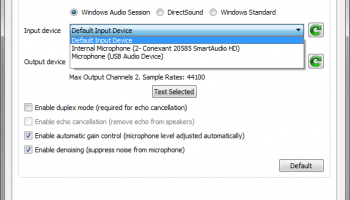
The user interface of TeamTalk is intuitive and user-friendly, allowing users to navigate the software with ease. The layout is clean and well-organized, making it simple for both tech-savvy users and those less familiar with conferencing tools to get started quickly. Additionally, TeamTalk is highly customizable, offering various settings and preferences that users can adjust to suit their specific needs.
Another notable aspect of TeamTalk is its cross-platform compatibility. The software is available on multiple operating systems, including Windows, macOS, Linux, iOS, and Android. This ensures that team members can stay connected regardless of the devices they use, providing flexibility and convenience.
TeamTalk also supports a wide range of audio and video codecs, ensuring compatibility with various hardware and network conditions. This adaptability ensures that users can enjoy a smooth and uninterrupted conferencing experience, even in less-than-ideal network environments.
In summary, TeamTalk by Bjoern D. Rasmussen is a powerful and reliable conferencing solution that offers a rich array of features designed to enhance communication and collaboration. Its high-quality audio and video capabilities, robust security measures, intuitive interface, and cross-platform compatibility make it a standout choice for any team looking to stay connected and productive. Whether you're conducting business meetings, educational sessions, or social gatherings, TeamTalk provides the tools you need to communicate effectively and efficiently.
At its core, TeamTalk offers high-quality audio and video conferencing capabilities, ensuring that users can interact in real-time with minimal latency. The software supports both one-on-one and group conversations, making it adaptable to various communication scenarios. The audio quality is crystal clear, and the video resolution is impressive, providing a near face-to-face interaction experience.
One of the standout features of TeamTalk is its support for screen sharing and remote desktop control. This functionality is invaluable for presentations, troubleshooting, and collaborative work, allowing users to share their screens or take control of another user's desktop seamlessly. This feature is particularly beneficial for remote teams who need to work closely despite geographical distances.
TeamTalk also excels in its file sharing capabilities. Users can easily upload and download files during a conference, ensuring that important documents and resources are readily accessible to all participants. This feature enhances productivity by streamlining the process of sharing information and collaborating on projects.
Security is a top priority for TeamTalk. The software employs advanced encryption protocols to protect user data and ensure that communications remain private and secure. This focus on security makes TeamTalk a reliable choice for organizations that handle sensitive information.
The user interface of TeamTalk is intuitive and user-friendly, allowing users to navigate the software with ease. The layout is clean and well-organized, making it simple for both tech-savvy users and those less familiar with conferencing tools to get started quickly. Additionally, TeamTalk is highly customizable, offering various settings and preferences that users can adjust to suit their specific needs.
Another notable aspect of TeamTalk is its cross-platform compatibility. The software is available on multiple operating systems, including Windows, macOS, Linux, iOS, and Android. This ensures that team members can stay connected regardless of the devices they use, providing flexibility and convenience.
TeamTalk also supports a wide range of audio and video codecs, ensuring compatibility with various hardware and network conditions. This adaptability ensures that users can enjoy a smooth and uninterrupted conferencing experience, even in less-than-ideal network environments.
In summary, TeamTalk by Bjoern D. Rasmussen is a powerful and reliable conferencing solution that offers a rich array of features designed to enhance communication and collaboration. Its high-quality audio and video capabilities, robust security measures, intuitive interface, and cross-platform compatibility make it a standout choice for any team looking to stay connected and productive. Whether you're conducting business meetings, educational sessions, or social gatherings, TeamTalk provides the tools you need to communicate effectively and efficiently.
OS: Windows 11, Windows 10 64 bit
Add Your Review or 64-bit Compatibility Report
Top Chat & Instant Messaging 64-bit downloads


VSee 4.28 (52330)
VSee: Secure video conferencing & telehealth platform for healthcare professionals.
Shareware | $29.00

Paltalk 2.4.0 Build 112318
Paltalk: Engage in vibrant video chat and messaging with global communities.
Shareware

PC SMS Software 8.0.1.3
Broadcast bulk messages notifications and alerts worldwide using PC SMS software
Shareware | $49.00

Beeper 4.2.653
Beeper unifies messaging across platforms, simplifying your communication.
Open Source

Windows Communicator 3.1
Voice and text communicator for corporate networks with web chat support
Shareware | $19.00

cwtch 1.16.2
Cwtch: A secure, decentralized messaging platform for privacy-focused users.
Open Source

LINE 9.9.0 Build 3633
LINE: A versatile messaging app with rich features and engaging stickers.
Freeware

Pidgin 2.14.13
Universal instant messenger client for AIM, ICQ, MSN, IRC, Yahoo, and Jabber
Open Source

Mass SMS 9.0.1.3
Advance utility to compose and send mass sms via PC on worldwide mobile services
Shareware | $49.00

WebCord 4.12.1
WebCord is a versatile Discord client that enhances your messaging experience.
Open Source
Members area
Top 64-bit Downloads
-
Linphone 5.0.8
x64 freeware download -
WeChat 3.9.6
x64 freeware download -
NK2Edit x64 3.46
x64 freeware download -
MAPIViewer 64-bit 3.4
x64 freeware download -
MOBILedit Forensic
Express 7.4.1.21502
x64 demo download -
AdiIRC 64bit 4.4
x64 freeware download -
SIP Communicator for
Windows (x64 bit) 2.10.5550
x64 open source download -
OutlookAddressBookView
x64 2.44
x64 freeware download -
KeyLemon 4.0.3
x64 trialware download -
Funambol x64 10.0.3
x64 open source download
Top Downloads
-
Skype 8.150.0.125
freeware download -
Find Unused Contacts 4.11
freeware download -
VSee 4.28 (52330)
shareware download -
Paltalk 2.4.0 Build 112318
shareware download -
PC SMS Software 8.0.1.3
shareware download -
Beeper 4.2.653
open source download -
Clyton 37.0
shareware download -
Windows Communicator 3.1
shareware download -
cwtch 1.16.2
open source download -
Wavebox 10.146.26.2
demo download -
Total Webmail Converter 1.4
shareware download -
Linphone 5.0.8
freeware download -
LINE 9.9.0 Build 3633
freeware download -
Mail.dll 3.0
shareware download -
Microsoft Outlook 2016 16.0.6741
trialware download