
TeamViewer - X 64-bit Download
Popular x64 Tags
- remote x64 download
- vnc x64 download
- remote desktop x64 download
- reboot x64 download
- telnet x64 download
- pc shutdown x64 download
- control x64 download
- file transfer x64 download
- remote pc x64 download
- remote shutdown x64 download
- remote control x64 download
- computer shutdown x64 download
- remote access x64 download
- network x64 download
- chat x64 download
- shutdown x64 download
- employee monitoring x64 download
- restart x64 download
- internet monitor x64 download
- power off x64 download
- spy software x64 download
- pc monitoring x64 download
- remote poweroff x64 download
- remote spy x64 download
- surveillance x64 download
- activity recorder x64 download
- spy x64 download
- poweroff x64 download
- keystroke logger x64 download
- keylogger x64 download
TeamViewer 15.75.5
Sponsored links:
license: Freeware ($13.90)
downloads: 26174
size: 70.70 MB
updated: 2026-03-04
tags: TeamViewer, download TeamViewer, TeamViewer free download, remote control computer, desktop sharing, remote presentation, connect, remote, connection, share
Add to Basket

TeamViewer GmbH

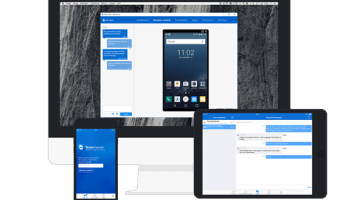
TeamViewer, developed by TeamViewer GmbH, stands as a paragon in the realm of remote access and support solutions. This versatile software is designed to facilitate seamless connectivity across a plethora of devices, making it an indispensable tool for businesses, IT professionals, and individuals alike.
At its core, TeamViewer offers robust remote control capabilities, allowing users to access and manage computers and mobile devices from virtually anywhere in the world. This feature is particularly beneficial for IT support teams who need to troubleshoot issues without being physically present, thereby saving time and resources.
One of the standout features of TeamViewer is its cross-platform compatibility. Whether you're using Windows, macOS, Linux, Android, or iOS, TeamViewer ensures a smooth and consistent experience. This flexibility is further enhanced by its ability to connect to IoT devices, making it a comprehensive solution for modern, interconnected environments.
Security is a paramount concern for any remote access tool, and TeamViewer excels in this regard. It employs end-to-end encryption, two-factor authentication, and other advanced security protocols to ensure that your data remains protected. These measures make it a trusted choice for industries that handle sensitive information, such as healthcare and finance.
The software also shines in its usability. The intuitive interface is designed to be user-friendly, even for those who may not be tech-savvy. Features like drag-and-drop file transfer, session recording, and multi-monitor support are easily accessible, making remote interactions as straightforward as possible.
For collaborative efforts, TeamViewer offers a suite of features that facilitate teamwork. Screen sharing, video conferencing, and chat functionalities are integrated seamlessly, allowing teams to work together in real-time, regardless of their physical locations. This makes it an excellent tool for remote work environments, which have become increasingly prevalent.
Another noteworthy aspect is TeamViewer's scalability. It caters to a wide range of users, from individual freelancers to large enterprises. Various licensing options are available, ensuring that you only pay for what you need. Additionally, the software is continually updated with new features and improvements, reflecting TeamViewer GmbH's commitment to innovation and customer satisfaction.
In summary, TeamViewer is a powerful, secure, and user-friendly remote access solution that excels in versatility and functionality. Its ability to connect across multiple platforms, coupled with its robust security measures and collaborative features, makes it a top choice for anyone in need of reliable remote access and support. Whether you're troubleshooting a technical issue, collaborating with a team, or managing devices across a network, TeamViewer provides the tools you need to get the job done efficiently and securely.
At its core, TeamViewer offers robust remote control capabilities, allowing users to access and manage computers and mobile devices from virtually anywhere in the world. This feature is particularly beneficial for IT support teams who need to troubleshoot issues without being physically present, thereby saving time and resources.
One of the standout features of TeamViewer is its cross-platform compatibility. Whether you're using Windows, macOS, Linux, Android, or iOS, TeamViewer ensures a smooth and consistent experience. This flexibility is further enhanced by its ability to connect to IoT devices, making it a comprehensive solution for modern, interconnected environments.
Security is a paramount concern for any remote access tool, and TeamViewer excels in this regard. It employs end-to-end encryption, two-factor authentication, and other advanced security protocols to ensure that your data remains protected. These measures make it a trusted choice for industries that handle sensitive information, such as healthcare and finance.
The software also shines in its usability. The intuitive interface is designed to be user-friendly, even for those who may not be tech-savvy. Features like drag-and-drop file transfer, session recording, and multi-monitor support are easily accessible, making remote interactions as straightforward as possible.
For collaborative efforts, TeamViewer offers a suite of features that facilitate teamwork. Screen sharing, video conferencing, and chat functionalities are integrated seamlessly, allowing teams to work together in real-time, regardless of their physical locations. This makes it an excellent tool for remote work environments, which have become increasingly prevalent.
Another noteworthy aspect is TeamViewer's scalability. It caters to a wide range of users, from individual freelancers to large enterprises. Various licensing options are available, ensuring that you only pay for what you need. Additionally, the software is continually updated with new features and improvements, reflecting TeamViewer GmbH's commitment to innovation and customer satisfaction.
In summary, TeamViewer is a powerful, secure, and user-friendly remote access solution that excels in versatility and functionality. Its ability to connect across multiple platforms, coupled with its robust security measures and collaborative features, makes it a top choice for anyone in need of reliable remote access and support. Whether you're troubleshooting a technical issue, collaborating with a team, or managing devices across a network, TeamViewer provides the tools you need to get the job done efficiently and securely.
OS: Windows 11, Windows Server 2022, Windows Server 2019, Windows Server 2016, Windows 10 32/64 bit, Windows Server 2012 R2, Windows Server 2012, Windows 2008 R2, Windows 2008 32/64 bit, Windows 2003, Windows 8 32/64 bit, Windows 7 32/64 bit, Windows Vista
Add Your Review or 64-bit Compatibility Report
Top Remote Computing 64-bit downloads

VNC for Mac and Linux 7.16.0 (r14)
Remote access made easy with secure, high-performance VNC Server.
Demo | $8.25


Print2XP 6.99
Access your desktop at the office or remotely accessing the home PC
Trialware | $139.99

LogMeIn Pro 4.1.16162
LogMeIn Pro: Secure and efficient remote access for your devices.
Trialware | $30.00


AnyDesk 9.6.12

AnyDesk: Fast, secure remote desktop software for seamless connectivity.
Freeware | $19.92


Internet Cafe 6.48
Internet Cafe: Efficient management software for internet cafes and gaming centers.
Demo

Repetier-Server 1.4.18
Repetier-Server: Efficient 3D printer management and remote control software.
Demo | $59.99

Classroom Spy Professional 5.6.3
Monitor and manage classroom activities with Classroom Spy Professional.
Trialware | $299.95

TSplus-RemoteWork 19.20.3.10
Seamless remote access solution for efficient team collaboration and productivity.
Demo | $25.00
Members area
Top 64-bit Downloads
-
Adobe Flash Player 10
for 64-bit Windows Preview 2
x64 freeware download -
FileZilla Server 1.8.1
x64 open source download -
Internet Explorer 8 for
Windows Vista 64-bit and
Windows Server 2008
64-bit
x64 freeware download -
Firefox 64bit x64 127.0.2
x64 open source download -
SSuite NetSurfer Extreme
x64 2.10.16.1
x64 freeware download -
Google Chrome x64 bit 126.0.6478.127
x64 freeware download -
SSuite NetSurfer Browser
x64 2.30.16.10
x64 freeware download -
WatchFTP x64 4.2.1.0
x64 trialware download -
Xlight FTP Server
Professional x64 3.9.4.2
x64 trialware download -
SoftPerfect Bandwidth
Manager 3.3.0
x64 shareware download
Top Downloads
-
Adobe Flash Player 10
for 64-bit Windows Preview 2
freeware download -
Profile Migrator 1.1
trialware download -
MiraxTV 2024.5
freeware download -
Web Archives for Opera 7.3.0
open source download -
TheWorld Browser 7.0.0.108
freeware download -
MusicFab 1.0.6.6
demo download -
Virtual World 4.7.4
commercial download -
Xftp Free 7.0 B0155
freeware download -
NetShareWatcher 1.5.8
shareware download -
Open With Photoshop 63.0
open source download -
Dooble 2024.12.31
open source download -
MP4 Downloader 6.3.0
trialware download -
Vuze 5.7.7.0
freeware download -
LocalSend 1.17.0
open source download -
NetSpeed 1.1
freeware download