
Tresorit - X 64-bit Download
Popular x64 Tags
- software x64 download
- network x64 download
- download x64 download
- seo x64 download
- rss reader x64 download
- online tv x64 download
- internet x64 download
- freeware x64 download
- free x64 download
- identity management x64 download
- hardware inventory x64 download
- slow pc performance x64 download
- proxy x64 download
- utility x64 download
- satellite tv for pc x64 download
- password manager x64 download
- email x64 download
- password reset x64 download
- security x64 download
- address x64 download
- server x64 download
- web x64 download
- remote control software x64 download
- pages x64 download
- rss x64 download
- password management x64 download
- active directory x64 download
- why is my computer so slow x64 download
- software distribution x64 download
- software inventory x64 download
Tresorit 3.5.2475.1420
Sponsored links:
license: Freeware
downloads: 63
size: 49.10 MB
updated: 2021-01-07
tags: file, backup, folder, data, file sharing client, cloud storage, cloud sync, share, cloud, synchronization
Add to Basket

Tresorit

Tresorit is an easy-to-use, cloud-based, secure file synchronising software designed to share confidential data. Simply place any kind of file into the Tresorit folder and they will automatically sync with every computers connecting to the same account. Files are encrypted before being uploaded into the cloud. Decryption is only possible with permission from the owner.
Encrypted contents can be shared without needing re-encryption. Tresorit is a cloud-based and easy to use piece of software with a strong focus on keeping your files both accessible and secure. Lining up with the industry's standard, the utility uses end-to-end encryption to make your files as safe as possible.
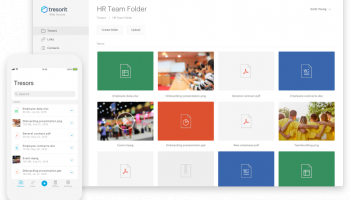
Subsequent to the installation process, to use the application, you first need to create a Tresorit account on the official website. Once this is taken care of, you can easily get started by uploading your files to the cloud server and sharing them. Working with Tresorit is quite an easy process, mainly thanks to a user-friendly and intuitive interface. The main window packs the most important features right on sight, with everything made even easier thanks to support for drag and drop.
The new apps still give you access to all of your cloud hosted files, and they still encrypt and decrypt them on demand—nothing leaves your computer without being encrypted first, and if you download anything new, it's decrypted when it gets to you, not on Tresorit's servers. This way not even Tresorit knows what you're storing—all of the keys are stored locally on your Mac, Windows PC, or Android device.
Easy access to your files
Upload files and folders to the cloud with a few clicks. Share them with anyone in seconds. We sync and update files automatically.
Client-side encryption
Tresorit secures your files and folders on your computer, before uploading to the cloud. Your encryption keys never leave your computer. This means noone can access your content if you don’t permit them, not even Tresorit.
Complete privacy
Security is not the only concern for cloud adopters – as long as your storage provider or an administrator can peek into your sensitive data, your privacy can be violated. This isn’t possible with Tresorit’s technology – your privacy is guaranteed.
Multi-layered security
Tresorit applies only published, scrutinized, industry-standard security algorithms, every one of which exceeds the computing power of currently available hardware.
Decrypting tresors without authorisation is mathematically unfeasible – it would take several lifetimes to crack one.
Files are encrypted with AES-256 before being uploaded to the cloud. Additional security is provided before upload by HMAC message authentication codes applied on SHA-512 hashes. Encrypted files are uploaded to the cloud using TLS-protected channels.
Everything can be ‘tresored’
Tresorit secures your files and folders on your computer, before uploading to the cloud. Your encryption keys never leave your computer. This means noone can access your content if you don’t permit them, not even Tresorit.
Shareable encryption
Tresorit’s patented shareable encryption makes it possible to collaborate easily and securely. You can share any number of files with any number of users using only their email addresses, while the software takes care of synchronization and tracking file changes.
Powerful permission handling
Permissions can be granted and revoked with a click. Tresorit allows you to set several distinct roles – reader, editor and manager. You are always in control of your data.
Encrypted contents can be shared without needing re-encryption. Tresorit is a cloud-based and easy to use piece of software with a strong focus on keeping your files both accessible and secure. Lining up with the industry's standard, the utility uses end-to-end encryption to make your files as safe as possible.
Subsequent to the installation process, to use the application, you first need to create a Tresorit account on the official website. Once this is taken care of, you can easily get started by uploading your files to the cloud server and sharing them. Working with Tresorit is quite an easy process, mainly thanks to a user-friendly and intuitive interface. The main window packs the most important features right on sight, with everything made even easier thanks to support for drag and drop.
The new apps still give you access to all of your cloud hosted files, and they still encrypt and decrypt them on demand—nothing leaves your computer without being encrypted first, and if you download anything new, it's decrypted when it gets to you, not on Tresorit's servers. This way not even Tresorit knows what you're storing—all of the keys are stored locally on your Mac, Windows PC, or Android device.
Easy access to your files
Upload files and folders to the cloud with a few clicks. Share them with anyone in seconds. We sync and update files automatically.
Client-side encryption
Tresorit secures your files and folders on your computer, before uploading to the cloud. Your encryption keys never leave your computer. This means noone can access your content if you don’t permit them, not even Tresorit.
Complete privacy
Security is not the only concern for cloud adopters – as long as your storage provider or an administrator can peek into your sensitive data, your privacy can be violated. This isn’t possible with Tresorit’s technology – your privacy is guaranteed.
Multi-layered security
Tresorit applies only published, scrutinized, industry-standard security algorithms, every one of which exceeds the computing power of currently available hardware.
Decrypting tresors without authorisation is mathematically unfeasible – it would take several lifetimes to crack one.
Files are encrypted with AES-256 before being uploaded to the cloud. Additional security is provided before upload by HMAC message authentication codes applied on SHA-512 hashes. Encrypted files are uploaded to the cloud using TLS-protected channels.
Everything can be ‘tresored’
Tresorit secures your files and folders on your computer, before uploading to the cloud. Your encryption keys never leave your computer. This means noone can access your content if you don’t permit them, not even Tresorit.
Shareable encryption
Tresorit’s patented shareable encryption makes it possible to collaborate easily and securely. You can share any number of files with any number of users using only their email addresses, while the software takes care of synchronization and tracking file changes.
Powerful permission handling
Permissions can be granted and revoked with a click. Tresorit allows you to set several distinct roles – reader, editor and manager. You are always in control of your data.
OS: Windows XP, Windows Vista, Windows 7, Windows 8, Windows 10, Windows 10 x64
Requirements: .NET Framework 4.5
Add Your Review or 64-bit Compatibility Report
Top Other 64-bit downloads


Adobe Flash Player 10 for 64-bit Windows Preview 2
Enables native 64-bit support on Linux operating systems
Freeware


Advanced TCP IP Data Logger 5.1.3 Build 310

Log data from one or more Terminal Servers to disk
Demo | $100.00


Virtual World 4.7.4
An interactive 3D Virtual World chat with live webcam and avatars support.
Commercial | $1 500.00

Octoparse 8.9.0
Powerful web scraping tool for data extraction without coding skills.
Trialware | $83.00

miTaggedMarks 2.01.4
Use tags to organize and access your local collection of bookmarks
Trialware | $20.00

Skyfiles 4.0
A client for Google Docs which enables folder drag and drop uploading.
Shareware | $29.00

eToolz 4.5.2
A collection of networking tools such as NS-Lookup, Ping, TraceRoute and Whois
Freeware
Members area
Top 64-bit Downloads
-
Adobe Flash Player 10
for 64-bit Windows Preview 2
x64 freeware download -
SoftPerfect Bandwidth
Manager 3.3.0
x64 shareware download -
Internet Explorer 8 for
Windows Vista 64-bit and
Windows Server 2008
64-bit
x64 freeware download -
FileZilla Server 1.8.1
x64 open source download -
SoftPerfect Connection
Emulator 1.9
x64 shareware download -
Angry IP Scanner 64bit 3.9.1
x64 open source download -
WatchFTP x64 4.2.1.0
x64 trialware download -
DameWare Mini Remote
Control 64bit 12.3.0.12
x64 trialware download -
Hitman Pro x64 3.8.34.330
x64 trialware download -
Xlight FTP Server
Standart x64 3.9.4.2
x64 trialware download
Top Downloads
-
TheWorld Browser 7.0.0.108
freeware download -
MusicFab 1.0.6.6
demo download -
Open With Photoshop 63.0
open source download -
Adobe Flash Player 10
for 64-bit Windows Preview 2
freeware download -
Profile Migrator 1.1
trialware download -
MetaMask for Chrome 13.22.0
open source download -
Web Archives for Opera 7.3.0
open source download -
Dooble 2024.12.31
open source download -
GetRight 6.5
shareware download -
MP4 Downloader 6.2.3
trialware download -
Vuze 5.7.7.0
freeware download -
BiglyBT 4.0.0.0
open source download -
VNC for Mac and Linux 7.16.0 (r14)
demo download -
Advanced TCP IP Data
Logger 5.1.3 Build 310
demo download -
Net-SNMP 5.9.1
freeware download