
ZD Screen Recorder - X 64-bit Download
Popular x64 Tags
- video x64 download
- video converter x64 download
- avi x64 download
- internet tv x64 download
- divx x64 download
- dvd x64 download
- online tv x64 download
- mov x64 download
- mpeg x64 download
- converter x64 download
- xvid x64 download
- 3gp converter x64 download
- psp x64 download
- download x64 download
- ipod x64 download
- mp4 x64 download
- wmv x64 download
- ipod video x64 download
- dvd ripper x64 download
- dvd to 3gp x64 download
- swf x64 download
- dvd to ipod x64 download
- dvd to psp x64 download
- 3gp x64 download
- asf x64 download
- iphone x64 download
- dat x64 download
- mpg x64 download
- video to ipod x64 download
- flv x64 download
ZD Screen Recorder 12.0.9
Sponsored links:
license: Demo ($39.00)
downloads: 73
size: 15.00 MB
updated: 2025-11-15
tags: ZD Screen Recorder, download ZD Screen Recorder, ZD Screen Recorder free download, Screen Recorder, Snapshot Screen, Record Screen, Recorder, Screenshot, Snapshot, Capture
Add to Basket

ZD Soft

ZD Screen Recorder by ZD Soft is a robust and versatile screen recording software designed to cater to a wide range of users, from casual gamers to professional content creators. With its intuitive interface and powerful features, this software stands out as a reliable tool for capturing high-quality video and audio directly from your screen.
One of the standout features of ZD Screen Recorder is its ability to record in full HD, ensuring that every detail is captured with crystal clarity. Whether you're creating tutorials, recording gameplay, or capturing video calls, the software provides smooth and lag-free performance, thanks to its efficient use of system resources.
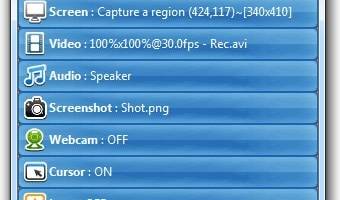
The software offers a variety of recording modes, including full screen, custom area, and window recording, giving users the flexibility to capture exactly what they need. Additionally, ZD Screen Recorder supports scheduled recording, allowing you to set up recordings in advance and automate the process, which is particularly useful for recording webinars or live streams.
Audio recording is another area where ZD Screen Recorder excels. It can capture audio from multiple sources, including system sound, microphone, or both simultaneously. This feature is especially beneficial for creating commentary videos or recording voiceovers. The software also includes a built-in audio mixer, enabling users to adjust audio levels and ensure a balanced sound output.
For gamers, ZD Screen Recorder offers game recording mode, optimized to capture high-motion scenes without compromising on quality. The software supports hardware acceleration, which leverages your GPU to enhance recording performance and reduce CPU load, resulting in smoother recordings even during intense gaming sessions.
ZD Screen Recorder also includes a range of editing tools, allowing users to trim, cut, and merge recordings directly within the software. This eliminates the need for additional video editing software and streamlines the content creation process. The software supports various output formats, including MP4, AVI, and FLV, ensuring compatibility with different platforms and devices.
Another noteworthy feature is the live streaming capability. ZD Screen Recorder allows users to broadcast their screen in real-time to popular streaming platforms like YouTube, Twitch, and Facebook. This feature is invaluable for live tutorials, gaming streams, and virtual events, providing a seamless way to engage with your audience.
Security and privacy are also prioritized, with options to password-protect recordings and hide sensitive information during recording. This ensures that your content remains secure and confidential.
In summary, ZD Screen Recorder by ZD Soft is a comprehensive and user-friendly screen recording solution that caters to a diverse range of needs. Its high-quality recording capabilities, flexible recording modes, advanced audio features, and built-in editing tools make it an excellent choice for anyone looking to capture and share their screen activities. Whether you're a professional content creator, a gamer, or someone who needs to record online meetings, ZD Screen Recorder provides all the tools you need to produce polished and professional recordings.
One of the standout features of ZD Screen Recorder is its ability to record in full HD, ensuring that every detail is captured with crystal clarity. Whether you're creating tutorials, recording gameplay, or capturing video calls, the software provides smooth and lag-free performance, thanks to its efficient use of system resources.
The software offers a variety of recording modes, including full screen, custom area, and window recording, giving users the flexibility to capture exactly what they need. Additionally, ZD Screen Recorder supports scheduled recording, allowing you to set up recordings in advance and automate the process, which is particularly useful for recording webinars or live streams.
Audio recording is another area where ZD Screen Recorder excels. It can capture audio from multiple sources, including system sound, microphone, or both simultaneously. This feature is especially beneficial for creating commentary videos or recording voiceovers. The software also includes a built-in audio mixer, enabling users to adjust audio levels and ensure a balanced sound output.
For gamers, ZD Screen Recorder offers game recording mode, optimized to capture high-motion scenes without compromising on quality. The software supports hardware acceleration, which leverages your GPU to enhance recording performance and reduce CPU load, resulting in smoother recordings even during intense gaming sessions.
ZD Screen Recorder also includes a range of editing tools, allowing users to trim, cut, and merge recordings directly within the software. This eliminates the need for additional video editing software and streamlines the content creation process. The software supports various output formats, including MP4, AVI, and FLV, ensuring compatibility with different platforms and devices.
Another noteworthy feature is the live streaming capability. ZD Screen Recorder allows users to broadcast their screen in real-time to popular streaming platforms like YouTube, Twitch, and Facebook. This feature is invaluable for live tutorials, gaming streams, and virtual events, providing a seamless way to engage with your audience.
Security and privacy are also prioritized, with options to password-protect recordings and hide sensitive information during recording. This ensures that your content remains secure and confidential.
In summary, ZD Screen Recorder by ZD Soft is a comprehensive and user-friendly screen recording solution that caters to a diverse range of needs. Its high-quality recording capabilities, flexible recording modes, advanced audio features, and built-in editing tools make it an excellent choice for anyone looking to capture and share their screen activities. Whether you're a professional content creator, a gamer, or someone who needs to record online meetings, ZD Screen Recorder provides all the tools you need to produce polished and professional recordings.
OS: Windows 11, Windows 10 32/64 bit, Windows 8 32/64 bit, Windows 7 32/64 bit
Add Your Review or 64-bit Compatibility Report
Top Video Tools 64-bit downloads


Screenbits 9.13.1.0
Screenbits: High-quality screen recording with intuitive controls and features.
Trialware

VLC Media Player x64 3.0.20
VLC x64 is a free and open source multimedia 64bit player for Windows x64
Open Source

vMix 29.0.0.46
vMix: Powerful live video production software for streaming and broadcasting.
Trialware | $50.00
tags: vMix, download vMix, vMix free download, Video Mixer, Stream HD, Capture HD, Mixer, Recorder, Capture, Stream


Stremio 4.4.181
Stream and organize your favorite movies, shows, and channels effortlessly.
Freeware

VideoPad Free Movie and Video Editor 18.14
Free Video Editor and Movie Making Software for Windows anyone can use.
Freeware
tags: video editor, free video editor, movie maker, free movie maker, video editing, video editing software, free video editing software, free movie making software, free film editing, video editing software free pc, best video editing apps free, video cutting software mac, video production software, windows video editor, open source video editor, video and audio editing software, free video editing apps for pc, video capture and editing software, video and audio editor

4Videosoft MTS Converter 6.2.22
Convert video to audio or convert audio to AAC, AC3 , AIFF, AMR, AU, and more
Shareware | $16.16

MP4 Converter 6.2.3

Effortlessly convert videos to MP4 with high quality and fast processing.
Trialware | $29.99

Duo video converter 1.0.13.0
Effortlessly convert videos with Duo Video Converter's intuitive interface.
Freeware

MonitorTest 4.0 Build 1002
Comprehensive tool for testing and calibrating monitor performance.
Trialware
Members area
Top 64-bit Downloads
-
Media Player Classic -
HomeCinema - 64 bit 2.3.0
x64 open source download -
VLC Media Player x64 3.0.20
x64 open source download -
GUITAR RIG 5 PRO 7.0.2
x64 demo download -
MCEBuddy 2.6.3
x64 trialware download -
ProgDVB (64 bit) 7.60.9
x64 freeware download -
PotPlayer 64bit 1.7.21397
x64 freeware download -
Panopreter 64-bit 4.0.1.3
x64 shareware download -
Adobe PhotoShop CC 2024 25.9.1
x64 trialware download -
Renoise 64-bit 3.4.4
x64 demo download -
Voxengo Stereo Touch x64 2.17
x64 freeware download
Top Downloads
-
FreeTube 0.23.14 Beta
open source download -
Little AlterBoy 5.4.1
trialware download -
Auremo 0.24.9
open source download -
ft2-clone 2.11
open source download -
DSpeech 1.72
freeware download -
Screenbits 9.13.1.0
trialware download -
DSP Filters 1.18.9
demo download -
Melodics 5.0.79.0
demo download -
Media Player Classic -
HomeCinema - 64 bit 2.3.0
open source download -
PlayIt Live 2.17.2.5046
shareware download -
VLC Media Player x64 3.0.20
open source download -
Cyclop 1.3.7
demo download -
iTools 4.5.1.9
shareware download -
1X-AMP - MP3 Player
Software 2026 26.1.2
shareware download -
Nero 7 Ultra Edition 7.10.1
shareware download