
Active ISO Burner - X 64-bit Download
Popular x64 Tags
- mp3 x64 download
- iso x64 download
- create iso x64 download
- dvd burner x64 download
- dvd copy x64 download
- audio cd burner x64 download
- cd burner x64 download
- burn cd x64 download
- burner x64 download
- free cd burner x64 download
- burn dvd x64 download
- burn audio cd x64 download
- dvd burning x64 download
- dvd creator x64 download
- image burner x64 download
- iso burner x64 download
- burn iso x64 download
- backup x64 download
- media burner x64 download
- burn x64 download
- date burner x64 download
- audio x64 download
- dvd x64 download
- mp3 to cd x64 download
- mp3 burner x64 download
- burning x64 download
- wav x64 download
- bluray x64 download
- audio burner x64 download
- burn dada x64 download
Active ISO Burner 4.0.3.0
Sponsored links:

LSoft Technologies Inc.

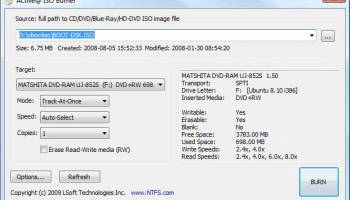
Active@ ISO Burner 3.0 is a simple-to-use dialog-style software to burn CD/DVD/Blu-ray ISO images compatible with the ISO 9660 standard. Automated burning is also supported.
To burn discs with your PC, you need two things. The first is a CD burner, or (better) a DVD burner, or (better still) a Blu-Ray burner. The second is disc-burning software. For the first, you're probably limited by the burner you already own, and your burner's capabilities will determine what kinds of disc you can burn, how much and what kind of data they can hold, and how long it takes to burn them. But for the second requirement, the burning tool, you have a lot more choices, and a lot of them are free.
New Features:
Many more CD/DVD/BD devices supported, as well as fewer burning errors
Three independent burning transports are supported (SPTI,ASPI,SPTD)
Works under User's account (via SPTI on Vista, and SPTD transports)
Extended device, media, and ISO file information is displayed
Burning mode (TAO,SAO,DAO) and number of copies to burn can automatically be specified
Full text log with actions performed, errors and progress information is displayed
Configuration of after-burn actions supported: Verify, Eject, Shut Down PC
Test Mode burning is supported
Burning Options:
* Transport - SCSI transport to use for device access:
o SPTI - SCSI Pass Through Interface - this transport is preferable and works only on NT based systems (NT4/2000/XP/2003/Vista/2008). Under Windows Vista it will allow you to burn under User's account (no Admin's privileges). No additional drivers or utilities need to be installed to use SPTI.
o SPTD - SCSI Pass Through Direct - this transport is preferable and works only on NT based systems (NT4/2000/XP/2003/Vista/2008). Additional SPTD drivers need to be installed (included in installation) and machine re-booted. If installed - allows to burn on ALL NT based systems under User's account (no Admin's privileges).
o ASPI - Advanced SCSI Programming Interface - this transport is primarily intended for Windows 9x systems (95/98/ME), but can be used on Windows NT based systems (included WnASPI32.dll must be located at the same directory where Active@ ISO Burner is installed/copied).
* Cache Size - size of the cache buffer in megabytes. Gives a basic level of Buffer Under RuN Error Protection using software buffers. The data, to be burnt, is kept in the system RAM, before it is burnt to the disc.
* Perform Buffer Underrun Protection (BUP) - sets the status of BURN-Proof (Buffer Under RuN error Proof) flag which helps in protection from BURN error.
* Perform Optimal Power Calibration (OPC) - sets the status of flag for performing OPC, before burning. Performing OPC is a special technique used in newer CD-Recorders for monitoring and maintaining the quality of the disc writing and ensuring the accuracy of all the mark and lands lengths across the disc. The term Performing OPC actually describes a general process which is also known by several trade names including "Dynamic Power Control (DPC)" and "Direct Read During Write (DRDW)". There may be differences in execution which gives some of these implementations competitive advantages over others. Sending OPC calibrates the device laser power at the beginning of burning session to adjust the properties of each recordable disc.
To burn discs with your PC, you need two things. The first is a CD burner, or (better) a DVD burner, or (better still) a Blu-Ray burner. The second is disc-burning software. For the first, you're probably limited by the burner you already own, and your burner's capabilities will determine what kinds of disc you can burn, how much and what kind of data they can hold, and how long it takes to burn them. But for the second requirement, the burning tool, you have a lot more choices, and a lot of them are free.
New Features:
Many more CD/DVD/BD devices supported, as well as fewer burning errors
Three independent burning transports are supported (SPTI,ASPI,SPTD)
Works under User's account (via SPTI on Vista, and SPTD transports)
Extended device, media, and ISO file information is displayed
Burning mode (TAO,SAO,DAO) and number of copies to burn can automatically be specified
Full text log with actions performed, errors and progress information is displayed
Configuration of after-burn actions supported: Verify, Eject, Shut Down PC
Test Mode burning is supported
Burning Options:
* Transport - SCSI transport to use for device access:
o SPTI - SCSI Pass Through Interface - this transport is preferable and works only on NT based systems (NT4/2000/XP/2003/Vista/2008). Under Windows Vista it will allow you to burn under User's account (no Admin's privileges). No additional drivers or utilities need to be installed to use SPTI.
o SPTD - SCSI Pass Through Direct - this transport is preferable and works only on NT based systems (NT4/2000/XP/2003/Vista/2008). Additional SPTD drivers need to be installed (included in installation) and machine re-booted. If installed - allows to burn on ALL NT based systems under User's account (no Admin's privileges).
o ASPI - Advanced SCSI Programming Interface - this transport is primarily intended for Windows 9x systems (95/98/ME), but can be used on Windows NT based systems (included WnASPI32.dll must be located at the same directory where Active@ ISO Burner is installed/copied).
* Cache Size - size of the cache buffer in megabytes. Gives a basic level of Buffer Under RuN Error Protection using software buffers. The data, to be burnt, is kept in the system RAM, before it is burnt to the disc.
* Perform Buffer Underrun Protection (BUP) - sets the status of BURN-Proof (Buffer Under RuN error Proof) flag which helps in protection from BURN error.
* Perform Optimal Power Calibration (OPC) - sets the status of flag for performing OPC, before burning. Performing OPC is a special technique used in newer CD-Recorders for monitoring and maintaining the quality of the disc writing and ensuring the accuracy of all the mark and lands lengths across the disc. The term Performing OPC actually describes a general process which is also known by several trade names including "Dynamic Power Control (DPC)" and "Direct Read During Write (DRDW)". There may be differences in execution which gives some of these implementations competitive advantages over others. Sending OPC calibrates the device laser power at the beginning of burning session to adjust the properties of each recordable disc.
OS: Windows 2000, Windows 2003, Windows XP, Windows Vista, Windows Vista x64, Windows 7, Windows 7 x64, Windows 8, Windows 8 x64, Windows 10, Windows 10 x64
Add Your Review or 64-bit Compatibility Report
Top CD Burners 64-bit downloads


AnyMP4 DVD 作成 7.2.66
AnyMP4 DVD Creator can burn any video to DVD / Blu-ray, ISO file.
Shareware | $59.00


Nero StartSmart 7.11.10.0c
Easy to use interface,Easy connection to the Nero ProductCenter
Shareware | $79.99


PowerISO (64-Bit) 9.3
Open,extract,create,edit,convert,compress,encrypt,split and mount ISO file.
Shareware | $39.95

Nero 12 12.5.01900
Software for burning, editing, converting and backup your data.
Shareware | $99.99
tags: burning, editing, converting, backup, playback, audio cd, ripping, capture, video editing, video converter


Alcohol 120% 2.1.1.2201
Alcohol 120%, is a powerful Windows CD and DVD burning software
Shareware | $43.00

Members area
Top 64-bit Downloads
-
VLC Media Player x64 3.0.20
x64 open source download -
Media Player Classic -
HomeCinema - 64 bit 2.3.0
x64 open source download -
MCEBuddy 2.6.3
x64 trialware download -
PotPlayer 64bit 1.7.21397
x64 freeware download -
GUITAR RIG 5 PRO 7.0.2
x64 demo download -
Voxengo Stereo Touch x64 2.17
x64 freeware download -
Devastor x64 2.3.2
x64 demo download -
Mp4Gain 1.03
x64 shareware download -
MediaCoder PSP Edition
x64 0.8.65.5830
x64 freeware download -
Blue Cat's Triple EQ x64 4.45
x64 freeware download
Top Downloads
-
FreeTube 0.23.15 Beta
open source download -
Little AlterBoy 5.4.1
trialware download -
Auremo 0.24.9
open source download -
Nero 7 Ultra Edition 7.10.1
shareware download -
ft2-clone 2.12
open source download -
VLC Media Player x64 3.0.20
open source download -
Screenbits 9.13.1.0
trialware download -
Cyclop 1.3.7
demo download -
Melodics 5.0.139.0
demo download -
Screenbox 0.18.0
open source download -
Soundbase 2012.10.10
freeware download -
Audio Reader XL 2026 26.1.3
shareware download -
Video Jaguar 1.0
shareware download -
CamStudio 2.7.4 r354
open source download -
4Videosoft MTS Converter 6.2.22
shareware download