
Adobe DNG Converter - X 64-bit Download
Popular x64 Tags
- pdf x64 download
- images x64 download
- freeware x64 download
- autocad x64 download
- html x64 download
- converter x64 download
- copyright x64 download
- convert x64 download
- jpg x64 download
- pictures x64 download
- photo x64 download
- picture x64 download
- bmp x64 download
- tif x64 download
- image resizer x64 download
- software x64 download
- image x64 download
- resize x64 download
- png x64 download
- free x64 download
- watermark x64 download
- conversion x64 download
- converting x64 download
- jpeg x64 download
- tiff x64 download
- gif x64 download
- batch x64 download
- resizer x64 download
- dxf x64 download
- photos x64 download
Adobe DNG Converter 18.2.2
Sponsored links:
license: Freeware
downloads: 804
size: 1740.80 MB
updated: 2026-03-16
tags: Adobe DNG Converter, download Adobe DNG Converter, Adobe DNG Converter free download, raw photo converter, dng creator, dng converter, raw photo, converter, dng, raw
Add to Basket

Adobe

Adobe DNG Converter: A Seamless Solution for Universal RAW Image Compatibility
Adobe DNG Converter, developed by the renowned software giant Adobe, is a powerful and indispensable tool for photographers and digital imaging professionals. This software addresses a critical need in the photography world: the ability to convert various proprietary RAW files from a multitude of camera models into the more universally accepted Digital Negative (DNG) format.
One of the standout features of Adobe DNG Converter is its extensive compatibility. It supports a vast array of camera models from leading manufacturers, ensuring that photographers can easily convert their RAW files regardless of their equipment. This broad compatibility is particularly beneficial for professionals who work with multiple camera systems or who need to archive their images in a consistent format.
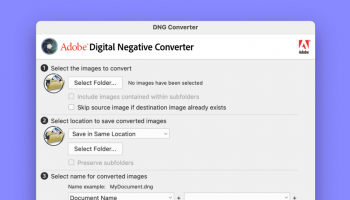
The conversion process itself is straightforward and efficient. Adobe DNG Converter offers a user-friendly interface that simplifies the task, allowing users to convert entire folders of images with just a few clicks. The software also provides advanced options for customization, such as embedding the original RAW file within the DNG file for future reference or adjusting the compatibility preferences to suit different versions of the DNG specification.
Performance-wise, Adobe DNG Converter is highly reliable. It maintains the integrity and quality of the original RAW files during the conversion process, ensuring that no data is lost. This is crucial for photographers who demand the highest quality for their images, as the DNG format preserves the full dynamic range and color information of the original RAW files.
Another notable advantage of using Adobe DNG Converter is the potential for long-term archival stability. The DNG format is an open standard, which means it is less likely to become obsolete compared to proprietary RAW formats. This makes it an excellent choice for photographers who need to ensure the accessibility and usability of their images for years to come.
Adobe DNG Converter also integrates seamlessly with other Adobe products, such as Adobe Lightroom and Adobe Photoshop. This integration streamlines the workflow for photographers who rely on Adobe's suite of tools for editing and managing their images. By converting RAW files to DNG, users can take full advantage of the advanced editing capabilities and organizational features offered by these applications.
In summary, Adobe DNG Converter is a robust, efficient, and user-friendly solution for photographers seeking to standardize their RAW image files. Its extensive compatibility, ease of use, and ability to preserve image quality make it an essential tool in the digital imaging toolkit. Whether for professional use or personal projects, Adobe DNG Converter ensures that your precious photographic memories are preserved in a versatile and future-proof format.
Adobe DNG Converter, developed by the renowned software giant Adobe, is a powerful and indispensable tool for photographers and digital imaging professionals. This software addresses a critical need in the photography world: the ability to convert various proprietary RAW files from a multitude of camera models into the more universally accepted Digital Negative (DNG) format.
One of the standout features of Adobe DNG Converter is its extensive compatibility. It supports a vast array of camera models from leading manufacturers, ensuring that photographers can easily convert their RAW files regardless of their equipment. This broad compatibility is particularly beneficial for professionals who work with multiple camera systems or who need to archive their images in a consistent format.
The conversion process itself is straightforward and efficient. Adobe DNG Converter offers a user-friendly interface that simplifies the task, allowing users to convert entire folders of images with just a few clicks. The software also provides advanced options for customization, such as embedding the original RAW file within the DNG file for future reference or adjusting the compatibility preferences to suit different versions of the DNG specification.
Performance-wise, Adobe DNG Converter is highly reliable. It maintains the integrity and quality of the original RAW files during the conversion process, ensuring that no data is lost. This is crucial for photographers who demand the highest quality for their images, as the DNG format preserves the full dynamic range and color information of the original RAW files.
Another notable advantage of using Adobe DNG Converter is the potential for long-term archival stability. The DNG format is an open standard, which means it is less likely to become obsolete compared to proprietary RAW formats. This makes it an excellent choice for photographers who need to ensure the accessibility and usability of their images for years to come.
Adobe DNG Converter also integrates seamlessly with other Adobe products, such as Adobe Lightroom and Adobe Photoshop. This integration streamlines the workflow for photographers who rely on Adobe's suite of tools for editing and managing their images. By converting RAW files to DNG, users can take full advantage of the advanced editing capabilities and organizational features offered by these applications.
In summary, Adobe DNG Converter is a robust, efficient, and user-friendly solution for photographers seeking to standardize their RAW image files. Its extensive compatibility, ease of use, and ability to preserve image quality make it an essential tool in the digital imaging toolkit. Whether for professional use or personal projects, Adobe DNG Converter ensures that your precious photographic memories are preserved in a versatile and future-proof format.
OS: Windows 11, Windows 10 64 bit
Add Your Review or 64-bit Compatibility Report
Top Converters & Optimizers 64-bit downloads


XnConvert 1.106.0
Powerful batch image converter and resizer with extensive format support.
Shareware | $15.00

ImageConvertPro 2.01.07
Easily adjust the size of your images, add watermark, or rename.
Shareware | $9.95


ToandFromWebP 1.0.0.0
Effortlessly convert images to and from WebP format with this intuitive tool.
Freeware

Cool Resizer 2016
Easy way to resize digital photos for web, e-mail, thumbnails and more
Shareware | $9.95

Blender for ARM64 4.3.0 Alpha
3D modeling, animation, rendering, and also features a game engine
Freeware
tags: x64 api, blender ARM64, x64 cut, x64 effects, x64 fonts, x64 import, x64 pack, x64 paint, project x64, proxy x64, support ARM64, ARM64


Potrace for Windows (x64 bit) 1.16
Utility for tracing a bitmap, which means, transforming a bitmap into a smooth
Open Source
Members area
Top 64-bit Downloads
-
Fluid Mask for Mac 3.3.14
x64 trialware download -
ICO file format x64 2.1f1
x64 open source download -
Archicad 64bit 27 B3001
x64 demo download -
TopSpice 10.26a
x64 demo download -
WellCAD x64 5.3 B625
x64 demo download -
Portable MicroDicom x64 2024.2
x64 freeware download -
Adobe Photoshop Elements 2024.3
x64 trialware download -
Potrace for Windows (x64
bit) 1.16
x64 open source download -
delaboratory x64 0.8
x64 open source download -
AcroPDF 6.2
x64 shareware download
Top Downloads
-
CorelDRAW X5 2026 v27.0.0.121
trialware download -
Tracfoil 4.12.07
trialware download -
oCam 428.0
freeware download -
Gyazo 5.9.1
demo download -
VueScan 9.8.53
demo download -
nanoCAD 5.1.2524.2017
freeware download -
MarvinSketch 23.16.0
freeware download -
MapInfo Professional 17.0.4
trialware download -
Scanahand 8.0.0.320
demo download -
iWisdom 0.0.0+2107~ga0785ce1
open source download -
CodeLoader 4.19.0
freeware download -
SeiSee 2.22.6
freeware download -
XnConvert 1.106.0
shareware download -
Topaz Simplify 4.1.1
trialware download -
World Tools 2.0.6
shareware download