
Auto Screen Capture - X 64-bit Download
Popular x64 Tags
- snapshot x64 download
- video screen capture x64 download
- print screen x64 download
- software x64 download
- screen capture tool x64 download
- video capture x64 download
- free screen capture x64 download
- screen capture x64 download
- capture x64 download
- desktop x64 download
- picture x64 download
- print x64 download
- video x64 download
- screen recorder x64 download
- screen capture software x64 download
- wmv x64 download
- screen x64 download
- image x64 download
- screen capture program x64 download
- clipboard x64 download
- screenshot x64 download
- screencapture x64 download
- record x64 download
- screen shot x64 download
- avi x64 download
- screen recording x64 download
- printscreen x64 download
- flash x64 download
- window x64 download
- recorder x64 download
Auto Screen Capture 2.3.0.3
Sponsored links:

Gavin Kendall

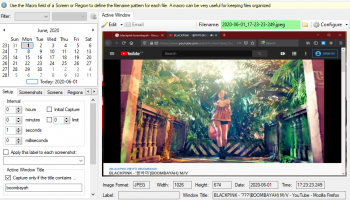
Auto Screen Capture is a free automated screen capture application for Windows Vista, Windows 7, and Windows 8/10 that enables you to take a screenshot of the primary display at a specified interval using a variety of image formats. All screenshots taken are saved as a series of time-stamped files organized in chronological order accessed via the application's calendar which can be played as a slideshow to review your computing activities.
The Auto Screen Capture is a software that will help you capture your screen after a time interval.
If you want to take screenshoots of your screen activity, just download Auto Screen Capture.
END USER LICENSE AGREEMENT
This license governs use of the downloaded software. If you use the downloaded software, you accept this license. The software is free and provided "as-is". The author (Gavin Kendall) gives no express warranties, guarantees or conditions. The author grants you the right to use the software for an unlimited period of time in any manner you personally consider is lawful, educational, and ethical either for personal or commercial enterprise. You may disassemble, reverse engineer, or otherwise edit, modify, or hack the software in any way you deem reasonable to the extent of the law. You may make an unlimited number of copies of the software and distribute the software in any format. You may not use the software in mission-critical, military, or data-sensitive environments. The author is not responsible for damages that the software may cause in the event of personal injury, business interference, death, or loss of financial, personal, military, or corporate data. The author will not provide support for the software. Use the software at your own risk.
Features:
No installation required and no third-party libraries installed; just an executable named "autoscreen.exe"
Small (~400 KB in size) and portable application that fits on any thumb drive
Schedule screen capture sessions and choose the days when screenshots should be taken
Customize the naming of files using a macro with date and time stamps or user name and machine name using whatever folder structure you prefer
Use your preferred image editors and edit screenshots with a chosen image editor
Create actions to trigger based on conditions to automate workflows
Preview what your screen captures will look like before you start a session
Calendar shows what days screenshots were taken
Capture multiple regions specifying name, macro, X, Y, Width, and Height
Save every screenshot to either a single file or as a series of time-stamped files
Image formats available: BMP, EMF, GIF, JPEG, PNG, TIFF, WMF
Compatible with Windows 7, Windows 8, and Windows 10
Apply your own labels to screenshots to represent what you're working on so you can keep your projects organized
Filter screenshots by label, active window title, or process name
The Auto Screen Capture is a software that will help you capture your screen after a time interval.
If you want to take screenshoots of your screen activity, just download Auto Screen Capture.
END USER LICENSE AGREEMENT
This license governs use of the downloaded software. If you use the downloaded software, you accept this license. The software is free and provided "as-is". The author (Gavin Kendall) gives no express warranties, guarantees or conditions. The author grants you the right to use the software for an unlimited period of time in any manner you personally consider is lawful, educational, and ethical either for personal or commercial enterprise. You may disassemble, reverse engineer, or otherwise edit, modify, or hack the software in any way you deem reasonable to the extent of the law. You may make an unlimited number of copies of the software and distribute the software in any format. You may not use the software in mission-critical, military, or data-sensitive environments. The author is not responsible for damages that the software may cause in the event of personal injury, business interference, death, or loss of financial, personal, military, or corporate data. The author will not provide support for the software. Use the software at your own risk.
Features:
No installation required and no third-party libraries installed; just an executable named "autoscreen.exe"
Small (~400 KB in size) and portable application that fits on any thumb drive
Schedule screen capture sessions and choose the days when screenshots should be taken
Customize the naming of files using a macro with date and time stamps or user name and machine name using whatever folder structure you prefer
Use your preferred image editors and edit screenshots with a chosen image editor
Create actions to trigger based on conditions to automate workflows
Preview what your screen captures will look like before you start a session
Calendar shows what days screenshots were taken
Capture multiple regions specifying name, macro, X, Y, Width, and Height
Save every screenshot to either a single file or as a series of time-stamped files
Image formats available: BMP, EMF, GIF, JPEG, PNG, TIFF, WMF
Compatible with Windows 7, Windows 8, and Windows 10
Apply your own labels to screenshots to represent what you're working on so you can keep your projects organized
Filter screenshots by label, active window title, or process name
OS: Windows XP, Windows Vista, Windows Vista x64, Windows 7, Windows 7 x64, Windows 8, Windows 8 x64, Windows 10, Windows 10 x64
Add Your Review or 64-bit Compatibility Report
Top Screen Capture 64-bit downloads


VueScan 9.8.52
VueScan: Powerful scanning software for enhanced image quality and versatility.
Demo | $29.96

iTop Screenshot 1.2.3.544
iTop Screenshot is a free, lightweight, yet powerful screenshot tool.
Freeware
tags: Screenshot, screen capture


SD Snap Studio 1.0
First-class screen capture application with an advanced image editor
Shareware | $20.95

HyperSnap 9.7.3
Capture and edit screenshots effortlessly with powerful tools and features.
Demo | $49.95

Screenpresso 2.2.7
Screenpresso: Capture, edit, and share screenshots and videos effortlessly.
Shareware | $29.99
Members area
Top 64-bit Downloads
-
Fluid Mask for Mac 3.3.14
x64 trialware download -
ICO file format x64 2.1f1
x64 open source download -
Archicad 64bit 27 B3001
x64 demo download -
Portable MicroDicom x64 2024.2
x64 freeware download -
Adobe Photoshop Elements 2024.3
x64 trialware download -
TopSpice 10.26a
x64 demo download -
Potrace for Windows (x64
bit) 1.16
x64 open source download -
Photo Ninja 64-bit 1.4.0c
x64 trialware download -
WellCAD x64 5.3 B625
x64 demo download -
RawDigger x64 1.2.27.607
x64 trialware download
Top Downloads
-
CorelDRAW X5 2026 v27.0.0.121
trialware download -
Tracfoil 4.12.07
trialware download -
oCam 428.0
freeware download -
Gyazo 5.9.1
demo download -
MapInfo Professional 17.0.4
trialware download -
iWisdom 0.0.0+2107~ga0785ce1
open source download -
CodeLoader 4.19.0
freeware download -
nanoCAD 5.1.2524.2017
freeware download -
SeiSee 2.22.6
freeware download -
MarvinSketch 23.16.0
freeware download -
VueScan 9.8.52
demo download -
Topaz Simplify 4.1.1
trialware download -
World Tools 2.0.6
shareware download -
Texmod 0.9b
freeware download -
DICOMscope 3.5.1
freeware download