
Batch MMedia Date Changer - X 64-bit Download
Popular x64 Tags
- photo editor x64 download
- software x64 download
- image editor x64 download
- image editing x64 download
- photos x64 download
- photoshop x64 download
- color x64 download
- design x64 download
- jpeg x64 download
- editor x64 download
- plugin x64 download
- image enhancement x64 download
- watermark x64 download
- exif x64 download
- rotate x64 download
- batch x64 download
- pictures x64 download
- graphics x64 download
- image x64 download
- digital camera x64 download
- photo x64 download
- graphic x64 download
- images x64 download
- resize x64 download
- paint x64 download
- camera x64 download
- digital x64 download
- digital imaging x64 download
- picture x64 download
- jpg x64 download
Batch MMedia Date Changer 2.41
Sponsored links:
license: Demo ($9.75)
downloads: 242
size: 30.80 MB
updated: 2026-03-12
tags: Batch MMedia Date Changer, download Batch MMedia Date Changer, Batch MMedia Date Changer free download, Date Changer, Change EXIF Date, JPEG Date Changer, Date, Changer, EXIF, Modify
Add to Basket

iRedSoft Technology Inc

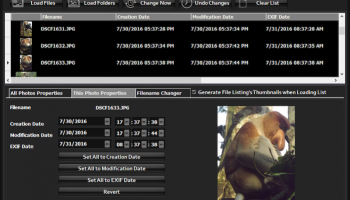
Photo Date Changer, developed by publicspace.net, is a specialized utility designed to address the often cumbersome task of managing and correcting the metadata of digital photos. This software is particularly focused on the EXIF data, specifically the date and time stamps, which are crucial for organizing and archiving digital photo collections.
At its core, Photo Date Changer provides users with the ability to modify the date and time information embedded in digital images. This functionality is essential for photographers and hobbyists who encounter discrepancies in their photo metadata, often caused by incorrect camera settings or time zone changes. The software supports a wide range of image formats, including JPEG, HEIC, and TIFF, ensuring compatibility with most digital cameras and smartphones.
One of the standout features of Photo Date Changer is its batch processing capability. Users can efficiently update the metadata of multiple photos simultaneously, saving time and effort. This feature is particularly useful for those dealing with large photo libraries or collections from extended trips or events. The software allows for precise adjustments, whether it's setting a new date and time, shifting the existing timestamps by a specified amount, or syncing the dates across multiple images.
The user interface of Photo Date Changer is designed to be straightforward and intuitive, making it accessible to both novice and experienced users. The process of changing photo dates is streamlined, with clear instructions and options that guide users through each step. Additionally, the software includes a preview function, allowing users to verify changes before they are applied, thus minimizing the risk of errors.
Beyond basic date and time adjustments, Photo Date Changer also offers advanced options for more detailed metadata management. Users can choose to overwrite existing metadata or append new information, providing flexibility in how data is handled. The software also maintains a log of changes, which can be useful for tracking modifications and ensuring data integrity.
Photo Date Changer is compatible with Windows operating systems, catering to a broad user base. It is a lightweight application, ensuring that it runs smoothly without demanding excessive system resources. This makes it an ideal tool for users who require a reliable solution for managing photo metadata without the need for complex or resource-intensive software.
In summary, Photo Date Changer by publicspace.net is a practical and efficient tool for anyone needing to correct or manage the date and time metadata of their digital photos. Its user-friendly interface, combined with powerful batch processing capabilities, makes it a valuable asset for photographers, archivists, and digital photo enthusiasts looking to maintain an organized and accurate photo collection.
At its core, Photo Date Changer provides users with the ability to modify the date and time information embedded in digital images. This functionality is essential for photographers and hobbyists who encounter discrepancies in their photo metadata, often caused by incorrect camera settings or time zone changes. The software supports a wide range of image formats, including JPEG, HEIC, and TIFF, ensuring compatibility with most digital cameras and smartphones.
One of the standout features of Photo Date Changer is its batch processing capability. Users can efficiently update the metadata of multiple photos simultaneously, saving time and effort. This feature is particularly useful for those dealing with large photo libraries or collections from extended trips or events. The software allows for precise adjustments, whether it's setting a new date and time, shifting the existing timestamps by a specified amount, or syncing the dates across multiple images.
The user interface of Photo Date Changer is designed to be straightforward and intuitive, making it accessible to both novice and experienced users. The process of changing photo dates is streamlined, with clear instructions and options that guide users through each step. Additionally, the software includes a preview function, allowing users to verify changes before they are applied, thus minimizing the risk of errors.
Beyond basic date and time adjustments, Photo Date Changer also offers advanced options for more detailed metadata management. Users can choose to overwrite existing metadata or append new information, providing flexibility in how data is handled. The software also maintains a log of changes, which can be useful for tracking modifications and ensuring data integrity.
Photo Date Changer is compatible with Windows operating systems, catering to a broad user base. It is a lightweight application, ensuring that it runs smoothly without demanding excessive system resources. This makes it an ideal tool for users who require a reliable solution for managing photo metadata without the need for complex or resource-intensive software.
In summary, Photo Date Changer by publicspace.net is a practical and efficient tool for anyone needing to correct or manage the date and time metadata of their digital photos. Its user-friendly interface, combined with powerful batch processing capabilities, makes it a valuable asset for photographers, archivists, and digital photo enthusiasts looking to maintain an organized and accurate photo collection.
OS: Windows 11, Windows Server 2016, Windows 10 64 bit, Windows Server 2012, Windows 8 64 bit
Add Your Review or 64-bit Compatibility Report
Top Editors 64-bit downloads


CorelDRAW X5 2026 v27.0.0.121
Versatile graphic design suite for vector illustration and layout creation.
Trialware | $269.00

FreeFotoWorks 2026 26.1.2

Photo editing software for beginners and pro. All well-known photo effects.
Freeware


jMonkeyEngine 3.9.0
jMonkeyEngine: Open-source 3D game development engine for Java developers.
Open Source

Members area
Top 64-bit Downloads
-
Fluid Mask for Mac 3.3.14
x64 trialware download -
ICO file format x64 2.1f1
x64 open source download -
Archicad 64bit 27 B3001
x64 demo download -
Affinity Photo 2.5.3
x64 trialware download -
Portable MicroDicom x64 2024.2
x64 freeware download -
Adobe Photoshop Elements 2024.3
x64 trialware download -
ImageJ x64 1.54i
x64 freeware download -
Volocity 64bit 6.5.1
x64 demo download -
TopSpice 10.26a
x64 demo download -
Potrace for Windows (x64
bit) 1.16
x64 open source download
Top Downloads
-
CorelDRAW X5 2026 v27.0.0.121
trialware download -
Tracfoil 4.12.07
trialware download -
oCam 428.0
freeware download -
Gyazo 5.9.1
demo download -
CodeLoader 4.19.0
freeware download -
SeiSee 2.22.6
freeware download -
MarvinSketch 23.16.0
freeware download -
MapInfo Professional 17.0.4
trialware download -
World Tools 2.0.6
shareware download -
Texmod 0.9b
freeware download -
iWisdom 0.0.0+2107~ga0785ce1
open source download -
sigTOOL 0.95
open source download -
LTpowerCAD 2.7.2
freeware download -
nanoCAD 5.1.2524.2017
freeware download -
ImageConvertPro 2.01.07
shareware download