
Black Menu for Chrome - X 64-bit Download
Popular x64 Tags
- mozilla x64 download
- internet explorer toolbar x64 download
- browser x64 download
- netscape x64 download
- toolbar x64 download
- ie toolbar x64 download
- firefox x64 download
- free toolbar x64 download
- favorites organizer x64 download
- internet explorer x64 download
- favorites x64 download
- internet x64 download
- bookmarks x64 download
- add ons x64 download
- browser toolbar x64 download
- bookmark manager x64 download
- theme x64 download
- explorer x64 download
- addons x64 download
- cache x64 download
- skin x64 download
- web x64 download
- backup x64 download
- golf x64 download
- anarchy bar anarchy x64 download
- golf pro x64 download
- mhfs rss rss feed reader x64 download
- golf leader x64 download
- womens golf x64 download
- ladies golf x64 download
Black Menu for Chrome 31.1.0
Sponsored links:
license: Freeware
downloads: 55
size: 2.40 MB
updated: 2026-03-09
tags: Black Menu for Chrome, download Black Menu for Chrome, Black Menu for Chrome free download, access Google service, Google popup, Google menu, Google, service, menu, access
Add to Basket

Carlos Jeurissen

"Black Menu for Chrome" by Carlos Jeurissen is a versatile and powerful browser extension designed to streamline your Google experience. This innovative tool integrates seamlessly into your Chrome browser, offering a compact, all-in-one menu that provides quick access to a wide array of Google services without the need to open multiple tabs.
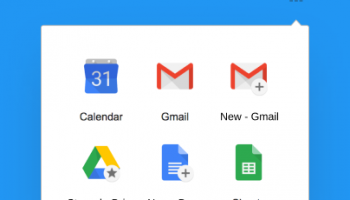
Upon installation, "Black Menu for Chrome" places a sleek, unobtrusive icon in your browser's toolbar. Clicking this icon unveils a neatly organized dropdown menu that brings together all your favorite Google services, including Search, Google+, Translate, Maps, News, Drive, and more. Each service is presented in a miniaturized, yet fully functional interface, allowing you to perform tasks directly within the menu.
One of the standout features of "Black Menu for Chrome" is its customizable nature. Users can tailor the menu to their specific needs by rearranging, adding, or removing services. This level of personalization ensures that you have quick access to the tools you use most frequently, enhancing productivity and efficiency.
The Search function is particularly noteworthy, providing instant access to Google’s powerful search engine. You can type your query directly into the menu and view results without leaving your current webpage. This feature alone can save significant time for users who frequently need to look up information while browsing.
Google Drive integration is another highlight, offering a quick glance at your recent documents and the ability to open and edit files on the fly. This is particularly useful for professionals and students who rely on Google Drive for their daily tasks.
"Black Menu for Chrome" also excels in its support for Google Maps, allowing users to search for locations, get directions, and even view real-time traffic updates without navigating away from their current tab. This can be a game-changer for users who need to plan routes or check locations quickly.
For those who rely on Google Translate, the extension provides a convenient way to translate text snippets directly from the menu. This can be incredibly useful for users who frequently encounter foreign languages while browsing.
In terms of performance, "Black Menu for Chrome" is lightweight and responsive, ensuring that it does not slow down your browsing experience. The interface is intuitive and user-friendly, making it accessible even for those who are not tech-savvy.
In conclusion, "Black Menu for Chrome" by Carlos Jeurissen is a must-have extension for any Chrome user who relies on Google services. Its ability to consolidate multiple tools into a single, easily accessible menu can significantly enhance your browsing efficiency and productivity. Whether you are a student, professional, or casual user, this extension offers a seamless and convenient way to interact with Google’s suite of services.
Upon installation, "Black Menu for Chrome" places a sleek, unobtrusive icon in your browser's toolbar. Clicking this icon unveils a neatly organized dropdown menu that brings together all your favorite Google services, including Search, Google+, Translate, Maps, News, Drive, and more. Each service is presented in a miniaturized, yet fully functional interface, allowing you to perform tasks directly within the menu.
One of the standout features of "Black Menu for Chrome" is its customizable nature. Users can tailor the menu to their specific needs by rearranging, adding, or removing services. This level of personalization ensures that you have quick access to the tools you use most frequently, enhancing productivity and efficiency.
The Search function is particularly noteworthy, providing instant access to Google’s powerful search engine. You can type your query directly into the menu and view results without leaving your current webpage. This feature alone can save significant time for users who frequently need to look up information while browsing.
Google Drive integration is another highlight, offering a quick glance at your recent documents and the ability to open and edit files on the fly. This is particularly useful for professionals and students who rely on Google Drive for their daily tasks.
"Black Menu for Chrome" also excels in its support for Google Maps, allowing users to search for locations, get directions, and even view real-time traffic updates without navigating away from their current tab. This can be a game-changer for users who need to plan routes or check locations quickly.
For those who rely on Google Translate, the extension provides a convenient way to translate text snippets directly from the menu. This can be incredibly useful for users who frequently encounter foreign languages while browsing.
In terms of performance, "Black Menu for Chrome" is lightweight and responsive, ensuring that it does not slow down your browsing experience. The interface is intuitive and user-friendly, making it accessible even for those who are not tech-savvy.
In conclusion, "Black Menu for Chrome" by Carlos Jeurissen is a must-have extension for any Chrome user who relies on Google services. Its ability to consolidate multiple tools into a single, easily accessible menu can significantly enhance your browsing efficiency and productivity. Whether you are a student, professional, or casual user, this extension offers a seamless and convenient way to interact with Google’s suite of services.
OS: Windows 11, Windows 10 32/64 bit
Add Your Review or 64-bit Compatibility Report
Top Browser Tools 64-bit downloads


Web Archives for Opera 7.3.0
Effortlessly save and manage web pages with this intuitive Opera extension.
Open Source


Mailtrack for Chrome 12.68.4

Mailtrack for Chrome: Email tracking with read receipts for Gmail users.
Shareware | $9.99

TagSpaces Web Clipper for Chrome 4.1.2
Organize your files effortlessly with TagSpaces' intuitive tagging system.
Freeware

MetaMask for Chrome 13.23.0
Seamlessly manage your Ethereum assets and interact with decentralized apps.
Open Source

Kami 2.0.22844
Transform PDFs and documents into interactive, collaborative experiences.
Trialware | $149.00

Chrono Download Manager 0.13.10
Effortlessly manage and accelerate your downloads with Chrono Download Manager.
Freeware
Members area
Top 64-bit Downloads
-
Adobe Flash Player 10
for 64-bit Windows Preview 2
x64 freeware download -
FileZilla Server 1.8.1
x64 open source download -
Internet Explorer 8 for
Windows Vista 64-bit and
Windows Server 2008
64-bit
x64 freeware download -
Firefox 64bit x64 127.0.2
x64 open source download -
SSuite NetSurfer Extreme
x64 2.10.16.1
x64 freeware download -
Google Chrome x64 bit 126.0.6478.127
x64 freeware download -
SSuite NetSurfer Browser
x64 2.30.16.10
x64 freeware download -
WatchFTP x64 4.2.1.0
x64 trialware download -
Xlight FTP Server
Professional x64 3.9.4.2
x64 trialware download -
SoftPerfect Bandwidth
Manager 3.3.0
x64 shareware download
Top Downloads
-
Adobe Flash Player 10
for 64-bit Windows Preview 2
freeware download -
Profile Migrator 1.1
trialware download -
MiraxTV 2024.5
freeware download -
Web Archives for Opera 7.3.0
open source download -
TheWorld Browser 7.0.0.108
freeware download -
MusicFab 1.0.6.6
demo download -
Virtual World 4.7.4
commercial download -
Xftp Free 7.0 B0155
freeware download -
NetShareWatcher 1.5.8
shareware download -
Open With Photoshop 63.0
open source download -
Dooble 2024.12.31
open source download -
MP4 Downloader 6.3.0
trialware download -
Vuze 5.7.7.0
freeware download -
LocalSend 1.17.0
open source download -
NetSpeed 1.1
freeware download