
Cacidi BarCodes - X 64-bit Download
Popular x64 Tags
- image x64 download
- design x64 download
- size x64 download
- color x64 download
- graphics x64 download
- gif x64 download
- panorama x64 download
- photoshop x64 download
- software x64 download
- jpeg x64 download
- utility x64 download
- photo x64 download
- plugin x64 download
- cover x64 download
- tool x64 download
- rgb x64 download
- png x64 download
- jpg x64 download
- pictures x64 download
- images x64 download
- vanderlee x64 download
- bmp x64 download
- photos x64 download
- vdl x64 download
- picture x64 download
- scanner x64 download
- screen x64 download
- video x64 download
- scan x64 download
- dust x64 download
Cacidi BarCodes CC2015
Sponsored links:

Cacidi Systems Aps.

Cacidi BarCodes CC allows you to create barcodes directly in your InDesign document by simply selecting the barcode type and entering your data in the BarCodes palette.
A large selection of barcode types
You can choose from all the most frequently used types of barcodes, including EAN-8, EAN-13, UPC-A, UPC-E, ISBN, ISSN, JAN-8, JAN-13, Bookland, Codabar, Code 11, Code 25, Code 39, Code 128, MSI/Plessey and PostNet.
Barcodes in Cacidi BarCodes are live objects
The barcode that Cacidi BarCodes creates is a live object that allows you to modify its size, rotate it or add normal properties such as colors to the barcode. If you change the number on the barcode in the Cacidi BarCodes palette, the barcode will change dynamically while naturally retaining all its properties.
Cooperation between Cacidi Extreme and Cacidi BarCodes
Cacidi BarCodes not only offers you the markets easiest way to work with barcodes. Cacidi BarCodes even works together with the Cacidi automation products. When you create a module in Cacidi Basic, Cacidi Extreme will detect whether your object is a barcode and during the production work together with Cacidi BarCodes to create your barcodes in a fully automated way!
Advanced settings
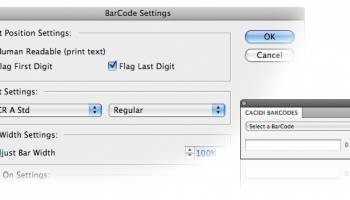
In the Cacidi BarCodes settings you can select a number of standards for the appearance of your barcode. You can select whether the barcode should be human readable (whether the barcode should contain text), whether the first and last digit should be placed outside the barcode area, whether the barcode should contain an extra barcode (with 2 or 5 digits) and which text and font you want to use.
Developers SDK
An SDK kit will be made available to other plug-in developers who want to implement BarCodes in their products.
A large selection of barcode types
You can choose from all the most frequently used types of barcodes, including EAN-8, EAN-13, UPC-A, UPC-E, ISBN, ISSN, JAN-8, JAN-13, Bookland, Codabar, Code 11, Code 25, Code 39, Code 128, MSI/Plessey and PostNet.
Barcodes in Cacidi BarCodes are live objects
The barcode that Cacidi BarCodes creates is a live object that allows you to modify its size, rotate it or add normal properties such as colors to the barcode. If you change the number on the barcode in the Cacidi BarCodes palette, the barcode will change dynamically while naturally retaining all its properties.
Cooperation between Cacidi Extreme and Cacidi BarCodes
Cacidi BarCodes not only offers you the markets easiest way to work with barcodes. Cacidi BarCodes even works together with the Cacidi automation products. When you create a module in Cacidi Basic, Cacidi Extreme will detect whether your object is a barcode and during the production work together with Cacidi BarCodes to create your barcodes in a fully automated way!
Advanced settings
In the Cacidi BarCodes settings you can select a number of standards for the appearance of your barcode. You can select whether the barcode should be human readable (whether the barcode should contain text), whether the first and last digit should be placed outside the barcode area, whether the barcode should contain an extra barcode (with 2 or 5 digits) and which text and font you want to use.
Developers SDK
An SDK kit will be made available to other plug-in developers who want to implement BarCodes in their products.
OS: Windows 2000, Windows 2003, Windows XP, Windows Vista, Windows Vista x64, Windows 7, Windows 7 x64
Add Your Review or 64-bit Compatibility Report
Top Other 64-bit downloads


iWisdom 0.0.0+2107~ga0785ce1
An application which helps you store small bits of wisdom, such as quotations
Open Source


World Tools 2.0.6
An Adobe InDesign to work on right-to-left languages and writing scripts
Shareware | $99.00




Topaz DeJPEG 4.1.0
Gives you the ability to improve the quality of your JPEG images
Trialware | $29.99

Members area
Top 64-bit Downloads
-
Fluid Mask for Mac 3.3.14
x64 trialware download -
ICO file format x64 2.1f1
x64 open source download -
Archicad 64bit 27 B3001
x64 demo download -
TopSpice 10.26a
x64 demo download -
WellCAD x64 5.3 B625
x64 demo download -
Portable MicroDicom x64 2024.2
x64 freeware download -
Adobe Photoshop Elements 2024.3
x64 trialware download -
Potrace for Windows (x64
bit) 1.16
x64 open source download -
delaboratory x64 0.8
x64 open source download -
AcroPDF 6.2
x64 shareware download
Top Downloads
-
CorelDRAW X5 2026 v27.0.0.121
trialware download -
Tracfoil 4.12.07
trialware download -
oCam 428.0
freeware download -
Gyazo 5.9.1
demo download -
nanoCAD 5.1.2524.2017
freeware download -
MarvinSketch 23.16.0
freeware download -
MapInfo Professional 17.0.4
trialware download -
Scanahand 8.0.0.320
demo download -
iWisdom 0.0.0+2107~ga0785ce1
open source download -
CodeLoader 4.19.0
freeware download -
SeiSee 2.22.6
freeware download -
XnConvert 1.106.0
shareware download -
VueScan 9.8.53
demo download -
Topaz Simplify 4.1.1
trialware download -
World Tools 2.0.6
shareware download