
ColorWasher Plugin - X 64-bit Download
Popular x64 Tags
- image x64 download
- design x64 download
- size x64 download
- color x64 download
- graphics x64 download
- gif x64 download
- panorama x64 download
- photoshop x64 download
- software x64 download
- jpeg x64 download
- utility x64 download
- photo x64 download
- plugin x64 download
- cover x64 download
- tool x64 download
- rgb x64 download
- png x64 download
- jpg x64 download
- pictures x64 download
- images x64 download
- vanderlee x64 download
- bmp x64 download
- photos x64 download
- vdl x64 download
- picture x64 download
- scanner x64 download
- screen x64 download
- video x64 download
- scan x64 download
- dust x64 download
ColorWasher Plugin 3.13
Sponsored links:

Harald Heim

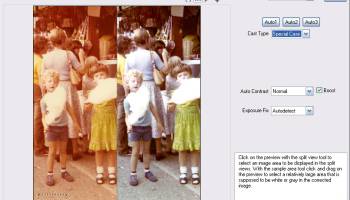
ColorWasher features a wide range of automatic, semi-automatic and manual tools for correcting, enhancing and restoring photos. It is very easy to use as it offers interactive explanations and hints for each feature, incorporates an Easy Mode and detailed step-by-step instructions in the manual.
ColorWasher lets you do professional photo corrections within seconds and also offers a Cloak mode for processing dozens of images very quickly.
ColorWasher can be used on digital photos as well as scanned photos. It even achieves great results on old and faded photos. But you can also use ColorWasher to enhance web graphics, drawings, cartoons, paintings or screen shots. ColorWasher is also recommended for photos in RAW format.
Some RAW converters don't produce perfect color correction results, so after the RAW files have been converted you can still apply ColorWasher to enhance the result. Moreover, if you want to create artistic and stylish color or b/w effects, ColorWasher lets you correct photos and apply impressive color effects in one step.
Take ColorWasher for spin to see just how useful it can be for you!
Features:
Corrects the colors, contrast, exposure, saturation and shadow/highlights of digital and scanned images
Automatic, semi-automatic and manual tools for correcting, enhancing and restoring photos
Offers an Easy Mode and Expert Mode
Allows batch processing of image files
Processes 8bit and 16bit RGB images
New in Version 3:
Support for multiple cores
The preview is rendered up to 12 times faster
Can be used as a smart filter and its settings can be recorded with actions
New Skin feature that imitates the user interface of Lightroom, Photoshop, Photoshop Elements, PaintShop Pro and Affinity
Support for preview zooming up to 3200%
You can now drag the eyedropper tool and make the preview automatically updates while dragging
Improved support for 16-bit per channel images and Windows 10
Support for Affinity Photo and common Photoshop CC plugins folder
Combined installer for plugins and standalones
Standalone Version: New save and batch options
Standalone Version: Support for the raw files of 80 new cameras
Standalone Version: Improved PSD support
Standalone Version: Improved meta data handling
Compatibility:
- Plugin Version
Runs as a filter plugin in Photoshop, Paint Shop Pro, Photoshop Elements, Photo-Paint, PhotoImpact, IrfanView and many other applications
Works as a smart filter in Photoshop
Color management depends on the host application
For Windows 10, 8, 7, Vista, XP (32-bit & 64-bit)
For MacOS X (10.6 and higher)
- Standalone/Lightroom Version
A standalone application that supports Camera Raw, JPEG, TIFF, PNG, PSD and other image formats
Works as an external editor in Adobe Lightroom, ACDSee, AfterShot Pro and many other applications
Lets you open and edit multiple images non-destructively
Can be used as a raw converter
Supports color management
For Windows 10, 8, 7, Vista, XP (32-bit & 64-bit)
Run the Windows standalone under MacOS X with the help of Wineskin or use the Mac plugin in Lightroom, Aperture and iPhoto with Launchbox
ColorWasher lets you do professional photo corrections within seconds and also offers a Cloak mode for processing dozens of images very quickly.
ColorWasher can be used on digital photos as well as scanned photos. It even achieves great results on old and faded photos. But you can also use ColorWasher to enhance web graphics, drawings, cartoons, paintings or screen shots. ColorWasher is also recommended for photos in RAW format.
Some RAW converters don't produce perfect color correction results, so after the RAW files have been converted you can still apply ColorWasher to enhance the result. Moreover, if you want to create artistic and stylish color or b/w effects, ColorWasher lets you correct photos and apply impressive color effects in one step.
Take ColorWasher for spin to see just how useful it can be for you!
Features:
Corrects the colors, contrast, exposure, saturation and shadow/highlights of digital and scanned images
Automatic, semi-automatic and manual tools for correcting, enhancing and restoring photos
Offers an Easy Mode and Expert Mode
Allows batch processing of image files
Processes 8bit and 16bit RGB images
New in Version 3:
Support for multiple cores
The preview is rendered up to 12 times faster
Can be used as a smart filter and its settings can be recorded with actions
New Skin feature that imitates the user interface of Lightroom, Photoshop, Photoshop Elements, PaintShop Pro and Affinity
Support for preview zooming up to 3200%
You can now drag the eyedropper tool and make the preview automatically updates while dragging
Improved support for 16-bit per channel images and Windows 10
Support for Affinity Photo and common Photoshop CC plugins folder
Combined installer for plugins and standalones
Standalone Version: New save and batch options
Standalone Version: Support for the raw files of 80 new cameras
Standalone Version: Improved PSD support
Standalone Version: Improved meta data handling
Compatibility:
- Plugin Version
Runs as a filter plugin in Photoshop, Paint Shop Pro, Photoshop Elements, Photo-Paint, PhotoImpact, IrfanView and many other applications
Works as a smart filter in Photoshop
Color management depends on the host application
For Windows 10, 8, 7, Vista, XP (32-bit & 64-bit)
For MacOS X (10.6 and higher)
- Standalone/Lightroom Version
A standalone application that supports Camera Raw, JPEG, TIFF, PNG, PSD and other image formats
Works as an external editor in Adobe Lightroom, ACDSee, AfterShot Pro and many other applications
Lets you open and edit multiple images non-destructively
Can be used as a raw converter
Supports color management
For Windows 10, 8, 7, Vista, XP (32-bit & 64-bit)
Run the Windows standalone under MacOS X with the help of Wineskin or use the Mac plugin in Lightroom, Aperture and iPhoto with Launchbox
Homepage: ColorWasher Plugin
OS: Windows XP, Windows Vista, Windows Vista x64, Windows 7, Windows 7 x64, Windows 8, Windows 8 x64, Windows 10, Windows 10 x64, Windows 11
Add Your Review or 64-bit Compatibility Report
Top Other 64-bit downloads


iWisdom 0.0.0+2107~ga0785ce1
An application which helps you store small bits of wisdom, such as quotations
Open Source


World Tools 2.0.6
An Adobe InDesign to work on right-to-left languages and writing scripts
Shareware | $99.00




Topaz DeJPEG 4.1.0
Gives you the ability to improve the quality of your JPEG images
Trialware | $29.99

Members area
Top 64-bit Downloads
-
Fluid Mask for Mac 3.3.14
x64 trialware download -
ICO file format x64 2.1f1
x64 open source download -
Archicad 64bit 27 B3001
x64 demo download -
TopSpice 10.26a
x64 demo download -
WellCAD x64 5.3 B625
x64 demo download -
Portable MicroDicom x64 2024.2
x64 freeware download -
Adobe Photoshop Elements 2024.3
x64 trialware download -
Potrace for Windows (x64
bit) 1.16
x64 open source download -
delaboratory x64 0.8
x64 open source download -
AcroPDF 6.2
x64 shareware download
Top Downloads
-
CorelDRAW X5 2026 v27.0.0.121
trialware download -
Tracfoil 4.12.07
trialware download -
oCam 428.0
freeware download -
Gyazo 5.9.1
demo download -
nanoCAD 5.1.2524.2017
freeware download -
MarvinSketch 23.16.0
freeware download -
MapInfo Professional 17.0.4
trialware download -
Scanahand 8.0.0.320
demo download -
iWisdom 0.0.0+2107~ga0785ce1
open source download -
CodeLoader 4.19.0
freeware download -
SeiSee 2.22.6
freeware download -
XnConvert 1.106.0
shareware download -
VueScan 9.8.53
demo download -
Topaz Simplify 4.1.1
trialware download -
World Tools 2.0.6
shareware download