
ComboTIFF for Windows - X 64-bit Download
Popular x64 Tags
- photo editor x64 download
- software x64 download
- image editor x64 download
- image editing x64 download
- photos x64 download
- photoshop x64 download
- color x64 download
- design x64 download
- jpeg x64 download
- editor x64 download
- plugin x64 download
- image enhancement x64 download
- watermark x64 download
- exif x64 download
- rotate x64 download
- batch x64 download
- pictures x64 download
- graphics x64 download
- image x64 download
- digital camera x64 download
- photo x64 download
- graphic x64 download
- images x64 download
- resize x64 download
- paint x64 download
- camera x64 download
- digital x64 download
- digital imaging x64 download
- picture x64 download
- jpg x64 download
ComboTIFF for Windows 2.93
Sponsored links:
license: Trialware ($14.95)
downloads: 263
size: 9.10 MB
updated: 2026-01-16
tags: ComboTIFF for Windows, download ComboTIFF for Windows, ComboTIFF for Windows free download, TIFF creator, merge TIFF, extract multi-page, merge, convert, TIFF, JPG
Add to Basket

iRedSoft Technology Inc

ComboTIFF for Windows, developed by iRedSoft Technology Inc., is a robust and versatile software solution designed to cater to the needs of professionals and enthusiasts working with TIFF files. This powerful tool simplifies the process of combining, extracting, and managing multi-page TIFF documents, making it an indispensable asset for anyone dealing with large volumes of image data.
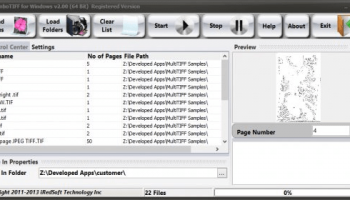
At its core, ComboTIFF for Windows excels in merging multiple TIFF files into a single, cohesive document. Whether you are compiling scanned documents, creating image archives, or organizing project files, this software ensures a seamless and efficient workflow. The intuitive drag-and-drop interface allows users to effortlessly add files, rearrange pages, and customize the output order, providing a user-friendly experience even for those with minimal technical expertise.
One of the standout features of ComboTIFF is its ability to handle multi-page TIFF files with ease. Users can extract individual pages from a multi-page document or split a large TIFF file into smaller, more manageable segments. This functionality is particularly useful for professionals in fields such as legal, medical, and architectural industries, where precise document management is crucial.
In addition to its merging and splitting capabilities, ComboTIFF for Windows offers a range of advanced options to enhance productivity. Users can set compression levels, adjust image resolution, and apply various filters to optimize the quality and size of the output files. Batch processing further streamlines the workflow, allowing users to process multiple files simultaneously, saving valuable time and effort.
The software also supports a wide array of image formats, including JPEG, PNG, BMP, and more, providing flexibility for users who work with diverse file types. This compatibility ensures that ComboTIFF can seamlessly integrate into existing workflows, regardless of the specific requirements of a project.
Security and reliability are paramount in document management, and ComboTIFF for Windows delivers on both fronts. The software is designed to handle large files without compromising performance, and its robust architecture ensures that data integrity is maintained throughout the processing stages. Additionally, iRedSoft Technology Inc. provides regular updates and customer support, ensuring that users have access to the latest features and assistance when needed.
In summary, ComboTIFF for Windows by iRedSoft Technology Inc. is a comprehensive and efficient tool for managing TIFF files. Its user-friendly interface, advanced features, and reliable performance make it an excellent choice for professionals seeking to streamline their document management processes. Whether you need to merge, split, or optimize TIFF files, ComboTIFF offers the functionality and flexibility to meet your needs with ease.
At its core, ComboTIFF for Windows excels in merging multiple TIFF files into a single, cohesive document. Whether you are compiling scanned documents, creating image archives, or organizing project files, this software ensures a seamless and efficient workflow. The intuitive drag-and-drop interface allows users to effortlessly add files, rearrange pages, and customize the output order, providing a user-friendly experience even for those with minimal technical expertise.
One of the standout features of ComboTIFF is its ability to handle multi-page TIFF files with ease. Users can extract individual pages from a multi-page document or split a large TIFF file into smaller, more manageable segments. This functionality is particularly useful for professionals in fields such as legal, medical, and architectural industries, where precise document management is crucial.
In addition to its merging and splitting capabilities, ComboTIFF for Windows offers a range of advanced options to enhance productivity. Users can set compression levels, adjust image resolution, and apply various filters to optimize the quality and size of the output files. Batch processing further streamlines the workflow, allowing users to process multiple files simultaneously, saving valuable time and effort.
The software also supports a wide array of image formats, including JPEG, PNG, BMP, and more, providing flexibility for users who work with diverse file types. This compatibility ensures that ComboTIFF can seamlessly integrate into existing workflows, regardless of the specific requirements of a project.
Security and reliability are paramount in document management, and ComboTIFF for Windows delivers on both fronts. The software is designed to handle large files without compromising performance, and its robust architecture ensures that data integrity is maintained throughout the processing stages. Additionally, iRedSoft Technology Inc. provides regular updates and customer support, ensuring that users have access to the latest features and assistance when needed.
In summary, ComboTIFF for Windows by iRedSoft Technology Inc. is a comprehensive and efficient tool for managing TIFF files. Its user-friendly interface, advanced features, and reliable performance make it an excellent choice for professionals seeking to streamline their document management processes. Whether you need to merge, split, or optimize TIFF files, ComboTIFF offers the functionality and flexibility to meet your needs with ease.
OS: Windows 11, Windows Server 2016, Windows 10 64 bit, Windows Server 2012 R2, Windows Server 2012, Windows 8 64 bit
Add Your Review or 64-bit Compatibility Report
Top Editors 64-bit downloads


CorelDRAW X5 2026 v27.0.0.121
Versatile graphic design suite for vector illustration and layout creation.
Trialware | $269.00

FreeFotoWorks 2026 26.1.3

Photo editing software for beginners and pro. All well-known photo effects.
Freeware


jMonkeyEngine 3.9.0
jMonkeyEngine: Open-source 3D game development engine for Java developers.
Open Source

Members area
Top 64-bit Downloads
-
Fluid Mask for Mac 3.3.14
x64 trialware download -
ICO file format x64 2.1f1
x64 open source download -
Archicad 64bit 27 B3001
x64 demo download -
Affinity Photo 2.5.3
x64 trialware download -
Portable MicroDicom x64 2024.2
x64 freeware download -
Adobe Photoshop Elements 2024.3
x64 trialware download -
ImageJ x64 1.54i
x64 freeware download -
Volocity 64bit 6.5.1
x64 demo download -
TopSpice 10.26a
x64 demo download -
Potrace for Windows (x64
bit) 1.16
x64 open source download
Top Downloads
-
CorelDRAW X5 2026 v27.0.0.121
trialware download -
Tracfoil 4.12.07
trialware download -
oCam 428.0
freeware download -
Gyazo 5.9.1
demo download -
CodeLoader 4.19.0
freeware download -
SeiSee 2.22.6
freeware download -
MarvinSketch 23.16.0
freeware download -
MapInfo Professional 17.0.4
trialware download -
World Tools 2.0.6
shareware download -
Texmod 0.9b
freeware download -
iWisdom 0.0.0+2107~ga0785ce1
open source download -
sigTOOL 0.95
open source download -
LTpowerCAD 2.7.2
freeware download -
nanoCAD 5.1.2524.2017
freeware download -
ImageConvertPro 2.01.07
shareware download