
DownTester - X 64-bit Download
Popular x64 Tags
- software x64 download
- network x64 download
- download x64 download
- seo x64 download
- rss reader x64 download
- online tv x64 download
- internet x64 download
- freeware x64 download
- free x64 download
- identity management x64 download
- hardware inventory x64 download
- slow pc performance x64 download
- proxy x64 download
- utility x64 download
- password manager x64 download
- satellite tv for pc x64 download
- email x64 download
- password reset x64 download
- address x64 download
- security x64 download
- server x64 download
- web x64 download
- remote control software x64 download
- pages x64 download
- rss x64 download
- password management x64 download
- active directory x64 download
- why is my computer so slow x64 download
- software distribution x64 download
- software inventory x64 download
DownTester 1.30
Sponsored links:

NirSoft

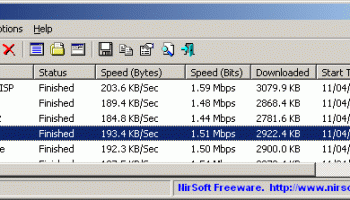
DownTester allows you to easily test your Internet download speed in multiple locations around the world. DownTester will automatically test, one after another, the download speed of the links that you choose.
It moves to the next download URL after the specified number of seconds has been elapsed or after it downloads the specified amount of KB - just according to your preferences.
After the download test is finished, you can easily save the result into text / html / xml / csv file, or copy it to the clipboard and paste it into Excel and other applications.
Choosing the download URLs list
DownTester doesn't provide an official list of URLs for the speed test. If DownTester provide a URL list, all users of DownTester will use the same servers, and will eventually overload them.
Here's some instructions about how to choose your download URLs for your speed tests:
· First, go to the Web site of your internet service provider, and try to locate the download URL provided for speed test, and if you find it, add this download URL into the list. Many ISP companies provide a download URL for speed test. However, this speed test only shows the download speed between your computer and your ISP. It doesn't mean that you'll get the same speed when downloading a file from the other side of the world.
· Go to the Web sites of large companies and locate some files to download. It's recommended to find files larger than 5 MB in order to insure that the speed result will be accurate. Some Web sites also provide mirrors across many countries, so you can use it to easily add download URLs of other countries.
After collecting the URLs for the downloads test, use the "Add URLs List" or "Add URLs From File" options to insert your URLs into DownTester. The URLs that you add are automatically saved into the .cfg file, so DownTester will remember them in the next time that you use it.
FTP: Passive Mode vs Active Mode
DownTester also allows you to test the speed of FTP downloads (Addresses begin with ftp://). FTP downloads can work in 2 modes, which in some cases might give completely different results:
· Active Mode: When downloading a file in Active Mode, the FTP server connects from port 20 into your computer in a random port number. Sometimes firewalls are configured to disallow any incoming connection. If your firewall is configured in this way, you won't be able to make a download test in Active Mode.
· Passive Mode: When downloading a file in Passive Mode, your computer connects the FTP server in a random port number.
Some Internet providers gives high priority for regular Web sites (port 80) and other popular Internet applications, while giving very low priority for connection in random port number. This technique is known as "Traffic shaping".
If your Internet provider uses this technique, you may get much lower speed results with Passive Mode FTP, because the FTP clicnt connects in random port number which may get much lower priority than the regular http downloads. In order to change the FTP mode in DownTester, go to Options->Advanced Option.
It moves to the next download URL after the specified number of seconds has been elapsed or after it downloads the specified amount of KB - just according to your preferences.
After the download test is finished, you can easily save the result into text / html / xml / csv file, or copy it to the clipboard and paste it into Excel and other applications.
Choosing the download URLs list
DownTester doesn't provide an official list of URLs for the speed test. If DownTester provide a URL list, all users of DownTester will use the same servers, and will eventually overload them.
Here's some instructions about how to choose your download URLs for your speed tests:
· First, go to the Web site of your internet service provider, and try to locate the download URL provided for speed test, and if you find it, add this download URL into the list. Many ISP companies provide a download URL for speed test. However, this speed test only shows the download speed between your computer and your ISP. It doesn't mean that you'll get the same speed when downloading a file from the other side of the world.
· Go to the Web sites of large companies and locate some files to download. It's recommended to find files larger than 5 MB in order to insure that the speed result will be accurate. Some Web sites also provide mirrors across many countries, so you can use it to easily add download URLs of other countries.
After collecting the URLs for the downloads test, use the "Add URLs List" or "Add URLs From File" options to insert your URLs into DownTester. The URLs that you add are automatically saved into the .cfg file, so DownTester will remember them in the next time that you use it.
FTP: Passive Mode vs Active Mode
DownTester also allows you to test the speed of FTP downloads (Addresses begin with ftp://). FTP downloads can work in 2 modes, which in some cases might give completely different results:
· Active Mode: When downloading a file in Active Mode, the FTP server connects from port 20 into your computer in a random port number. Sometimes firewalls are configured to disallow any incoming connection. If your firewall is configured in this way, you won't be able to make a download test in Active Mode.
· Passive Mode: When downloading a file in Passive Mode, your computer connects the FTP server in a random port number.
Some Internet providers gives high priority for regular Web sites (port 80) and other popular Internet applications, while giving very low priority for connection in random port number. This technique is known as "Traffic shaping".
If your Internet provider uses this technique, you may get much lower speed results with Passive Mode FTP, because the FTP clicnt connects in random port number which may get much lower priority than the regular http downloads. In order to change the FTP mode in DownTester, go to Options->Advanced Option.
OS: Windows XP, Windows Vista, Windows Vista x64, Windows 7, Windows 7 x64, Windows 8, Windows 8 x64
Add Your Review or 64-bit Compatibility Report
Top Other 64-bit downloads


Adobe Flash Player 10 for 64-bit Windows Preview 2
Enables native 64-bit support on Linux operating systems
Freeware


Virtual World 4.7.4
An interactive 3D Virtual World chat with live webcam and avatars support.
Commercial | $1 500.00

Google Apps Manager 7.39.01

Manage Google Workspace accounts and services effortlessly with GAM.
Open Source

Advanced TCP IP Data Logger 5.1.3 Build 310
Log data from one or more Terminal Servers to disk
Demo | $100.00


Members area
Top 64-bit Downloads
-
Adobe Flash Player 10
for 64-bit Windows Preview 2
x64 freeware download -
Internet Explorer 8 for
Windows Vista 64-bit and
Windows Server 2008
64-bit
x64 freeware download -
FileZilla Server 1.8.1
x64 open source download -
Firefox 64bit x64 127.0.2
x64 open source download -
SSuite NetSurfer Extreme
x64 2.10.16.1
x64 freeware download -
Google Chrome x64 bit 126.0.6478.127
x64 freeware download -
SSuite NetSurfer Browser
x64 2.30.16.10
x64 freeware download -
AlternaTIFF x64 2.0.8
x64 freeware download -
WatchFTP x64 4.2.1.0
x64 trialware download -
Heroix Longitude for
VMware x64 10.0.1
x64 trialware download
Top Downloads
-
Adobe Flash Player 10
for 64-bit Windows Preview 2
freeware download -
MiraxTV 2024.5
freeware download -
Internet Explorer 8 for
Windows Vista 64-bit and
Windows Server 2008
64-bit
freeware download -
Xftp Free 7.0 B0155
freeware download -
FileZilla Server 1.8.1
open source download -
Profile Migrator 1.1
trialware download -
Chrono Download Manager 0.13.10
freeware download -
Web Archives for Opera 7.3.0
open source download -
TheWorld Browser 7.0.0.108
freeware download -
MusicFab 1.0.6.6
demo download -
Virtual World 4.7.4
commercial download -
Open With Photoshop 63.0
open source download -
NetShareWatcher 1.5.8
shareware download -
Dooble 2024.12.31
open source download -
GetRight 6.5
shareware download