
Fast Screen Recorder - X 64-bit Download
Popular x64 Tags
- snapshot x64 download
- video screen capture x64 download
- print screen x64 download
- software x64 download
- screen capture tool x64 download
- video capture x64 download
- free screen capture x64 download
- screen capture x64 download
- capture x64 download
- desktop x64 download
- picture x64 download
- print x64 download
- video x64 download
- screen recorder x64 download
- screen capture software x64 download
- wmv x64 download
- screen x64 download
- image x64 download
- screen capture program x64 download
- clipboard x64 download
- screenshot x64 download
- screencapture x64 download
- record x64 download
- screen shot x64 download
- avi x64 download
- screen recording x64 download
- printscreen x64 download
- flash x64 download
- window x64 download
- recorder x64 download
Fast Screen Recorder 2.1.0.18
Sponsored links:
license: Demo ($11.90)
downloads: 42
size: 2.10 MB
updated: 2026-02-05
tags: Fast Screen Recorder, download Fast Screen Recorder, Fast Screen Recorder free download, screen capture, screen activity recorder, capture desktop, recorder, screen, record, capture
Add to Basket

FastPcTools

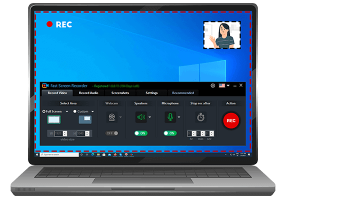
Fast Screen Recorder by FastPcTools is an intuitive and efficient screen recording software designed to cater to a wide range of users, from casual content creators to professional educators and business professionals. This versatile tool stands out for its simplicity, reliability, and robust feature set, making it an ideal choice for anyone looking to capture high-quality screen recordings with minimal hassle.
One of the standout features of Fast Screen Recorder is its user-friendly interface. The clean, straightforward design ensures that even those with limited technical expertise can navigate and utilize the software with ease. The main dashboard provides quick access to all essential functions, allowing users to start recording with just a few clicks.
Fast Screen Recorder offers multiple recording modes to suit various needs. Users can choose to record the entire screen, a specific application window, or a custom-defined area. This flexibility is particularly useful for creating tutorials, presentations, and gameplay videos, as it allows for precise control over what is captured.
The software supports high-definition recording, ensuring that all captured content is crisp and clear. Additionally, Fast Screen Recorder includes options for recording audio from multiple sources, such as system sounds, microphone input, or both simultaneously. This feature is invaluable for creating engaging and informative videos with clear narration and sound effects.
One of the key advantages of Fast Screen Recorder is its performance optimization. The software is designed to minimize system resource usage, ensuring smooth recording even on older or less powerful computers. This efficiency is achieved without compromising on the quality of the output, making it a reliable choice for users with varying hardware capabilities.
Fast Screen Recorder also includes a range of customization options to enhance the recording experience. Users can adjust frame rates, select preferred output formats, and configure hotkeys for quick access to recording functions. These options provide a high level of control, allowing users to tailor the software to their specific needs and preferences.
The software also features a built-in video editor, enabling users to trim, cut, and merge recordings directly within the application. This eliminates the need for additional editing software, streamlining the workflow and saving valuable time.
FastPcTools has also prioritized user support and updates. The software comes with comprehensive documentation and a responsive customer support team, ensuring that users can quickly resolve any issues they may encounter. Regular updates are released to introduce new features and improvements, keeping the software current and competitive.
In summary, Fast Screen Recorder by FastPcTools is a powerful and versatile screen recording solution that combines ease of use with a rich feature set. Its high-definition recording capabilities, performance optimization, and customization options make it an excellent choice for anyone looking to create professional-quality screen recordings. Whether you're a content creator, educator, or business professional, Fast Screen Recorder provides the tools you need to capture and share your screen with confidence and clarity.
One of the standout features of Fast Screen Recorder is its user-friendly interface. The clean, straightforward design ensures that even those with limited technical expertise can navigate and utilize the software with ease. The main dashboard provides quick access to all essential functions, allowing users to start recording with just a few clicks.
Fast Screen Recorder offers multiple recording modes to suit various needs. Users can choose to record the entire screen, a specific application window, or a custom-defined area. This flexibility is particularly useful for creating tutorials, presentations, and gameplay videos, as it allows for precise control over what is captured.
The software supports high-definition recording, ensuring that all captured content is crisp and clear. Additionally, Fast Screen Recorder includes options for recording audio from multiple sources, such as system sounds, microphone input, or both simultaneously. This feature is invaluable for creating engaging and informative videos with clear narration and sound effects.
One of the key advantages of Fast Screen Recorder is its performance optimization. The software is designed to minimize system resource usage, ensuring smooth recording even on older or less powerful computers. This efficiency is achieved without compromising on the quality of the output, making it a reliable choice for users with varying hardware capabilities.
Fast Screen Recorder also includes a range of customization options to enhance the recording experience. Users can adjust frame rates, select preferred output formats, and configure hotkeys for quick access to recording functions. These options provide a high level of control, allowing users to tailor the software to their specific needs and preferences.
The software also features a built-in video editor, enabling users to trim, cut, and merge recordings directly within the application. This eliminates the need for additional editing software, streamlining the workflow and saving valuable time.
FastPcTools has also prioritized user support and updates. The software comes with comprehensive documentation and a responsive customer support team, ensuring that users can quickly resolve any issues they may encounter. Regular updates are released to introduce new features and improvements, keeping the software current and competitive.
In summary, Fast Screen Recorder by FastPcTools is a powerful and versatile screen recording solution that combines ease of use with a rich feature set. Its high-definition recording capabilities, performance optimization, and customization options make it an excellent choice for anyone looking to create professional-quality screen recordings. Whether you're a content creator, educator, or business professional, Fast Screen Recorder provides the tools you need to capture and share your screen with confidence and clarity.
OS: Windows 11, Windows 10 32/64 bit, Windows 8 32/64 bit, Windows 7 32/64 bit
Add Your Review or 64-bit Compatibility Report
Top Screen Capture 64-bit downloads


VueScan 9.8.53

VueScan: Powerful scanning software for enhanced image quality and versatility.
Demo | $29.96

Screenpresso 2.2.8
Screenpresso: Capture, edit, and share screenshots and videos effortlessly.
Shareware | $29.99

iTop Screenshot 1.2.3.544
iTop Screenshot is a free, lightweight, yet powerful screenshot tool.
Freeware
tags: Screenshot, screen capture


SD Snap Studio 1.0
First-class screen capture application with an advanced image editor
Shareware | $20.95

HyperSnap 9.7.3
Capture and edit screenshots effortlessly with powerful tools and features.
Demo | $49.95
Members area
Top 64-bit Downloads
-
Fluid Mask for Mac 3.3.14
x64 trialware download -
ICO file format x64 2.1f1
x64 open source download -
Archicad 64bit 27 B3001
x64 demo download -
WellCAD x64 5.3 B625
x64 demo download -
Portable MicroDicom x64 2024.2
x64 freeware download -
Adobe Photoshop Elements 2024.3
x64 trialware download -
TopSpice 10.26a
x64 demo download -
Potrace for Windows (x64
bit) 1.16
x64 open source download -
delaboratory x64 0.8
x64 open source download -
Photo Ninja 64-bit 1.4.0c
x64 trialware download
Top Downloads
-
CorelDRAW X5 2026 v27.0.0.121
trialware download -
Tracfoil 4.12.07
trialware download -
oCam 428.0
freeware download -
Gyazo 5.9.1
demo download -
nanoCAD 5.1.2524.2017
freeware download -
MarvinSketch 23.16.0
freeware download -
MapInfo Professional 17.0.4
trialware download -
iWisdom 0.0.0+2107~ga0785ce1
open source download -
CodeLoader 4.19.0
freeware download -
SeiSee 2.22.6
freeware download -
XnConvert 1.106.0
shareware download -
Scanahand 8.0.0.320
demo download -
VueScan 9.8.53
demo download -
Topaz Simplify 4.1.1
trialware download -
World Tools 2.0.6
shareware download