
Firefox Showcase - X 64-bit Download
Popular x64 Tags
- mozilla x64 download
- internet explorer toolbar x64 download
- browser x64 download
- netscape x64 download
- toolbar x64 download
- ie toolbar x64 download
- firefox x64 download
- free toolbar x64 download
- favorites organizer x64 download
- internet explorer x64 download
- favorites x64 download
- internet x64 download
- bookmarks x64 download
- add ons x64 download
- browser toolbar x64 download
- bookmark manager x64 download
- theme x64 download
- explorer x64 download
- addons x64 download
- cache x64 download
- skin x64 download
- web x64 download
- backup x64 download
- golf x64 download
- anarchy bar anarchy x64 download
- golf pro x64 download
- mhfs rss rss feed reader x64 download
- golf leader x64 download
- womens golf x64 download
- ladies golf x64 download
Firefox Showcase 0.9.5.11
Sponsored links:

Josep del Rio

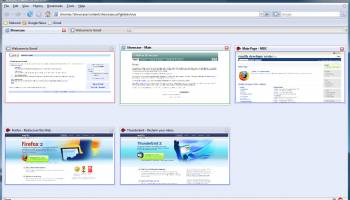
Firefox Showcase is a Mozilla Firefox extension that will show all opened browser tabs as thumbnails. This view can be opened in a new window, tab or sidebar, and provides several functionalities to interact with them, like a find bar, zoom mode, keyboard navigation, multiple thumbnail selection or "drag & drop".
Showcase provides a new way to manage your Firefox tabs and windows by showing them as thumbnails in a single window, tab or sidebar. Includes a find bar that will filter the thumbnails, and the capability to select the thumbnails in the same way you would select files in your system.
To learn how to use Showcase, take a look at the manual.
For a list of the currently implemented features, and what will be added in the next versions, check the features page. A detailed list of all the changes can be found at the Changelog.
In the gallery section, you can find several screenshots of Firefox Showcase in action.
From the download section any version of Showcase may be downloaded. Also you may find a version of this extension for Mozilla SeaMonkey and Portable Firefox, and the latest version of the MultiSidebar extension
Features:
· Showcase will show thumbnails of all open tabs of any window (or, optionally, only of the invoking window).
· Thumbnails are resized and distributed on the Showcase window in the best way possible.
· Showcase can be placed in it's own window, a tab inside a browser, or as a sidebar.
· Find bar (can be toggled with CTRL+F), to filter thumbnails and find the ones you're looking for.
· Multiple selection of thumbnails, so different actions can be applied on them (like bookmark, reload, merge...).
· Browsers that are opened or closed will be dinamically added and removed from the thumbnail list, and thumbnails will be updated if the browser they represent loads a new page.
· Labels are placed on each thumbnail indicating each browser current page title and icon. Loading icon will be shown when content is being loaded.
· Contextual menu for thumbnails that contains the most common operations for the browsers (like bookmarking, printing, navigation controls...). Completely configurable.
· Added an option to disable contextual menu for thumbnails, so it's possible to assign an action for it.
· Lots of configuration options, allowing a lot of different possibilities.
· Middle click can be used to zoom on a thumbnail (although other functions can be assigned to it using the extension configuration panel).
· Thumbnail will increase size when the mouse is over. Values over 100% are well supported since 0.5.8 version.
· Keyboard support. Cursors to navigate through the different thumbnails, space for zoom, enter to select and delete to close. F11 will toggle full screen mode, and Esc will close Showcase.
· IE Tab support. Right now it's not possible to show a thumbnail of a IE Tab, but it will place an illustrative icon and will also show the correct URL.
· Since 0.7.0, the window can use an scrollbar that will prevent thumbnails from being too small. It's on by default for the sidebar mode, and can be enabled in the other modes, too.
Showcase provides a new way to manage your Firefox tabs and windows by showing them as thumbnails in a single window, tab or sidebar. Includes a find bar that will filter the thumbnails, and the capability to select the thumbnails in the same way you would select files in your system.
To learn how to use Showcase, take a look at the manual.
For a list of the currently implemented features, and what will be added in the next versions, check the features page. A detailed list of all the changes can be found at the Changelog.
In the gallery section, you can find several screenshots of Firefox Showcase in action.
From the download section any version of Showcase may be downloaded. Also you may find a version of this extension for Mozilla SeaMonkey and Portable Firefox, and the latest version of the MultiSidebar extension
Features:
· Showcase will show thumbnails of all open tabs of any window (or, optionally, only of the invoking window).
· Thumbnails are resized and distributed on the Showcase window in the best way possible.
· Showcase can be placed in it's own window, a tab inside a browser, or as a sidebar.
· Find bar (can be toggled with CTRL+F), to filter thumbnails and find the ones you're looking for.
· Multiple selection of thumbnails, so different actions can be applied on them (like bookmark, reload, merge...).
· Browsers that are opened or closed will be dinamically added and removed from the thumbnail list, and thumbnails will be updated if the browser they represent loads a new page.
· Labels are placed on each thumbnail indicating each browser current page title and icon. Loading icon will be shown when content is being loaded.
· Contextual menu for thumbnails that contains the most common operations for the browsers (like bookmarking, printing, navigation controls...). Completely configurable.
· Added an option to disable contextual menu for thumbnails, so it's possible to assign an action for it.
· Lots of configuration options, allowing a lot of different possibilities.
· Middle click can be used to zoom on a thumbnail (although other functions can be assigned to it using the extension configuration panel).
· Thumbnail will increase size when the mouse is over. Values over 100% are well supported since 0.5.8 version.
· Keyboard support. Cursors to navigate through the different thumbnails, space for zoom, enter to select and delete to close. F11 will toggle full screen mode, and Esc will close Showcase.
· IE Tab support. Right now it's not possible to show a thumbnail of a IE Tab, but it will place an illustrative icon and will also show the correct URL.
· Since 0.7.0, the window can use an scrollbar that will prevent thumbnails from being too small. It's on by default for the sidebar mode, and can be enabled in the other modes, too.
OS: Windows 2000, Windows 2003, Windows XP, Windows Vista, Windows Vista x64, Windows 7, Windows 7 x64
Requirements: Firefox 1.5 - 4.0b9pre
Add Your Review or 64-bit Compatibility Report
Top Browser Tools 64-bit downloads


Web Archives for Opera 7.3.0
Effortlessly save and manage web pages with this intuitive Opera extension.
Open Source


Chrono Download Manager 0.13.10
Effortlessly manage and accelerate your downloads with Chrono Download Manager.
Freeware


TagSpaces Web Clipper for Chrome 4.1.3

Organize your files effortlessly with TagSpaces' intuitive tagging system.
Freeware


Mailtrack for Chrome 12.68.5
Mailtrack for Chrome: Email tracking with read receipts for Gmail users.
Shareware | $9.99

MetaMask for Chrome 13.23.0
Seamlessly manage your Ethereum assets and interact with decentralized apps.
Open Source

Kami 2.0.22844
Transform PDFs and documents into interactive, collaborative experiences.
Trialware | $149.00
Members area
Top 64-bit Downloads
-
Adobe Flash Player 10
for 64-bit Windows Preview 2
x64 freeware download -
FileZilla Server 1.8.1
x64 open source download -
Internet Explorer 8 for
Windows Vista 64-bit and
Windows Server 2008
64-bit
x64 freeware download -
Firefox 64bit x64 127.0.2
x64 open source download -
SSuite NetSurfer Extreme
x64 2.10.16.1
x64 freeware download -
Google Chrome x64 bit 126.0.6478.127
x64 freeware download -
SSuite NetSurfer Browser
x64 2.30.16.10
x64 freeware download -
WatchFTP x64 4.2.1.0
x64 trialware download -
Heroix Longitude for
VMware x64 10.0.1
x64 trialware download -
Xlight FTP Server
Professional x64 3.9.4.2
x64 trialware download
Top Downloads
-
Adobe Flash Player 10
for 64-bit Windows Preview 2
freeware download -
MiraxTV 2024.5
freeware download -
Profile Migrator 1.1
trialware download -
Web Archives for Opera 7.3.0
open source download -
TheWorld Browser 7.0.0.108
freeware download -
MusicFab 1.0.6.6
demo download -
Xftp Free 7.0 B0155
freeware download -
Virtual World 4.7.4
commercial download -
Open With Photoshop 63.0
open source download -
NetShareWatcher 1.5.8
shareware download -
Dooble 2024.12.31
open source download -
MP4 Downloader 6.3.0
trialware download -
Vuze 5.7.7.0
freeware download -
LocalSend 1.17.0
open source download -
FileZilla Server 1.8.1
open source download