
GEOPoint - X 64-bit Download
Popular x64 Tags
- autocad x64 download
- solidworks x64 download
- intellicad x64 download
- dxf x64 download
- dwg x64 download
- architectural x64 download
- visualization x64 download
- cad x64 download
- home x64 download
- design x64 download
- hpgl x64 download
- progecad x64 download
- animation x64 download
- fence x64 download
- cam x64 download
- dwg to pdf x64 download
- architect x64 download
- viz x64 download
- vrml x64 download
- convert x64 download
- gear x64 download
- landscape x64 download
- deck x64 download
- strength check x64 download
- batch x64 download
- garden x64 download
- yard x64 download
- gardening x64 download
- landscaping x64 download
- backyard x64 download
GEOPoint 5.1
Sponsored links:
license: Demo ($50.00)
downloads: 471
size: 20.40 MB
updated: 2024-06-22
tags: antenna pointing calculator, geostationary communication, antenna calculator, satellite, antenna, calculate
Add to Basket

Gunamoi Software


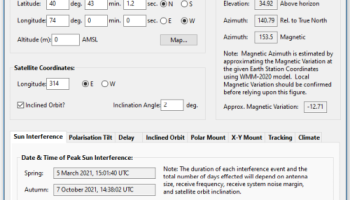
GEOPoint is an easy to use satellite antenna pointing calculator, for geostationary communications satellites. It calculates the azimuth and elevation pointing angles from a given location on the earth towards a specified geostationary satellite. The program also calculates polarisation tilt angles, estimates dates and times of annual sun-outage events, calculates antenna G/T, EIRP and frequency stability, and estimates path-loss and rain-attenuation based on ITU-R climate models. As used by Hausfeld Consulting for satellite communications planning.
Anyone may download and install GEOPoint to access the basic Lite features free of charge.
Lite Features (Free):
an easy to use dialog-style user interface for data entry and calculation;
entry of earth station location coordinates directly, or by clicking on a world map;
select earth station location from a built-in list of world major cities;
display of satellite azimuth and elevation contours on the world map to aid in site selection;
entry of latitude and longitude coordinates in d,m,s format, or as decimal degrees;
entry of coordinates in Australian AMG coordinates and automatic conversion to latitude, longitude;
calculation of pointing angles to a specified satellite for common types of antenna mount;
display of azimuth pointing angles relative to True North, and relative to local magnetic north;
estimation of antenna movement limits for inclined orbit satellites;
calculation of polarisation tilt angle, loop-back path delay, and required antenna tracking speeds;
estimation of the peak dates and times for sun-interference on the receive link.
Output of a summary report in PDF or HTML format.
Pro Features (requires Registration):
ability to zoom the world map one level for more accurate site selection;
ability to save the current map image to file.
ability to save azimuth and elevation contours to a KML file for viewing in Google Earth.
estimation of site altitude from ITU-R world topography model;
select earth station location from a user supplied file containing a list of sites;
view and save a diagram of the GEO Arc visible from the site;
labelling of individual satellites and plotting local horizon and antenna movement limits;
plotting of satellite locations from Norad two-line element or Intelsat ephemeris format orbit data;
display of ITU-R Climate Model data for the specified earth station location;
estimate antenna G/T from user inputs of antenna parameters and frequency;
calculate path loss between the earth station and satellite at a specified frequency using ITU-R propagation models;
estimate the impact of satellite motion on EIRP and frequency stability;
output a batch report of pointing angles from the site, for a list of user selected satellites;
output a detailed report of sun interference dates and times for given receive antenna parameters;
output a detailed report of rain attenuation loss for a range of frequencies and link availability;
output a batch summary report for a list of earth station sites.
Anyone may download and install GEOPoint to access the basic Lite features free of charge.
Lite Features (Free):
an easy to use dialog-style user interface for data entry and calculation;
entry of earth station location coordinates directly, or by clicking on a world map;
select earth station location from a built-in list of world major cities;
display of satellite azimuth and elevation contours on the world map to aid in site selection;
entry of latitude and longitude coordinates in d,m,s format, or as decimal degrees;
entry of coordinates in Australian AMG coordinates and automatic conversion to latitude, longitude;
calculation of pointing angles to a specified satellite for common types of antenna mount;
display of azimuth pointing angles relative to True North, and relative to local magnetic north;
estimation of antenna movement limits for inclined orbit satellites;
calculation of polarisation tilt angle, loop-back path delay, and required antenna tracking speeds;
estimation of the peak dates and times for sun-interference on the receive link.
Output of a summary report in PDF or HTML format.
Pro Features (requires Registration):
ability to zoom the world map one level for more accurate site selection;
ability to save the current map image to file.
ability to save azimuth and elevation contours to a KML file for viewing in Google Earth.
estimation of site altitude from ITU-R world topography model;
select earth station location from a user supplied file containing a list of sites;
view and save a diagram of the GEO Arc visible from the site;
labelling of individual satellites and plotting local horizon and antenna movement limits;
plotting of satellite locations from Norad two-line element or Intelsat ephemeris format orbit data;
display of ITU-R Climate Model data for the specified earth station location;
estimate antenna G/T from user inputs of antenna parameters and frequency;
calculate path loss between the earth station and satellite at a specified frequency using ITU-R propagation models;
estimate the impact of satellite motion on EIRP and frequency stability;
output a batch report of pointing angles from the site, for a list of user selected satellites;
output a detailed report of sun interference dates and times for given receive antenna parameters;
output a detailed report of rain attenuation loss for a range of frequencies and link availability;
output a batch summary report for a list of earth station sites.
OS: Windows 7, Windows 7 x64, Windows 8, Windows 8 x64, Windows 10, Windows 10 x64, Windows 11

Add Your Review or 64-bit Compatibility Report
Top CAD 64-bit downloads


Tracfoil 4.12.07
Edit and print your ribs and airfoils templates from data
Trialware
tags: Cad, model, aircraft, plane, airfoil plotting, rib plotting, airfoil to DXF, airfoil, plot, rib

nanoCAD 5.1.2524.2017
nanoCAD - easy-to-use free CAD software delivering great user experience.
Freeware


MapInfo Professional 17.0.4
Location-based decisions: Explore, model and act with confidence
Trialware | $1 995.00
DICOMscope 3.5.1
A free DICOM viewer which can display uncompressed, monochrome DICOM images
Freeware


CrystalMaker 11.1.0
A full-featured scientific program, supporting the major database file formats
Demo | $499.00

Members area
Top 64-bit Downloads
-
Fluid Mask for Mac 3.3.14
x64 trialware download -
ICO file format x64 2.1f1
x64 open source download -
Archicad 64bit 27 B3001
x64 demo download -
TopSpice 10.26a
x64 demo download -
WellCAD x64 5.3 B625
x64 demo download -
Portable MicroDicom x64 2024.2
x64 freeware download -
Adobe Photoshop Elements 2024.3
x64 trialware download -
Potrace for Windows (x64
bit) 1.16
x64 open source download -
delaboratory x64 0.8
x64 open source download -
AcroPDF 6.2
x64 shareware download
Top Downloads
-
CorelDRAW X5 2026 v27.0.0.121
trialware download -
Tracfoil 4.12.07
trialware download -
oCam 428.0
freeware download -
Gyazo 5.9.1
demo download -
nanoCAD 5.1.2524.2017
freeware download -
MarvinSketch 23.16.0
freeware download -
MapInfo Professional 17.0.4
trialware download -
Scanahand 8.0.0.320
demo download -
iWisdom 0.0.0+2107~ga0785ce1
open source download -
CodeLoader 4.19.0
freeware download -
SeiSee 2.22.6
freeware download -
XnConvert 1.106.0
shareware download -
VueScan 9.8.53
demo download -
Topaz Simplify 4.1.1
trialware download -
World Tools 2.0.6
shareware download