
HardCopy Pro - X 64-bit Download
Popular x64 Tags
- snapshot x64 download
- video screen capture x64 download
- print screen x64 download
- software x64 download
- screen capture tool x64 download
- video capture x64 download
- free screen capture x64 download
- screen capture x64 download
- capture x64 download
- desktop x64 download
- picture x64 download
- print x64 download
- video x64 download
- screen recorder x64 download
- screen capture software x64 download
- wmv x64 download
- screen x64 download
- image x64 download
- screen capture program x64 download
- clipboard x64 download
- screenshot x64 download
- screencapture x64 download
- record x64 download
- screen shot x64 download
- avi x64 download
- screen recording x64 download
- printscreen x64 download
- flash x64 download
- window x64 download
- recorder x64 download
HardCopy Pro 4.18.1
Sponsored links:
license: Trialware ($20.00)
downloads: 538
size: 1.50 MB
updated: 2025-10-25
tags: HardCopy Pro, download HardCopy Pro, HardCopy Pro free download, screen capture, capture window, edit screenshot, screenshot, capture, snapshot, crop
Add to Basket

DeskSoft

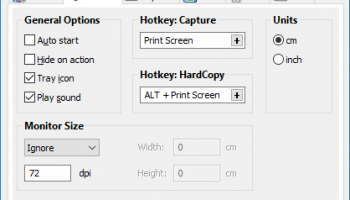
HardCopy Pro by DeskSoft is a versatile and user-friendly screen capture utility designed to meet the needs of both casual users and professionals. This robust software offers a comprehensive suite of features that make capturing, editing, and managing screenshots an effortless task.
At its core, HardCopy Pro excels in its primary function: capturing screenshots. Users can easily capture the entire screen, specific windows, or user-defined areas with just a few clicks. The intuitive interface ensures that even those with minimal technical expertise can navigate and utilize the software effectively. Additionally, the software supports multiple monitor setups, allowing users to capture content across several screens seamlessly.
One of the standout features of HardCopy Pro is its extensive editing capabilities. Once a screenshot is captured, users can annotate, highlight, and modify the image using a variety of built-in tools. This includes adding text, shapes, and arrows, as well as applying effects such as grayscale, inversion, and color adjustments. These features are particularly useful for creating instructional materials, presentations, or detailed reports.
HardCopy Pro also offers flexible output options, making it easy to save, print, or share screenshots. Users can save images in a variety of formats, including BMP, GIF, JPG, PNG, and TIF. The software also supports direct printing and can automatically scale images to fit the selected paper size. For those who need to share their screenshots quickly, HardCopy Pro integrates with email clients, allowing users to send images directly from the application.
Another notable feature is the software's ability to automate repetitive tasks. Users can create profiles with predefined settings for capturing, editing, and saving screenshots. This is particularly beneficial for professionals who need to capture and process multiple images consistently. Additionally, HardCopy Pro supports command-line parameters, enabling advanced users to script and automate their workflows further.
Performance-wise, HardCopy Pro is lightweight and efficient, ensuring that it does not hinder system performance. The software is compatible with various versions of Windows, making it accessible to a wide range of users. Regular updates from DeskSoft ensure that the software remains reliable and up-to-date with the latest operating system enhancements and security standards.
In summary, HardCopy Pro by DeskSoft is a powerful and flexible screen capture tool that caters to a diverse audience. Its combination of ease-of-use, extensive editing features, and robust output options make it an indispensable tool for anyone who needs to capture and manipulate screenshots regularly. Whether you are a casual user looking to capture a moment on your screen or a professional needing detailed and annotated screenshots, HardCopy Pro is a reliable choice that delivers on its promises.
At its core, HardCopy Pro excels in its primary function: capturing screenshots. Users can easily capture the entire screen, specific windows, or user-defined areas with just a few clicks. The intuitive interface ensures that even those with minimal technical expertise can navigate and utilize the software effectively. Additionally, the software supports multiple monitor setups, allowing users to capture content across several screens seamlessly.
One of the standout features of HardCopy Pro is its extensive editing capabilities. Once a screenshot is captured, users can annotate, highlight, and modify the image using a variety of built-in tools. This includes adding text, shapes, and arrows, as well as applying effects such as grayscale, inversion, and color adjustments. These features are particularly useful for creating instructional materials, presentations, or detailed reports.
HardCopy Pro also offers flexible output options, making it easy to save, print, or share screenshots. Users can save images in a variety of formats, including BMP, GIF, JPG, PNG, and TIF. The software also supports direct printing and can automatically scale images to fit the selected paper size. For those who need to share their screenshots quickly, HardCopy Pro integrates with email clients, allowing users to send images directly from the application.
Another notable feature is the software's ability to automate repetitive tasks. Users can create profiles with predefined settings for capturing, editing, and saving screenshots. This is particularly beneficial for professionals who need to capture and process multiple images consistently. Additionally, HardCopy Pro supports command-line parameters, enabling advanced users to script and automate their workflows further.
Performance-wise, HardCopy Pro is lightweight and efficient, ensuring that it does not hinder system performance. The software is compatible with various versions of Windows, making it accessible to a wide range of users. Regular updates from DeskSoft ensure that the software remains reliable and up-to-date with the latest operating system enhancements and security standards.
In summary, HardCopy Pro by DeskSoft is a powerful and flexible screen capture tool that caters to a diverse audience. Its combination of ease-of-use, extensive editing features, and robust output options make it an indispensable tool for anyone who needs to capture and manipulate screenshots regularly. Whether you are a casual user looking to capture a moment on your screen or a professional needing detailed and annotated screenshots, HardCopy Pro is a reliable choice that delivers on its promises.
OS: Windows Server 2025, Windows 11, Windows Server 2022, Windows Server 2019, Windows Server 2016, Windows 10 32/64 bit, Windows Server 2012 R2, Windows Server 2012, Windows 2008 64 bit, Windows 8 32/64 bit, Windows 7 32/64 bit, Windows Vista
Add Your Review or 64-bit Compatibility Report
Top Screen Capture 64-bit downloads


VueScan 9.8.53

VueScan: Powerful scanning software for enhanced image quality and versatility.
Demo | $29.96

Screenpresso 2.2.9
Screenpresso: Capture, edit, and share screenshots and videos effortlessly.
Shareware | $29.99


iTop Screenshot 1.2.3.544
iTop Screenshot is a free, lightweight, yet powerful screenshot tool.
Freeware
tags: Screenshot, screen capture


SD Snap Studio 1.0
First-class screen capture application with an advanced image editor
Shareware | $20.95

HyperSnap 9.7.3
Capture and edit screenshots effortlessly with powerful tools and features.
Demo | $49.95
Members area
Top 64-bit Downloads
-
Fluid Mask for Mac 3.3.14
x64 trialware download -
ICO file format x64 2.1f1
x64 open source download -
Archicad 64bit 27 B3001
x64 demo download -
TopSpice 10.26a
x64 demo download -
WellCAD x64 5.3 B625
x64 demo download -
Portable MicroDicom x64 2024.2
x64 freeware download -
Adobe Photoshop Elements 2024.3
x64 trialware download -
Potrace for Windows (x64
bit) 1.16
x64 open source download -
delaboratory x64 0.8
x64 open source download -
AcroPDF 6.2
x64 shareware download
Top Downloads
-
CorelDRAW X5 2026 v27.0.0.121
trialware download -
Tracfoil 4.12.07
trialware download -
oCam 428.0
freeware download -
Gyazo 5.9.1
demo download -
VueScan 9.8.53
demo download -
nanoCAD 5.1.2524.2017
freeware download -
MarvinSketch 23.16.0
freeware download -
MapInfo Professional 17.0.4
trialware download -
Scanahand 8.0.0.320
demo download -
iWisdom 0.0.0+2107~ga0785ce1
open source download -
CodeLoader 4.19.0
freeware download -
SeiSee 2.22.6
freeware download -
XnConvert 1.106.0
shareware download -
Topaz Simplify 4.1.1
trialware download -
World Tools 2.0.6
shareware download