
Helicon Filter - X 64-bit Download
Popular x64 Tags
- photo editor x64 download
- software x64 download
- image editor x64 download
- image editing x64 download
- photos x64 download
- photoshop x64 download
- color x64 download
- design x64 download
- jpeg x64 download
- editor x64 download
- plugin x64 download
- image enhancement x64 download
- watermark x64 download
- exif x64 download
- rotate x64 download
- batch x64 download
- pictures x64 download
- graphics x64 download
- image x64 download
- digital camera x64 download
- photo x64 download
- graphic x64 download
- images x64 download
- resize x64 download
- paint x64 download
- camera x64 download
- digital x64 download
- digital imaging x64 download
- picture x64 download
- jpg x64 download
Helicon Filter 5.8.0
Sponsored links:

Helicon Soft Ltd.

Helicon Filter is a complete photo editing solution for the digital photographer.
Its easy and intuitive interface, live preview feature, and contextual help ensure an easy start in photo editing for beginners.
The program is built as step by step workflow guiding you through all post processing stages of photo editing.
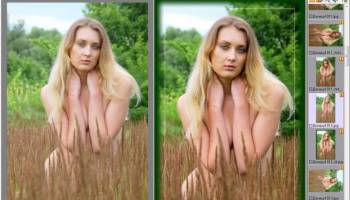
The most typical workflow is shown: crop and fix horizon, enhance brightness, set white balance, apply a bit of sharpening and add a nice frame.
File management:
Support for all popular file types including all RAW
Fast folder browser
Lossless rotate, copy, delete, move operations
Template-based rename
Full EXIF and IPTC information
Support of color profiles
Noise reduction:
Noise level auto detection
Selective noise reduction in highlights and shadows, in defined hue, in color
range.
Brightness:
Gradient haze compensation
Brightness equalizer/curve
Brightness in Highlights, Shadows
Contrast, Gamma, Exposure
Local contrast
Levels (black point, white point)
Colors:
One-click White Balance tool
Color map and RGB sliders for manual WB
Memory colors list (several skin types, green, sky, etc.)
Saturation for bright and dull colors
Equalizer for selective saturation
Spectral sensitivity controls
Black&White conversion
Exposure warnings
Aberration:
Reduction of chromatic aberration on high contrast areas (e.g. sun behind the
tree)
Sharpening:
Fine details extraction
Edge sharpening
Threshold to keep noise from sharpening
White halo control
Equalizer to sharpen only selected color ranges.
Distortions:
Vignetting correction
Barrel/pincushion correction
Perspective correction
Rotation, squeezing, stretching
Skewing, bending
Crop/Resize:
Presets for popular paper sizes, monitor resolutions
Proportional selection (e.g. 2:3, 3:4, user defined)
Batch crop/resize
Frames:
Blurred or black&white image as a frame texture
Overlay frames
Color picker to choose frame color
Text:
Placeholders for EXIF data (date, ISO, aperture, etc).
Several text styles including embossed, shadowed, semi-transparent, inverted
text
Retouching:
'Delete scratches' brush to remove scratches, wires, pimples on the face,
etc.
'Clone' brush
'Change brightness' brush to make some areas darker or brighter
'Change color' brush to paint with color or to change the hue keeping the brightness the same
'Change saturation' brush
'Blur/sharpen' brush
'Reduce noise' brush
'Fix red eye' brush
'Distort' brush to fix protruding ears and similar problems
'Erase changes' brush to delete effect of the brushes and/or filters
All brushes can be edge-sensitive
Undo/redo is available
Save:
Image can be saved to disk, emailed, printed
Save dialog shows file size for give JPEG quality
JPEG, JPEG2000, TIFF (24 bit, 48 bit, lzw compression), PNG, PSD, BMP formats
are supported
Advanced features:
Multiprocessor support
Batch processing
User settings support
16 bit precision image processing
Its easy and intuitive interface, live preview feature, and contextual help ensure an easy start in photo editing for beginners.
The program is built as step by step workflow guiding you through all post processing stages of photo editing.
The most typical workflow is shown: crop and fix horizon, enhance brightness, set white balance, apply a bit of sharpening and add a nice frame.
File management:
Support for all popular file types including all RAW
Fast folder browser
Lossless rotate, copy, delete, move operations
Template-based rename
Full EXIF and IPTC information
Support of color profiles
Noise reduction:
Noise level auto detection
Selective noise reduction in highlights and shadows, in defined hue, in color
range.
Brightness:
Gradient haze compensation
Brightness equalizer/curve
Brightness in Highlights, Shadows
Contrast, Gamma, Exposure
Local contrast
Levels (black point, white point)
Colors:
One-click White Balance tool
Color map and RGB sliders for manual WB
Memory colors list (several skin types, green, sky, etc.)
Saturation for bright and dull colors
Equalizer for selective saturation
Spectral sensitivity controls
Black&White conversion
Exposure warnings
Aberration:
Reduction of chromatic aberration on high contrast areas (e.g. sun behind the
tree)
Sharpening:
Fine details extraction
Edge sharpening
Threshold to keep noise from sharpening
White halo control
Equalizer to sharpen only selected color ranges.
Distortions:
Vignetting correction
Barrel/pincushion correction
Perspective correction
Rotation, squeezing, stretching
Skewing, bending
Crop/Resize:
Presets for popular paper sizes, monitor resolutions
Proportional selection (e.g. 2:3, 3:4, user defined)
Batch crop/resize
Frames:
Blurred or black&white image as a frame texture
Overlay frames
Color picker to choose frame color
Text:
Placeholders for EXIF data (date, ISO, aperture, etc).
Several text styles including embossed, shadowed, semi-transparent, inverted
text
Retouching:
'Delete scratches' brush to remove scratches, wires, pimples on the face,
etc.
'Clone' brush
'Change brightness' brush to make some areas darker or brighter
'Change color' brush to paint with color or to change the hue keeping the brightness the same
'Change saturation' brush
'Blur/sharpen' brush
'Reduce noise' brush
'Fix red eye' brush
'Distort' brush to fix protruding ears and similar problems
'Erase changes' brush to delete effect of the brushes and/or filters
All brushes can be edge-sensitive
Undo/redo is available
Save:
Image can be saved to disk, emailed, printed
Save dialog shows file size for give JPEG quality
JPEG, JPEG2000, TIFF (24 bit, 48 bit, lzw compression), PNG, PSD, BMP formats
are supported
Advanced features:
Multiprocessor support
Batch processing
User settings support
16 bit precision image processing
OS: Windows Vista, Windows Vista x64, Windows 7, Windows 7 x64, Windows 8, Windows 8 x64, Windows 10, Windows 10 x64
Add Your Review or 64-bit Compatibility Report
Top Editors 64-bit downloads


CorelDRAW X5 2026 v27.0.0.121
Versatile graphic design suite for vector illustration and layout creation.
Trialware | $269.00

FreeFotoWorks 2026 26.1.3

Photo editing software for beginners and pro. All well-known photo effects.
Freeware


jMonkeyEngine 3.9.0
jMonkeyEngine: Open-source 3D game development engine for Java developers.
Open Source

Adobe Photoshop Elements 2024.3
Powerful yet easy-to-use photo editing software for print, e-mail, and the Web
Trialware | $99.99
Members area
Top 64-bit Downloads
-
Fluid Mask for Mac 3.3.14
x64 trialware download -
ICO file format x64 2.1f1
x64 open source download -
Archicad 64bit 27 B3001
x64 demo download -
WellCAD x64 5.3 B625
x64 demo download -
Portable MicroDicom x64 2024.2
x64 freeware download -
Adobe Photoshop Elements 2024.3
x64 trialware download -
TopSpice 10.26a
x64 demo download -
Potrace for Windows (x64
bit) 1.16
x64 open source download -
Photo Ninja 64-bit 1.4.0c
x64 trialware download -
RawDigger x64 1.2.27.607
x64 trialware download
Top Downloads
-
CorelDRAW X5 2026 v27.0.0.121
trialware download -
Tracfoil 4.12.07
trialware download -
oCam 428.0
freeware download -
Gyazo 5.9.1
demo download -
MapInfo Professional 17.0.4
trialware download -
iWisdom 0.0.0+2107~ga0785ce1
open source download -
CodeLoader 4.19.0
freeware download -
nanoCAD 5.1.2524.2017
freeware download -
SeiSee 2.22.6
freeware download -
MarvinSketch 23.16.0
freeware download -
VueScan 9.8.52
demo download -
Topaz Simplify 4.1.1
trialware download -
World Tools 2.0.6
shareware download -
Texmod 0.9b
freeware download -
DICOMscope 3.5.1
freeware download