
Hotfolder Prints - X 64-bit Download
Popular x64 Tags
- image x64 download
- design x64 download
- size x64 download
- color x64 download
- graphics x64 download
- gif x64 download
- panorama x64 download
- photoshop x64 download
- software x64 download
- jpeg x64 download
- utility x64 download
- photo x64 download
- plugin x64 download
- cover x64 download
- tool x64 download
- rgb x64 download
- png x64 download
- jpg x64 download
- pictures x64 download
- images x64 download
- vanderlee x64 download
- bmp x64 download
- photos x64 download
- vdl x64 download
- picture x64 download
- scanner x64 download
- screen x64 download
- video x64 download
- scan x64 download
- dust x64 download
Hotfolder Prints 1.8.3
Sponsored links:
license: Trialware ($175.00)
downloads: 349
size: 40.20 MB
updated: 2022-09-15
Buy Now
Add to Basket

Breeze Systems Ltd.

Hotfolder Prints is a handy application that allows you to monitor a folder and automatically print the new images. The program can help you increase the productivity by arranging the images on a page and by printing them.
You can view the new images as a slideshow in full screen mode by using the Breeze Viewer that is included in the installation.
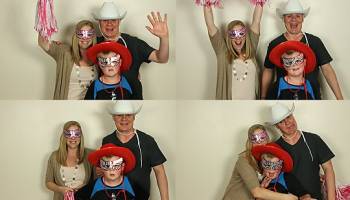
An invaluable tool for event photographers and photobooth operators wanting to automatically lay out images and then print, copy, email them, upload to social networking sites or display the photos as a sliedshow.
Hotfolder Prints monitors a folder for new JPEG images and when the required number of images are available it automatically formats them into a page ready for printing, copying elsewhere or emailing. Hotfolder Prints uses the same layout options as our popular photobooth software and can place up to 10 different photos on a page with any size and orientation together with a background, overlay and captions. This allows almost any layout to be designed from single photos with captions and logos through to complex layouts with multiple photos and transparent overlays.
A number of example uses for Hotfolder Prints are described below:
Event Photography
Setting up a mini studio with a backdrop and lights to take portraits is a popular form of event photography. Typically the photographer takes several photos of people and then either prints them all automatically or has an assistant who reviews them with the customer and selects the best ones for printing. Hotfolder Prints can help with both scenarios:
Automatic printing: The photographer takes the photos which are automatically downloaded to the PC (e.g. by shooting tethered using software our camera control software or using an Eye-Fi memory card to wirelessly transfer photos to the PC). Hotfolder Prints will monitor the download folder and when it has the required number of images it will automatically format and print them. This could be single images which need to be resized to fit a page and sharpened with the photographer's logo or the event name added or several images could be printed on the same page.
Selective printing: The photographer takes several pictures of each guest and these are downloaded automatically to the PC as above. An assistant then reviews the images with the guests (e.g. using our BreezeBrowser Pro software), selects the best ones and copies them to the hot folder. Hotfolder Prints will monitor the hot folder and when it has the required number of ima
You can view the new images as a slideshow in full screen mode by using the Breeze Viewer that is included in the installation.
An invaluable tool for event photographers and photobooth operators wanting to automatically lay out images and then print, copy, email them, upload to social networking sites or display the photos as a sliedshow.
Hotfolder Prints monitors a folder for new JPEG images and when the required number of images are available it automatically formats them into a page ready for printing, copying elsewhere or emailing. Hotfolder Prints uses the same layout options as our popular photobooth software and can place up to 10 different photos on a page with any size and orientation together with a background, overlay and captions. This allows almost any layout to be designed from single photos with captions and logos through to complex layouts with multiple photos and transparent overlays.
A number of example uses for Hotfolder Prints are described below:
Event Photography
Setting up a mini studio with a backdrop and lights to take portraits is a popular form of event photography. Typically the photographer takes several photos of people and then either prints them all automatically or has an assistant who reviews them with the customer and selects the best ones for printing. Hotfolder Prints can help with both scenarios:
Automatic printing: The photographer takes the photos which are automatically downloaded to the PC (e.g. by shooting tethered using software our camera control software or using an Eye-Fi memory card to wirelessly transfer photos to the PC). Hotfolder Prints will monitor the download folder and when it has the required number of images it will automatically format and print them. This could be single images which need to be resized to fit a page and sharpened with the photographer's logo or the event name added or several images could be printed on the same page.
Selective printing: The photographer takes several pictures of each guest and these are downloaded automatically to the PC as above. An assistant then reviews the images with the guests (e.g. using our BreezeBrowser Pro software), selects the best ones and copies them to the hot folder. Hotfolder Prints will monitor the hot folder and when it has the required number of ima
Homepage: Hotfolder Prints
OS: Windows Vista, Windows Vista x64, Windows 7, Windows 7 x64, Windows 8, Windows 8 x64, Windows 10, Windows 10 x64, Windows 11
Add Your Review or 64-bit Compatibility Report
Top Other 64-bit downloads


iWisdom 0.0.0+2107~ga0785ce1
An application which helps you store small bits of wisdom, such as quotations
Open Source


World Tools 2.0.6
An Adobe InDesign to work on right-to-left languages and writing scripts
Shareware | $99.00




Topaz DeJPEG 4.1.0
Gives you the ability to improve the quality of your JPEG images
Trialware | $29.99

Members area
Top 64-bit Downloads
-
Fluid Mask for Mac 3.3.14
x64 trialware download -
ICO file format x64 2.1f1
x64 open source download -
Archicad 64bit 27 B3001
x64 demo download -
WellCAD x64 5.3 B625
x64 demo download -
Portable MicroDicom x64 2024.2
x64 freeware download -
Adobe Photoshop Elements 2024.3
x64 trialware download -
TopSpice 10.26a
x64 demo download -
Potrace for Windows (x64
bit) 1.16
x64 open source download -
delaboratory x64 0.8
x64 open source download -
Photo Ninja 64-bit 1.4.0c
x64 trialware download
Top Downloads
-
CorelDRAW X5 2026 v27.0.0.121
trialware download -
Tracfoil 4.12.07
trialware download -
oCam 428.0
freeware download -
Gyazo 5.9.1
demo download -
nanoCAD 5.1.2524.2017
freeware download -
MarvinSketch 23.16.0
freeware download -
MapInfo Professional 17.0.4
trialware download -
iWisdom 0.0.0+2107~ga0785ce1
open source download -
CodeLoader 4.19.0
freeware download -
SeiSee 2.22.6
freeware download -
Scanahand 8.0.0.320
demo download -
VueScan 9.8.53
demo download -
Topaz Simplify 4.1.1
trialware download -
World Tools 2.0.6
shareware download -
Texmod 0.9b
freeware download