
Hyperwords - X 64-bit Download
Popular x64 Tags
- mozilla x64 download
- internet explorer toolbar x64 download
- browser x64 download
- netscape x64 download
- toolbar x64 download
- ie toolbar x64 download
- firefox x64 download
- free toolbar x64 download
- favorites organizer x64 download
- internet explorer x64 download
- favorites x64 download
- internet x64 download
- bookmarks x64 download
- add ons x64 download
- browser toolbar x64 download
- bookmark manager x64 download
- theme x64 download
- explorer x64 download
- addons x64 download
- cache x64 download
- skin x64 download
- web x64 download
- backup x64 download
- golf x64 download
- anarchy bar anarchy x64 download
- golf pro x64 download
- mhfs rss rss feed reader x64 download
- golf leader x64 download
- womens golf x64 download
- ladies golf x64 download
Hyperwords 5.6.3
Sponsored links:

The Hyperwords Company

Hyperwords is designed to support academic, corporate, consumers and knowledge workers in general.
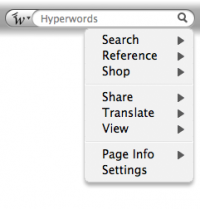
A basic function of Hyperwords is to select text on a web page and make it easy to get other information about the text. You are no longer restricted to following only the links others have made for you.
Selecting text is simple: either double-click on a word, double-click between two words (like in a name) to select both, or stripe/drag-select a larger selection of text.
References
If for some reason you want to find out who the prime minister of Kazakhstan is, just select Kazakhstan and select 'References' from the menu that pops up and then select 'Wikipedia' from the sub-menu.
You should now be seeing the Wikipedia entry open in a new window to the left of your main window.
You can even get the result right inside the menu, just hover over 'Wikipedia' (or any other reference or many searches, such as 'people' or 'pictures').
More
There are other kinds of commands in Hyperwords, it is not just about references or searching. Please have a look at some of the tutorials above to learn more.
To perform a quick Google search, just select text on the page and hit 'enter'.
Conventions used in this Tutorial
Words in italic are words we suggest you try commands on.
A basic function of Hyperwords is to select text on a web page and make it easy to get other information about the text. You are no longer restricted to following only the links others have made for you.
Selecting text is simple: either double-click on a word, double-click between two words (like in a name) to select both, or stripe/drag-select a larger selection of text.
References
If for some reason you want to find out who the prime minister of Kazakhstan is, just select Kazakhstan and select 'References' from the menu that pops up and then select 'Wikipedia' from the sub-menu.
You should now be seeing the Wikipedia entry open in a new window to the left of your main window.
You can even get the result right inside the menu, just hover over 'Wikipedia' (or any other reference or many searches, such as 'people' or 'pictures').
More
There are other kinds of commands in Hyperwords, it is not just about references or searching. Please have a look at some of the tutorials above to learn more.
To perform a quick Google search, just select text on the page and hit 'enter'.
Conventions used in this Tutorial
Words in italic are words we suggest you try commands on.
OS: Windows 2000, Windows 2003, Windows XP, Windows Vista, Windows Vista x64, Windows 7, Windows 7 x64
Requirements: · Firefox: 1.5 – 3.5.*
Add Your Review or 64-bit Compatibility Report
Top Browser Tools 64-bit downloads


Chrono Download Manager 0.13.10
Effortlessly manage and accelerate your downloads with Chrono Download Manager.
Freeware


Web Archives for Opera 7.3.0
Effortlessly save and manage web pages with this intuitive Opera extension.
Open Source


Mailtrack for Chrome 12.68.6

Mailtrack for Chrome: Email tracking with read receipts for Gmail users.
Shareware | $9.99


TagSpaces Web Clipper for Chrome 4.1.3
Organize your files effortlessly with TagSpaces' intuitive tagging system.
Freeware


MetaMask for Chrome 13.24.0
Seamlessly manage your Ethereum assets and interact with decentralized apps.
Open Source

Kami 2.0.22844
Transform PDFs and documents into interactive, collaborative experiences.
Trialware | $149.00
Members area
Top 64-bit Downloads
-
Adobe Flash Player 10
for 64-bit Windows Preview 2
x64 freeware download -
Internet Explorer 8 for
Windows Vista 64-bit and
Windows Server 2008
64-bit
x64 freeware download -
FileZilla Server 1.8.1
x64 open source download -
Firefox 64bit x64 127.0.2
x64 open source download -
SSuite NetSurfer Extreme
x64 2.10.16.1
x64 freeware download -
Google Chrome x64 bit 126.0.6478.127
x64 freeware download -
SSuite NetSurfer Browser
x64 2.30.16.10
x64 freeware download -
AlternaTIFF x64 2.0.8
x64 freeware download -
WatchFTP x64 4.2.1.0
x64 trialware download -
Heroix Longitude for
VMware x64 10.0.1
x64 trialware download
Top Downloads
-
Adobe Flash Player 10
for 64-bit Windows Preview 2
freeware download -
MiraxTV 2024.5
freeware download -
Xftp Free 7.0 B0155
freeware download -
Profile Migrator 1.1
trialware download -
Chrono Download Manager 0.13.10
freeware download -
Web Archives for Opera 7.3.0
open source download -
Internet Explorer 8 for
Windows Vista 64-bit and
Windows Server 2008
64-bit
freeware download -
TheWorld Browser 7.0.0.108
freeware download -
MusicFab 1.0.6.6
demo download -
FileZilla Server 1.8.1
open source download -
Virtual World 4.7.4
commercial download -
Open With Photoshop 63.0
open source download -
NetShareWatcher 1.5.8
shareware download -
Dooble 2024.12.31
open source download -
GetRight 6.5
shareware download