
ImageJ - X 64-bit Download
Popular x64 Tags
- photo editor x64 download
- software x64 download
- image editor x64 download
- image editing x64 download
- photos x64 download
- photoshop x64 download
- color x64 download
- design x64 download
- jpeg x64 download
- editor x64 download
- plugin x64 download
- image enhancement x64 download
- watermark x64 download
- exif x64 download
- rotate x64 download
- batch x64 download
- pictures x64 download
- graphics x64 download
- image x64 download
- digital camera x64 download
- photo x64 download
- graphic x64 download
- images x64 download
- resize x64 download
- paint x64 download
- camera x64 download
- digital x64 download
- digital imaging x64 download
- picture x64 download
- jpg x64 download
ImageJ 1.54i
Sponsored links:

Wayne Rasband

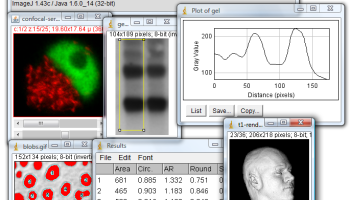
ImageJ is an interesting Java based image processing application inspired by NIH Image for the Macintosh. It runs, either as an online applet or as a downloadable application, on any computer with a Java 1.1 or later virtual machine. It can display, edit, analyze, process, save and print 8-bit, 16-bit and 32-bit images. It can read many image formats including TIFF, GIF, JPEG, BMP, DICOM, FITS and "raw". It supports "stacks", a series of images that share a single window. It is multithreaded, so time-consuming operations such as image file reading can be performed in parallel with other operations.
It can calculate area and pixel value statistics of user-defined selections. It can measure distances and angles. It can create density histograms and line profile plots. It supports standard image processing functions such as contrast manipulation, sharpening, smoothing, edge detection and median filtering.
It does geometric transformations such as scaling, rotation and flips. Image can be zoomed up to 32:1 and down to 1:32. All analysis and processing functions are available at any magnification factor. The program supports any number of windows (images) simultaneously, limited only by available memory.
Spatial calibration is available to provide real world dimensional measurements in units such as millimeters. Density or gray scale calibration is also available.
ImageJ was designed with an open architecture that provides extensibility via Java plugins. Custom acquisition, analysis and processing plugins can be developed using ImageJ's built in editor and Java compiler. User-written plugins make it possible to solve almost any image processing or analysis problem.
FEATURES:
Runs Everywhere:
· ImageJ runs on Linux, Mac OS 9, Mac OS X, Windows, and the Sharp Zaurus PDA.
Open Source:
· ImageJ and its Java source code are freely available and in the public domain. No license is required.
User Community:
· ImageJ has a large and knowledgeable worldwide user community. More than 1700 users and developers subscribe to the ImageJ mailing list.
Macros:
· Automate tasks and create custom tools using macros. Automatically generate macro code using the command recorder. More than 300 macros are available on the ImageJ Web site.
Plugins:
· Extend ImageJ by developing plugins using ImageJ's built in text editor and Java compiler. More than 500 plugins are available.
Toolkit:
· Use ImageJ as a image processing toolkit (class library) to develop applets, servlets or applications.
Speed:
· ImageJ is the world's fastest pure Java image processing program. It can filter a 2048x2048 image in 0.1 seconds (*). That's 40 million pixels per second!
Data Types:
· 8-bit grayscale or indexed color, 16-bit unsigned integer, 32-bit floating-point and RGB color.
File Formats:
· Open and save all supported data types as TIFF (uncompressed) or as raw data. Open and save GIF, JPEG, BMP, PNG, PGM, FITS and ASCII. Open DICOM. Open TIFFs, GIFs, JPEGs, DICOMs and raw data using a URL. Open and save many other formats using plugins.
Image display:
· Tools are provided for zooming (1:32 to 32:1) and scrolling images. All analysis and processing functions work at any magnification factor.
Selections:
· Create rectangular, elliptical or irregular area selections. Create line and point selections. Edit selectoins and automatically create them using the wand tool. Draw, fill, clear, filter or measure selections. Save selections and transer them to other images.
Image Enhancement:
· Supports smoothing, sharpening, edge detection, median filtering and thresholding on both 8-bit grayscale and RGB color images. Interactively adjust brightness and contrast of 8, 16 and 32-bit images.
Geometric Operations:
· Crop, scale, resize and rotate. Flip vertically or horizontally.
Analysis:
· Measure area, mean, standard deviation, min and max of selection or entire image. Measure lengths and angles. Use real world measurement units such as millimeters.
It can calculate area and pixel value statistics of user-defined selections. It can measure distances and angles. It can create density histograms and line profile plots. It supports standard image processing functions such as contrast manipulation, sharpening, smoothing, edge detection and median filtering.
It does geometric transformations such as scaling, rotation and flips. Image can be zoomed up to 32:1 and down to 1:32. All analysis and processing functions are available at any magnification factor. The program supports any number of windows (images) simultaneously, limited only by available memory.
Spatial calibration is available to provide real world dimensional measurements in units such as millimeters. Density or gray scale calibration is also available.
ImageJ was designed with an open architecture that provides extensibility via Java plugins. Custom acquisition, analysis and processing plugins can be developed using ImageJ's built in editor and Java compiler. User-written plugins make it possible to solve almost any image processing or analysis problem.
FEATURES:
Runs Everywhere:
· ImageJ runs on Linux, Mac OS 9, Mac OS X, Windows, and the Sharp Zaurus PDA.
Open Source:
· ImageJ and its Java source code are freely available and in the public domain. No license is required.
User Community:
· ImageJ has a large and knowledgeable worldwide user community. More than 1700 users and developers subscribe to the ImageJ mailing list.
Macros:
· Automate tasks and create custom tools using macros. Automatically generate macro code using the command recorder. More than 300 macros are available on the ImageJ Web site.
Plugins:
· Extend ImageJ by developing plugins using ImageJ's built in text editor and Java compiler. More than 500 plugins are available.
Toolkit:
· Use ImageJ as a image processing toolkit (class library) to develop applets, servlets or applications.
Speed:
· ImageJ is the world's fastest pure Java image processing program. It can filter a 2048x2048 image in 0.1 seconds (*). That's 40 million pixels per second!
Data Types:
· 8-bit grayscale or indexed color, 16-bit unsigned integer, 32-bit floating-point and RGB color.
File Formats:
· Open and save all supported data types as TIFF (uncompressed) or as raw data. Open and save GIF, JPEG, BMP, PNG, PGM, FITS and ASCII. Open DICOM. Open TIFFs, GIFs, JPEGs, DICOMs and raw data using a URL. Open and save many other formats using plugins.
Image display:
· Tools are provided for zooming (1:32 to 32:1) and scrolling images. All analysis and processing functions work at any magnification factor.
Selections:
· Create rectangular, elliptical or irregular area selections. Create line and point selections. Edit selectoins and automatically create them using the wand tool. Draw, fill, clear, filter or measure selections. Save selections and transer them to other images.
Image Enhancement:
· Supports smoothing, sharpening, edge detection, median filtering and thresholding on both 8-bit grayscale and RGB color images. Interactively adjust brightness and contrast of 8, 16 and 32-bit images.
Geometric Operations:
· Crop, scale, resize and rotate. Flip vertically or horizontally.
Analysis:
· Measure area, mean, standard deviation, min and max of selection or entire image. Measure lengths and angles. Use real world measurement units such as millimeters.
OS: Windows XP, Windows Vista, Windows Vista x64, Windows 7, Windows 7 x64, Windows 8, Windows 8 x64, Windows 10, Windows 10 x64, Windows 11
Add Your Review or 64-bit Compatibility Report
Top Editors 64-bit downloads


CorelDRAW X5 2026 v27.0.0.121
Versatile graphic design suite for vector illustration and layout creation.
Trialware | $269.00

FreeFotoWorks 2026 26.1.3
Photo editing software for beginners and pro. All well-known photo effects.
Freeware


jMonkeyEngine 3.9.0
jMonkeyEngine: Open-source 3D game development engine for Java developers.
Open Source

Adobe Photoshop Elements 2024.3
Powerful yet easy-to-use photo editing software for print, e-mail, and the Web
Trialware | $99.99
Members area
Top 64-bit Downloads
-
Fluid Mask for Mac 3.3.14
x64 trialware download -
ICO file format x64 2.1f1
x64 open source download -
Archicad 64bit 27 B3001
x64 demo download -
WellCAD x64 5.3 B625
x64 demo download -
Portable MicroDicom x64 2024.2
x64 freeware download -
Adobe Photoshop Elements 2024.3
x64 trialware download -
TopSpice 10.26a
x64 demo download -
Potrace for Windows (x64
bit) 1.16
x64 open source download -
delaboratory x64 0.8
x64 open source download -
Photo Ninja 64-bit 1.4.0c
x64 trialware download
Top Downloads
-
CorelDRAW X5 2026 v27.0.0.121
trialware download -
Tracfoil 4.12.07
trialware download -
oCam 428.0
freeware download -
Gyazo 5.9.1
demo download -
MapInfo Professional 17.0.4
trialware download -
iWisdom 0.0.0+2107~ga0785ce1
open source download -
CodeLoader 4.19.0
freeware download -
nanoCAD 5.1.2524.2017
freeware download -
SeiSee 2.22.6
freeware download -
MarvinSketch 23.16.0
freeware download -
Scanahand 8.0.0.320
demo download -
VueScan 9.8.52
demo download -
Topaz Simplify 4.1.1
trialware download -
World Tools 2.0.6
shareware download -
Texmod 0.9b
freeware download