
ImTranslator for Opera - X 64-bit Download
Popular x64 Tags
- mozilla x64 download
- internet explorer toolbar x64 download
- browser x64 download
- netscape x64 download
- toolbar x64 download
- ie toolbar x64 download
- firefox x64 download
- free toolbar x64 download
- favorites organizer x64 download
- internet explorer x64 download
- favorites x64 download
- internet x64 download
- bookmarks x64 download
- add ons x64 download
- browser toolbar x64 download
- bookmark manager x64 download
- theme x64 download
- explorer x64 download
- addons x64 download
- cache x64 download
- skin x64 download
- web x64 download
- backup x64 download
- golf x64 download
- anarchy bar anarchy x64 download
- golf pro x64 download
- mhfs rss rss feed reader x64 download
- golf leader x64 download
- womens golf x64 download
- ladies golf x64 download
ImTranslator for Opera 18.0
Sponsored links:
license: Freeware
downloads: 39
size: 2.90 MB
updated: 2026-03-24
tags: ImTranslator for Opera, download ImTranslator for Opera, ImTranslator for Opera free download, Online Translation, Website Translation, Translate Text, Translator, Dictionary, Translate, Speech
Add to Basket

Smart Link Corporation

ImTranslator for Opera, developed by Smart Link Corporation, is a versatile and powerful browser extension designed to enhance your web browsing experience by breaking down language barriers. This tool is a must-have for anyone who frequently interacts with multilingual content online, whether for personal use, academic research, or professional purposes.
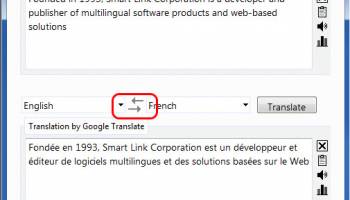
At its core, ImTranslator offers robust translation capabilities, supporting over 100 languages. The extension seamlessly integrates with the Opera browser, providing users with instant translations of selected text, entire web pages, or even typed input. The interface is intuitive and user-friendly, making it accessible for users of all technical skill levels.
One of the standout features of ImTranslator is its multiple translation engines. Users can choose from Google Translate, Microsoft Translator, and others, ensuring the most accurate and contextually appropriate translations. This flexibility is particularly useful for comparing translations and understanding nuanced meanings.
In addition to translation, ImTranslator includes a built-in dictionary and thesaurus, offering definitions, synonyms, and usage examples. This feature is invaluable for language learners and professionals who need precise language tools at their fingertips.
The Text-to-Speech (TTS) functionality is another highlight. It supports multiple languages and accents, allowing users to hear the correct pronunciation of words and phrases. This is especially beneficial for language learners looking to improve their speaking and listening skills.
ImTranslator also offers a variety of customization options. Users can adjust the appearance of the translation toolbar, choose their preferred translation engine, and set hotkeys for quick access. These features ensure that the extension can be tailored to fit individual preferences and workflows.
Privacy and security are also prioritized. ImTranslator operates within the secure environment of the Opera browser, and Smart Link Corporation has a solid reputation for maintaining user data confidentiality.
In summary, ImTranslator for Opera by Smart Link Corporation is a comprehensive and reliable tool for anyone dealing with multilingual content. Its combination of powerful translation engines, dictionary and thesaurus integration, TTS functionality, and customizable features make it an indispensable extension for breaking down language barriers and enhancing communication. Whether you're a student, a professional, or a casual browser, ImTranslator is designed to meet your translation needs with efficiency and ease.
At its core, ImTranslator offers robust translation capabilities, supporting over 100 languages. The extension seamlessly integrates with the Opera browser, providing users with instant translations of selected text, entire web pages, or even typed input. The interface is intuitive and user-friendly, making it accessible for users of all technical skill levels.
One of the standout features of ImTranslator is its multiple translation engines. Users can choose from Google Translate, Microsoft Translator, and others, ensuring the most accurate and contextually appropriate translations. This flexibility is particularly useful for comparing translations and understanding nuanced meanings.
In addition to translation, ImTranslator includes a built-in dictionary and thesaurus, offering definitions, synonyms, and usage examples. This feature is invaluable for language learners and professionals who need precise language tools at their fingertips.
The Text-to-Speech (TTS) functionality is another highlight. It supports multiple languages and accents, allowing users to hear the correct pronunciation of words and phrases. This is especially beneficial for language learners looking to improve their speaking and listening skills.
ImTranslator also offers a variety of customization options. Users can adjust the appearance of the translation toolbar, choose their preferred translation engine, and set hotkeys for quick access. These features ensure that the extension can be tailored to fit individual preferences and workflows.
Privacy and security are also prioritized. ImTranslator operates within the secure environment of the Opera browser, and Smart Link Corporation has a solid reputation for maintaining user data confidentiality.
In summary, ImTranslator for Opera by Smart Link Corporation is a comprehensive and reliable tool for anyone dealing with multilingual content. Its combination of powerful translation engines, dictionary and thesaurus integration, TTS functionality, and customizable features make it an indispensable extension for breaking down language barriers and enhancing communication. Whether you're a student, a professional, or a casual browser, ImTranslator is designed to meet your translation needs with efficiency and ease.
OS: Windows 11, Windows 10 32/64 bit
Add Your Review or 64-bit Compatibility Report
Top Browser Tools 64-bit downloads


Web Archives for Opera 7.3.0
Effortlessly save and manage web pages with this intuitive Opera extension.
Open Source


Chrono Download Manager 0.13.10
Effortlessly manage and accelerate your downloads with Chrono Download Manager.
Freeware


Mailtrack for Chrome 12.68.6

Mailtrack for Chrome: Email tracking with read receipts for Gmail users.
Shareware | $9.99

TagSpaces Web Clipper for Chrome 4.1.3
Organize your files effortlessly with TagSpaces' intuitive tagging system.
Freeware


MetaMask for Chrome 13.24.0
Seamlessly manage your Ethereum assets and interact with decentralized apps.
Open Source

Kami 2.0.22844
Transform PDFs and documents into interactive, collaborative experiences.
Trialware | $149.00
Members area
Top 64-bit Downloads
-
Adobe Flash Player 10
for 64-bit Windows Preview 2
x64 freeware download -
Internet Explorer 8 for
Windows Vista 64-bit and
Windows Server 2008
64-bit
x64 freeware download -
FileZilla Server 1.8.1
x64 open source download -
Firefox 64bit x64 127.0.2
x64 open source download -
SSuite NetSurfer Extreme
x64 2.10.16.1
x64 freeware download -
Google Chrome x64 bit 126.0.6478.127
x64 freeware download -
SSuite NetSurfer Browser
x64 2.30.16.10
x64 freeware download -
WatchFTP x64 4.2.1.0
x64 trialware download -
Heroix Longitude for
VMware x64 10.0.1
x64 trialware download -
Xlight FTP Server
Professional x64 3.9.4.2
x64 trialware download
Top Downloads
-
Adobe Flash Player 10
for 64-bit Windows Preview 2
freeware download -
MiraxTV 2024.5
freeware download -
Xftp Free 7.0 B0155
freeware download -
Profile Migrator 1.1
trialware download -
Web Archives for Opera 7.3.0
open source download -
TheWorld Browser 7.0.0.108
freeware download -
MusicFab 1.0.6.6
demo download -
Virtual World 4.7.4
commercial download -
Open With Photoshop 63.0
open source download -
Chrono Download Manager 0.13.10
freeware download -
Internet Explorer 8 for
Windows Vista 64-bit and
Windows Server 2008
64-bit
freeware download -
FileZilla Server 1.8.1
open source download -
NetShareWatcher 1.5.8
shareware download -
Dooble 2024.12.31
open source download -
GetRight 6.5
shareware download