
Iriun Webcam - X 64-bit Download
Popular x64 Tags
- webcam software x64 download
- webcam x64 download
- web cam x64 download
- ip cam x64 download
- screen x64 download
- camera x64 download
- chat x64 download
- motion detection x64 download
- broadcast x64 download
- video chat x64 download
- videochat x64 download
- web x64 download
- image x64 download
- cam x64 download
- surveillance x64 download
- video conference x64 download
- yahoo x64 download
- security x64 download
- messenger x64 download
- motion x64 download
- network x64 download
- video x64 download
- mjpeg x64 download
- conferencing x64 download
- streaming x64 download
- alarm x64 download
- icq x64 download
- intrusion x64 download
- msn x64 download
- netcam x64 download
Iriun Webcam 2.9.2
Sponsored links:
license: Open Source
downloads: 63
size: 4.30 MB
updated: 2026-02-12
tags: Iriun Webcam, download Iriun Webcam, Iriun Webcam free download, Phone Webcam, Webcam Phone, Windows Webcam, Webcam, Phone, Android, iOS
Add to Basket

Iriun

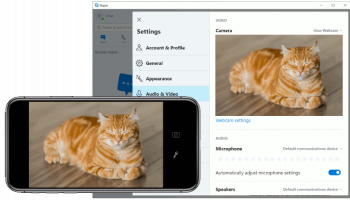
Iriun Webcam, developed by Iriun, is a versatile and user-friendly software that transforms your smartphone into a high-definition webcam for your computer. Designed to bridge the gap between mobile and desktop devices, Iriun Webcam provides a seamless solution for enhancing video communication, whether for professional meetings, online classes, or casual video chats.
One of the standout features of Iriun Webcam is its cross-platform compatibility. The software supports Windows, macOS, and Linux operating systems, making it accessible to a wide range of users. Additionally, it is compatible with both Android and iOS devices, ensuring that almost any smartphone can be utilized as a webcam.
Setting up Iriun Webcam is straightforward and hassle-free. Users simply need to install the application on both their smartphone and computer, connect the devices via Wi-Fi or USB, and select Iriun Webcam as the video source in their preferred video conferencing or streaming application. The intuitive interface and clear instructions make the setup process quick and easy, even for those who are not tech-savvy.
In terms of performance, Iriun Webcam delivers impressive video quality, supporting resolutions up to 4K, depending on the capabilities of your smartphone. This ensures crisp, clear, and professional-looking video output, which is a significant upgrade from most built-in laptop webcams. The software also supports both landscape and portrait modes, providing flexibility for different use cases.
Iriun Webcam is not just about video quality; it also offers a range of features to enhance the user experience. The application supports autofocus, ensuring that you remain sharp and clear during your video calls. It also allows for manual adjustments of brightness, contrast, and other settings, giving users control over their video output.
Another notable feature is the low latency performance of Iriun Webcam. The software ensures minimal delay between the smartphone camera and the computer display, providing a smooth and real-time video experience. This is particularly beneficial for live streaming and interactive video sessions where timing is crucial.
For those concerned about privacy and security, Iriun Webcam operates over a secure connection, ensuring that your video feed is protected from unauthorized access. The software also respects user privacy by not collecting any personal data.
In conclusion, Iriun Webcam by Iriun is a powerful and practical tool for anyone looking to enhance their video communication setup. Its ease of use, high-quality video output, and robust feature set make it an excellent choice for professionals, educators, and casual users alike. Whether you're attending a virtual meeting, teaching an online class, or catching up with friends and family, Iriun Webcam ensures that you always look your best on camera.
One of the standout features of Iriun Webcam is its cross-platform compatibility. The software supports Windows, macOS, and Linux operating systems, making it accessible to a wide range of users. Additionally, it is compatible with both Android and iOS devices, ensuring that almost any smartphone can be utilized as a webcam.
Setting up Iriun Webcam is straightforward and hassle-free. Users simply need to install the application on both their smartphone and computer, connect the devices via Wi-Fi or USB, and select Iriun Webcam as the video source in their preferred video conferencing or streaming application. The intuitive interface and clear instructions make the setup process quick and easy, even for those who are not tech-savvy.
In terms of performance, Iriun Webcam delivers impressive video quality, supporting resolutions up to 4K, depending on the capabilities of your smartphone. This ensures crisp, clear, and professional-looking video output, which is a significant upgrade from most built-in laptop webcams. The software also supports both landscape and portrait modes, providing flexibility for different use cases.
Iriun Webcam is not just about video quality; it also offers a range of features to enhance the user experience. The application supports autofocus, ensuring that you remain sharp and clear during your video calls. It also allows for manual adjustments of brightness, contrast, and other settings, giving users control over their video output.
Another notable feature is the low latency performance of Iriun Webcam. The software ensures minimal delay between the smartphone camera and the computer display, providing a smooth and real-time video experience. This is particularly beneficial for live streaming and interactive video sessions where timing is crucial.
For those concerned about privacy and security, Iriun Webcam operates over a secure connection, ensuring that your video feed is protected from unauthorized access. The software also respects user privacy by not collecting any personal data.
In conclusion, Iriun Webcam by Iriun is a powerful and practical tool for anyone looking to enhance their video communication setup. Its ease of use, high-quality video output, and robust feature set make it an excellent choice for professionals, educators, and casual users alike. Whether you're attending a virtual meeting, teaching an online class, or catching up with friends and family, Iriun Webcam ensures that you always look your best on camera.
OS: Windows 11, Windows 10 32/64 bit
Add Your Review or 64-bit Compatibility Report
Top Web/Video Cams 64-bit downloads


Flutter 3.38.8
Build natively compiled applications for mobile, web, and desktop with ease.
Open Source


WebCamSplitter 1.5
WebCamSplitter duplicates the video stream for multiple applications.
Shareware | $19.95

WebCamSplitter Pro 1.5
WebCamSplitterPro duplicates the video stream for multiple applications.
Shareware | $39.95


Members area
Top 64-bit Downloads
-
Netcam Studio x64 1.9.5.0
x64 freeware download -
Linphone 5.0.8
x64 freeware download -
ActiveXperts SendSMS x64 6.5
x64 freeware download -
SysInfoTools Email
Converter x64 2.0
x64 shareware download -
MOBILedit Forensic
Express 7.4.1.21502
x64 demo download -
EasyMail for Gmail 3.1.6.0
x64 freeware download -
Tweetings x64 1.4.5.0
x64 freeware download -
Miranda IM (x64 bit) 0.10.80.0
x64 open source download -
SIP Communicator for
Windows (x64 bit) 2.10.5550
x64 open source download -
OutlookAddressBookView
x64 2.44
x64 freeware download
Top Downloads
-
GSM Mobile Phone SMS
Software 9.0.1.2
shareware download -
The Bat! Voyager 11.2.1
shareware download -
Squiggle LAN Messenger 3.4
open source download -
IMVU 551.14 Classic
adware download -
LinkedIn Missing Data
Extractor 3.1.14
shareware download -
Ekiga for Windows 4.0.1
open source download -
Samsung Kies 3 3.2.16084_2
freeware download -
E-Mail Converter 26.0.8
shareware download -
Bulk SMS Group Software 7.2.2.8
shareware download -
Quiet 6.5.1
open source download -
Jitsi Meet 2026.1.1
open source download -
OE Classic 5.3.1 Classic
demo download -
Oceantiger Mail 2.0
freeware download -
Howard Email Notifier 2.15
freeware download -
POPFile 1.1.3
freeware download