
LightMachine Plugin - X 64-bit Download
Popular x64 Tags
- image x64 download
- design x64 download
- size x64 download
- color x64 download
- graphics x64 download
- gif x64 download
- panorama x64 download
- photoshop x64 download
- software x64 download
- jpeg x64 download
- utility x64 download
- photo x64 download
- plugin x64 download
- cover x64 download
- tool x64 download
- rgb x64 download
- png x64 download
- jpg x64 download
- pictures x64 download
- images x64 download
- vanderlee x64 download
- bmp x64 download
- photos x64 download
- vdl x64 download
- picture x64 download
- scanner x64 download
- screen x64 download
- video x64 download
- scan x64 download
- dust x64 download
LightMachine Plugin 2.11b
Sponsored links:

Harald Heim

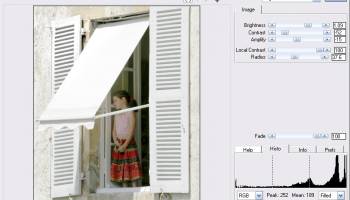
LightMachine corrects brightness, contrast, color and saturation in specific image areas independently from each other. It basically consists of four different filters each split up into a simple mode suitable for beginners and a Pro mode with more features for more flexibility.
The Brightness/Contrast modes adjust brightness and contrast throughout the image which is nice as a starting point.
The Shadows/Highlights modes give you complete control over dark and bright image areas and let you correct them completely independently from each other with the help of sophisticated masking options.
The Virtual Studio modes allow you to place an unlimited number of shadow and light spots as if you were placing studio lights in a real photo studio. The intensity, size, ovality, angle, hardness and reflection properties of each spot can be adjusted precisely. Finally, the Colors modes let you selectively correct image objects of a specific color by clicking on them.
Give LightMachine a try to see what it can actually do for you!
Features:
Shadow/highlight, virtual lighting and color-based photo enhancement tools
Corrects brightness, contrast, color and saturation in shadows and highlights independently of each other
Place shadow/light spots similar to a real photo studio in Virtual Studio mode
Achieve special effects like glows, sunsets, high key and selective b/w effects, replace one color with another and simulate polarizing filters
Allows batch processing of image files
Processes 8-bit and 16-bit RGB images
The Brightness/Contrast modes adjust brightness and contrast throughout the image which is nice as a starting point.
The Shadows/Highlights modes give you complete control over dark and bright image areas and let you correct them completely independently from each other with the help of sophisticated masking options.
The Virtual Studio modes allow you to place an unlimited number of shadow and light spots as if you were placing studio lights in a real photo studio. The intensity, size, ovality, angle, hardness and reflection properties of each spot can be adjusted precisely. Finally, the Colors modes let you selectively correct image objects of a specific color by clicking on them.
Give LightMachine a try to see what it can actually do for you!
Features:
Shadow/highlight, virtual lighting and color-based photo enhancement tools
Corrects brightness, contrast, color and saturation in shadows and highlights independently of each other
Place shadow/light spots similar to a real photo studio in Virtual Studio mode
Achieve special effects like glows, sunsets, high key and selective b/w effects, replace one color with another and simulate polarizing filters
Allows batch processing of image files
Processes 8-bit and 16-bit RGB images
Homepage: LightMachine Plugin
OS: Windows XP, Windows Vista, Windows Vista x64, Windows 7, Windows 7 x64, Windows 8, Windows 8 x64, Windows 10, Windows 10 x64
Add Your Review or 64-bit Compatibility Report
Top Other 64-bit downloads


World Tools 2.0.6
An Adobe InDesign to work on right-to-left languages and writing scripts
Shareware | $99.00


iWisdom 0.0.0+2107~ga0785ce1
An application which helps you store small bits of wisdom, such as quotations
Open Source




Topaz DeJPEG 4.1.0
Gives you the ability to improve the quality of your JPEG images
Trialware | $29.99

Topaz DeNoise 6.0.1
A Photoshop plugin that can help you remove digital image noise
Trialware | $79.99
Members area
Top 64-bit Downloads
-
Fluid Mask for Mac 3.3.14
x64 trialware download -
ICO file format x64 2.1f1
x64 open source download -
Archicad 64bit 27 B3001
x64 demo download -
Portable MicroDicom x64 2024.2
x64 freeware download -
TopSpice 10.26a
x64 demo download -
Affinity Photo 2.5.3
x64 trialware download -
Adobe Photoshop Elements 2024.3
x64 trialware download -
ImageJ x64 1.54i
x64 freeware download -
Volocity 64bit 6.5.1
x64 demo download -
Potrace for Windows (x64
bit) 1.16
x64 open source download
Top Downloads
-
CorelDRAW X5 2026 v27.0.0.121
trialware download -
Tracfoil 4.12.07
trialware download -
oCam 428.0
freeware download -
Gyazo 5.9.1
demo download -
CodeLoader 4.19.0
freeware download -
SeiSee 2.22.6
freeware download -
MarvinSketch 23.16.0
freeware download -
MapInfo Professional 17.0.4
trialware download -
VueScan 9.8.52
demo download -
World Tools 2.0.6
shareware download -
Texmod 0.9b
freeware download -
iWisdom 0.0.0+2107~ga0785ce1
open source download -
sigTOOL 0.95
open source download -
LTpowerCAD 2.7.2
freeware download -
nanoCAD 5.1.2524.2017
freeware download