
mRemoteNG Portable - X 64-bit Download
Popular x64 Tags
- software x64 download
- network x64 download
- download x64 download
- seo x64 download
- rss reader x64 download
- online tv x64 download
- internet x64 download
- freeware x64 download
- free x64 download
- identity management x64 download
- hardware inventory x64 download
- slow pc performance x64 download
- proxy x64 download
- utility x64 download
- password manager x64 download
- satellite tv for pc x64 download
- email x64 download
- password reset x64 download
- address x64 download
- security x64 download
- server x64 download
- web x64 download
- remote control software x64 download
- pages x64 download
- rss x64 download
- password management x64 download
- active directory x64 download
- why is my computer so slow x64 download
- software distribution x64 download
- software inventory x64 download
mRemoteNG Portable 1.76.20.24669
Sponsored links:
license: Open Source
downloads: 1090
size: 37.30 MB
updated: 2026-02-22
tags: mRemoteNG Portable, download mRemoteNG Portable, mRemoteNG Portable free download, remote connection, manage session, RDP manager, remote, connection, RDP, session
Add to Basket

Riley McArdle

mRemoteNG Portable, developed by Riley McArdle, is a versatile and robust open-source remote connections manager that stands out for its portability and comprehensive feature set. Designed for IT professionals and system administrators, this software offers a streamlined solution for managing multiple remote connections from a single, unified interface.
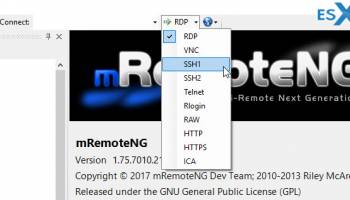
One of the key strengths of mRemoteNG Portable is its support for a wide array of protocols, including RDP, VNC, SSH, Telnet, ICA, HTTP/S, Rlogin, and Raw Socket Connections. This extensive protocol support ensures that users can manage various types of remote connections without the need for multiple standalone applications, thereby enhancing productivity and efficiency.
The portable nature of mRemoteNG is a significant advantage, allowing users to carry the software on a USB drive and run it on any Windows machine without the need for installation. This feature is particularly beneficial for IT professionals who need to access remote systems from different locations or computers, as it ensures that their connection settings and preferences are always at hand.
The user interface of mRemoteNG Portable is intuitive and customizable, featuring a tabbed interface that allows users to organize and switch between multiple sessions effortlessly. The software also includes a powerful credential management system, enabling users to store and manage login details securely. This feature not only enhances security but also saves time by eliminating the need to repeatedly enter credentials.
mRemoteNG Portable is equipped with a range of tools that cater to the needs of advanced users. It supports scripting and automation, allowing users to automate repetitive tasks and streamline workflows. Additionally, the software provides robust logging and auditing capabilities, which are essential for maintaining security and compliance in enterprise environments.
Despite its powerful features, mRemoteNG Portable remains lightweight and efficient, ensuring that it does not consume excessive system resources. This makes it an ideal choice for users who require a reliable and fast remote connection manager without compromising on performance.
In summary, mRemoteNG Portable is a comprehensive and flexible solution for managing remote connections. Its portability, extensive protocol support, and user-friendly interface make it an indispensable tool for IT professionals seeking to enhance their remote management capabilities. Whether you're a system administrator managing a complex network or a tech enthusiast looking for a reliable remote connection manager, mRemoteNG Portable is a commendable choice that delivers on all fronts.
One of the key strengths of mRemoteNG Portable is its support for a wide array of protocols, including RDP, VNC, SSH, Telnet, ICA, HTTP/S, Rlogin, and Raw Socket Connections. This extensive protocol support ensures that users can manage various types of remote connections without the need for multiple standalone applications, thereby enhancing productivity and efficiency.
The portable nature of mRemoteNG is a significant advantage, allowing users to carry the software on a USB drive and run it on any Windows machine without the need for installation. This feature is particularly beneficial for IT professionals who need to access remote systems from different locations or computers, as it ensures that their connection settings and preferences are always at hand.
The user interface of mRemoteNG Portable is intuitive and customizable, featuring a tabbed interface that allows users to organize and switch between multiple sessions effortlessly. The software also includes a powerful credential management system, enabling users to store and manage login details securely. This feature not only enhances security but also saves time by eliminating the need to repeatedly enter credentials.
mRemoteNG Portable is equipped with a range of tools that cater to the needs of advanced users. It supports scripting and automation, allowing users to automate repetitive tasks and streamline workflows. Additionally, the software provides robust logging and auditing capabilities, which are essential for maintaining security and compliance in enterprise environments.
Despite its powerful features, mRemoteNG Portable remains lightweight and efficient, ensuring that it does not consume excessive system resources. This makes it an ideal choice for users who require a reliable and fast remote connection manager without compromising on performance.
In summary, mRemoteNG Portable is a comprehensive and flexible solution for managing remote connections. Its portability, extensive protocol support, and user-friendly interface make it an indispensable tool for IT professionals seeking to enhance their remote management capabilities. Whether you're a system administrator managing a complex network or a tech enthusiast looking for a reliable remote connection manager, mRemoteNG Portable is a commendable choice that delivers on all fronts.
OS: Windows Server 2025, Windows 11, Windows Server 2022, Windows Server 2019, Windows Server 2016, Windows 10 32/64 bit, Windows Server 2012 R2, Windows 8 32/64 bit
Add Your Review or 64-bit Compatibility Report
Top Other 64-bit downloads


Adobe Flash Player 10 for 64-bit Windows Preview 2
Enables native 64-bit support on Linux operating systems
Freeware


Virtual World 4.7.4
An interactive 3D Virtual World chat with live webcam and avatars support.
Commercial | $1 500.00

Google Apps Manager 7.39.01

Manage Google Workspace accounts and services effortlessly with GAM.
Open Source

Advanced TCP IP Data Logger 5.1.3 Build 310
Log data from one or more Terminal Servers to disk
Demo | $100.00


Lansweeper 12.6.3.5
Comprehensive IT asset management and network discovery solution.
Demo | $219.00

Members area
Top 64-bit Downloads
-
Adobe Flash Player 10
for 64-bit Windows Preview 2
x64 freeware download -
Internet Explorer 8 for
Windows Vista 64-bit and
Windows Server 2008
64-bit
x64 freeware download -
FileZilla Server 1.8.1
x64 open source download -
Firefox 64bit x64 127.0.2
x64 open source download -
SSuite NetSurfer Extreme
x64 2.10.16.1
x64 freeware download -
Google Chrome x64 bit 126.0.6478.127
x64 freeware download -
SSuite NetSurfer Browser
x64 2.30.16.10
x64 freeware download -
AlternaTIFF x64 2.0.8
x64 freeware download -
WatchFTP x64 4.2.1.0
x64 trialware download -
Heroix Longitude for
VMware x64 10.0.1
x64 trialware download
Top Downloads
-
Adobe Flash Player 10
for 64-bit Windows Preview 2
freeware download -
MiraxTV 2024.5
freeware download -
Xftp Free 7.0 B0155
freeware download -
Internet Explorer 8 for
Windows Vista 64-bit and
Windows Server 2008
64-bit
freeware download -
Profile Migrator 1.1
trialware download -
Chrono Download Manager 0.13.10
freeware download -
Web Archives for Opera 7.3.0
open source download -
TheWorld Browser 7.0.0.108
freeware download -
MusicFab 1.0.6.6
demo download -
FileZilla Server 1.8.1
open source download -
Virtual World 4.7.4
commercial download -
Open With Photoshop 63.0
open source download -
NetShareWatcher 1.5.8
shareware download -
Dooble 2024.12.31
open source download -
GetRight 6.5
shareware download