
Name Dropper - X 64-bit Download
Popular x64 Tags
- image x64 download
- design x64 download
- size x64 download
- color x64 download
- graphics x64 download
- gif x64 download
- panorama x64 download
- photoshop x64 download
- software x64 download
- jpeg x64 download
- utility x64 download
- photo x64 download
- plugin x64 download
- cover x64 download
- tool x64 download
- rgb x64 download
- png x64 download
- jpg x64 download
- pictures x64 download
- images x64 download
- vanderlee x64 download
- bmp x64 download
- photos x64 download
- vdl x64 download
- picture x64 download
- scanner x64 download
- screen x64 download
- video x64 download
- scan x64 download
- dust x64 download
Name Dropper 3.7
Sponsored links:

Cognitial Software

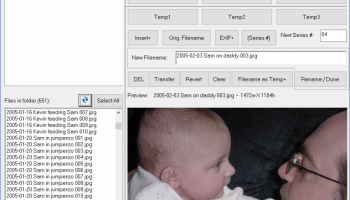
Name Dropper is a compact piece of software that allows you to manage multiple image files and rename them in a few clicks. If you take lots of pictures with a digital camera, or just have lots of files to rename, Name Dropper makes the process of renaming files easy to do.
Name Dropper's interface is simple and straight-forward, but don't let that fool you. Name Dropper has powerful features and functions that other batch renamers simply do not have. A total of 12 buttons insert text that you specify, allowing you to quickly build new filenames simply by clicking on buttons. What's more, you can save your custom buttons as templates so that you can quickly recall them in the future. Digital camera users will love the ability to insert the exposure date and / or time directly into the filename with a couple clicks of the mouse. Don't have a digital camera? Name Dropper allows you to rename ANY type of file, and it's easier to use than any other file renamer!
Name Dropper also provides functions to copy or move files from one place to another. So does Windows, right? Yes, but only Name Dropper has the powerful SmartName feature. When enabled, you never again have to worry about failed copy or move operations due to duplicate filenames in the destination folder! If a file being copied or moved shares the same name as a file already in the destination folder, SmartName will automatically modify the name of the file being copied by adding what is called a sub-series number. This process not only retains the original filename (while adding a little to it to make it unique), but it also retains the order of the files in the destination folder. Only Name Dropper has this feature! And if you don't usually rename your digital photos, you probably know the headaches associated with moving files from your camera to the same folder on your computer. This usually results in duplicate filenames. With SmartName, you will never have to worry about duplicate filenames again when copying or moving files.
For advanced users, there are advanced features and functions too! Name Dropper allows you to map (connect) network drives to a local drive letter (and un-map / disconnect them as well). You can also execute a "Search & Replace" on a group of files... tell Name Dropper what to look for in the filename, and automatically replace it with different text. Want to see more details about a picture you took with your digital camera? Did the flash fire? You can view the EXIF data of any JPG or TIF image taken with an EXIF-capable digital camera. EXIF Date & Time can also be extracted from virtually any RAW image file, too!
Name Dropper Highlights:
* Geared for digital camera users, but capable of renaming ANY type of file
* Supports major file formats used by all digital cameras
* Supports most proprietary RAW images found on higher-end cameras
* Supports many audio & video formats, as well as several common ID3 (MP3) tags
* Allows rapid renaming of files... one at a time, or even batch renaming
* Simply click on buttons with your mouse to build unique filenames
* Add incremental ‘series numbers’ with a click of your mouse
* Save button configurations as templates for common subjects
* Supports EXIF Date & Time, allowing you to insert the original date and/or time a
picture was taken into the filename
* All EXIF information created by the camera remains intact, as only the filename is
changed
* Allows you to copy or move files, and with Name Dropper’s exclusive SmartName
feature, you will never again have to worry about existing filenames in the destination
folder!
* Full support for networks, with built-in network drive mapping
* Easy and fun to use
* Outstanding technical support from a person who cares
* FREE upgrades for life
Name Dropper's interface is simple and straight-forward, but don't let that fool you. Name Dropper has powerful features and functions that other batch renamers simply do not have. A total of 12 buttons insert text that you specify, allowing you to quickly build new filenames simply by clicking on buttons. What's more, you can save your custom buttons as templates so that you can quickly recall them in the future. Digital camera users will love the ability to insert the exposure date and / or time directly into the filename with a couple clicks of the mouse. Don't have a digital camera? Name Dropper allows you to rename ANY type of file, and it's easier to use than any other file renamer!
Name Dropper also provides functions to copy or move files from one place to another. So does Windows, right? Yes, but only Name Dropper has the powerful SmartName feature. When enabled, you never again have to worry about failed copy or move operations due to duplicate filenames in the destination folder! If a file being copied or moved shares the same name as a file already in the destination folder, SmartName will automatically modify the name of the file being copied by adding what is called a sub-series number. This process not only retains the original filename (while adding a little to it to make it unique), but it also retains the order of the files in the destination folder. Only Name Dropper has this feature! And if you don't usually rename your digital photos, you probably know the headaches associated with moving files from your camera to the same folder on your computer. This usually results in duplicate filenames. With SmartName, you will never have to worry about duplicate filenames again when copying or moving files.
For advanced users, there are advanced features and functions too! Name Dropper allows you to map (connect) network drives to a local drive letter (and un-map / disconnect them as well). You can also execute a "Search & Replace" on a group of files... tell Name Dropper what to look for in the filename, and automatically replace it with different text. Want to see more details about a picture you took with your digital camera? Did the flash fire? You can view the EXIF data of any JPG or TIF image taken with an EXIF-capable digital camera. EXIF Date & Time can also be extracted from virtually any RAW image file, too!
Name Dropper Highlights:
* Geared for digital camera users, but capable of renaming ANY type of file
* Supports major file formats used by all digital cameras
* Supports most proprietary RAW images found on higher-end cameras
* Supports many audio & video formats, as well as several common ID3 (MP3) tags
* Allows rapid renaming of files... one at a time, or even batch renaming
* Simply click on buttons with your mouse to build unique filenames
* Add incremental ‘series numbers’ with a click of your mouse
* Save button configurations as templates for common subjects
* Supports EXIF Date & Time, allowing you to insert the original date and/or time a
picture was taken into the filename
* All EXIF information created by the camera remains intact, as only the filename is
changed
* Allows you to copy or move files, and with Name Dropper’s exclusive SmartName
feature, you will never again have to worry about existing filenames in the destination
folder!
* Full support for networks, with built-in network drive mapping
* Easy and fun to use
* Outstanding technical support from a person who cares
* FREE upgrades for life
OS: Windows XP, Windows Vista, Windows Vista x64, Windows 7, Windows 7 x64, Windows 8, Windows 8 x64, Windows 10, Windows 10 x64
Add Your Review or 64-bit Compatibility Report
Top Other 64-bit downloads


iWisdom 0.0.0+2107~ga0785ce1
An application which helps you store small bits of wisdom, such as quotations
Open Source


World Tools 2.0.6
An Adobe InDesign to work on right-to-left languages and writing scripts
Shareware | $99.00




Topaz DeJPEG 4.1.0
Gives you the ability to improve the quality of your JPEG images
Trialware | $29.99

Members area
Top 64-bit Downloads
-
Fluid Mask for Mac 3.3.14
x64 trialware download -
ICO file format x64 2.1f1
x64 open source download -
Archicad 64bit 27 B3001
x64 demo download -
WellCAD x64 5.3 B625
x64 demo download -
Portable MicroDicom x64 2024.2
x64 freeware download -
Adobe Photoshop Elements 2024.3
x64 trialware download -
TopSpice 10.26a
x64 demo download -
Potrace for Windows (x64
bit) 1.16
x64 open source download -
delaboratory x64 0.8
x64 open source download -
Photo Ninja 64-bit 1.4.0c
x64 trialware download
Top Downloads
-
CorelDRAW X5 2026 v27.0.0.121
trialware download -
Tracfoil 4.12.07
trialware download -
oCam 428.0
freeware download -
Gyazo 5.9.1
demo download -
MapInfo Professional 17.0.4
trialware download -
iWisdom 0.0.0+2107~ga0785ce1
open source download -
CodeLoader 4.19.0
freeware download -
nanoCAD 5.1.2524.2017
freeware download -
SeiSee 2.22.6
freeware download -
MarvinSketch 23.16.0
freeware download -
VueScan 9.8.52
demo download -
Topaz Simplify 4.1.1
trialware download -
World Tools 2.0.6
shareware download -
Texmod 0.9b
freeware download -
DICOMscope 3.5.1
freeware download