
Nikon NEF Codec - X 64-bit Download
Popular x64 Tags
- image x64 download
- design x64 download
- size x64 download
- color x64 download
- graphics x64 download
- gif x64 download
- panorama x64 download
- photoshop x64 download
- software x64 download
- jpeg x64 download
- utility x64 download
- photo x64 download
- plugin x64 download
- cover x64 download
- tool x64 download
- rgb x64 download
- png x64 download
- jpg x64 download
- pictures x64 download
- images x64 download
- vanderlee x64 download
- bmp x64 download
- photos x64 download
- vdl x64 download
- picture x64 download
- scanner x64 download
- screen x64 download
- video x64 download
- scan x64 download
- dust x64 download
Nikon NEF Codec 1.31.4
Sponsored links:
license: Freeware
downloads: 348
size: 190.00 MB
updated: 2024-10-24
tags: Graphics, RAW Codec, Nikon, raw files, Picture, Nikon NEF Codec free download, image processing, Nikon NEF Codec, RAW, download Nikon NEF Codec, Graphic Codec, NEF Codec, RAW Image, software, Codec, Nikon Corporation
Add to Basket

Nikon Corporation

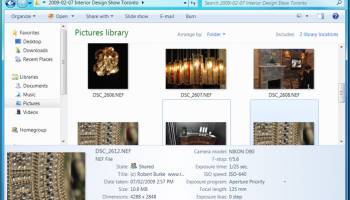
The Nikon NEF Codec is a specialized piece of software developed by Nikon Corporation, designed to enhance the workflow of photographers who utilize Nikon cameras. This codec is an essential tool for those who frequently work with NEF files, Nikon's proprietary RAW image format. By integrating seamlessly with Windows operating systems, the NEF Codec allows users to view NEF files as easily as they would view JPEGs or TIFFs, directly within Windows Explorer and other applications that use Windows Imaging Component (WIC).
One of the standout features of the Nikon NEF Codec is its ability to provide quick and efficient access to high-quality image previews. This is particularly beneficial for photographers who need to manage large volumes of images and require a streamlined process for sorting and organizing their work. The codec eliminates the need for third-party software to view NEF files, thereby simplifying the workflow and saving valuable time.
The installation process of the Nikon NEF Codec is straightforward, making it accessible even for those who may not be particularly tech-savvy. Once installed, the codec integrates into the system, allowing for immediate functionality without the need for complex configurations. This ease of use is a testament to Nikon's commitment to providing user-friendly solutions for photographers.
In terms of performance, the Nikon NEF Codec is optimized to ensure that image quality is preserved when viewing NEF files. This is crucial for photographers who rely on the high resolution and detail that RAW files offer. The codec supports a wide range of Nikon camera models, ensuring compatibility across different devices and making it a versatile tool for both amateur and professional photographers.
However, it's important to note that while the Nikon NEF Codec is a powerful tool for viewing and organizing NEF files, it does not offer editing capabilities. Photographers looking to edit their RAW images will still need to use dedicated photo editing software. Nonetheless, the codec serves as an excellent bridge between capturing images and post-processing, providing a reliable means of managing and previewing RAW files.
In conclusion, the Nikon NEF Codec is an invaluable utility for Nikon camera users who seek a hassle-free method to view and organize their NEF files on Windows systems. Its ease of use, seamless integration, and preservation of image quality make it a must-have for anyone looking to optimize their photography workflow. Whether you're a seasoned professional or an enthusiastic hobbyist, the Nikon NEF Codec is a tool that can significantly enhance your digital photography experience.
One of the standout features of the Nikon NEF Codec is its ability to provide quick and efficient access to high-quality image previews. This is particularly beneficial for photographers who need to manage large volumes of images and require a streamlined process for sorting and organizing their work. The codec eliminates the need for third-party software to view NEF files, thereby simplifying the workflow and saving valuable time.
The installation process of the Nikon NEF Codec is straightforward, making it accessible even for those who may not be particularly tech-savvy. Once installed, the codec integrates into the system, allowing for immediate functionality without the need for complex configurations. This ease of use is a testament to Nikon's commitment to providing user-friendly solutions for photographers.
In terms of performance, the Nikon NEF Codec is optimized to ensure that image quality is preserved when viewing NEF files. This is crucial for photographers who rely on the high resolution and detail that RAW files offer. The codec supports a wide range of Nikon camera models, ensuring compatibility across different devices and making it a versatile tool for both amateur and professional photographers.
However, it's important to note that while the Nikon NEF Codec is a powerful tool for viewing and organizing NEF files, it does not offer editing capabilities. Photographers looking to edit their RAW images will still need to use dedicated photo editing software. Nonetheless, the codec serves as an excellent bridge between capturing images and post-processing, providing a reliable means of managing and previewing RAW files.
In conclusion, the Nikon NEF Codec is an invaluable utility for Nikon camera users who seek a hassle-free method to view and organize their NEF files on Windows systems. Its ease of use, seamless integration, and preservation of image quality make it a must-have for anyone looking to optimize their photography workflow. Whether you're a seasoned professional or an enthusiastic hobbyist, the Nikon NEF Codec is a tool that can significantly enhance your digital photography experience.
OS: Windows 11, Windows 10 32/64 bit, Windows 8 32/64 bit, Windows 7 32/64 bit
Add Your Review or 64-bit Compatibility Report
Top Other 64-bit downloads


iWisdom 0.0.0+2107~ga0785ce1
An application which helps you store small bits of wisdom, such as quotations
Open Source


World Tools 2.0.6
An Adobe InDesign to work on right-to-left languages and writing scripts
Shareware | $99.00




Topaz DeJPEG 4.1.0
Gives you the ability to improve the quality of your JPEG images
Trialware | $29.99

Members area
Top 64-bit Downloads
-
Fluid Mask for Mac 3.3.14
x64 trialware download -
ICO file format x64 2.1f1
x64 open source download -
Archicad 64bit 27 B3001
x64 demo download -
WellCAD x64 5.3 B625
x64 demo download -
Portable MicroDicom x64 2024.2
x64 freeware download -
Adobe Photoshop Elements 2024.3
x64 trialware download -
TopSpice 10.26a
x64 demo download -
Potrace for Windows (x64
bit) 1.16
x64 open source download -
delaboratory x64 0.8
x64 open source download -
Photo Ninja 64-bit 1.4.0c
x64 trialware download
Top Downloads
-
CorelDRAW X5 2026 v27.0.0.121
trialware download -
Tracfoil 4.12.07
trialware download -
oCam 428.0
freeware download -
Gyazo 5.9.1
demo download -
MapInfo Professional 17.0.4
trialware download -
iWisdom 0.0.0+2107~ga0785ce1
open source download -
CodeLoader 4.19.0
freeware download -
nanoCAD 5.1.2524.2017
freeware download -
SeiSee 2.22.6
freeware download -
MarvinSketch 23.16.0
freeware download -
Scanahand 8.0.0.320
demo download -
VueScan 9.8.52
demo download -
Topaz Simplify 4.1.1
trialware download -
World Tools 2.0.6
shareware download -
Texmod 0.9b
freeware download