
PanoramaStudio Pro - X 64-bit Download
Popular x64 Tags
- image x64 download
- design x64 download
- size x64 download
- color x64 download
- graphics x64 download
- gif x64 download
- panorama x64 download
- photoshop x64 download
- software x64 download
- jpeg x64 download
- utility x64 download
- photo x64 download
- plugin x64 download
- cover x64 download
- tool x64 download
- rgb x64 download
- png x64 download
- jpg x64 download
- pictures x64 download
- images x64 download
- vanderlee x64 download
- bmp x64 download
- photos x64 download
- vdl x64 download
- picture x64 download
- scanner x64 download
- screen x64 download
- video x64 download
- scan x64 download
- dust x64 download
PanoramaStudio Pro 4.1.5
Sponsored links:
license: Demo ($99.00)
downloads: 408
size: 38.90 MB
updated: 2025-08-01
tags: PanoramaStudio Pro, download PanoramaStudio Pro, PanoramaStudio Pro free download, Create Panorama, Photo Stitcher, Edit Panorama, Panorama, Stitch, Merger, Alignment
Add to Basket

Tobias Huellmandel Softwareentwicklung


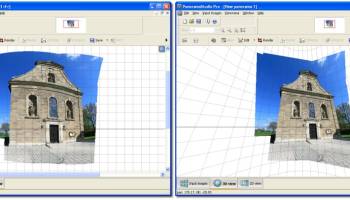
PanoramaStudio Pro, developed by Tobias Huellmandel Softwareentwicklung, is a sophisticated tool designed for photographers and digital artists who seek to create stunning panoramic images with ease and precision. This software stands out in the realm of panoramic photography for its comprehensive feature set, intuitive interface, and robust performance.
At its core, PanoramaStudio Pro excels in stitching multiple images into seamless panoramas, whether they are wide-angle landscapes or intricate architectural shots. The software supports both single-row and multi-row panoramas, allowing users to create full spherical 360x180 degree images. This flexibility is particularly beneficial for professionals who require high-resolution outputs for print or digital media.
One of the standout features of PanoramaStudio Pro is its advanced alignment algorithms. These algorithms ensure that images are stitched together with remarkable accuracy, minimizing distortion and preserving the natural look of the scene. The software automatically corrects lens distortions, vignetting, and exposure differences, which significantly reduces the need for manual adjustments and speeds up the workflow.
The user interface is designed to be both powerful and accessible. New users will appreciate the guided workflow that walks them through the panorama creation process, while experienced users can take advantage of the software's extensive customization options. The control point editor, for instance, allows for fine-tuning of image alignment, providing users with the ability to achieve perfect results even in challenging stitching scenarios.
PanoramaStudio Pro also offers a range of post-processing tools. Users can enhance their panoramas with features such as color correction, sharpening, and cropping. The software supports a wide array of output formats, including JPEG, TIFF, PSD, and even interactive formats like HTML5 and Flash for web presentations. This versatility ensures that users can deliver their work in the format that best suits their needs.
Moreover, the software is equipped with batch processing capabilities, enabling users to automate the creation of multiple panoramas, which is a significant time-saver for professionals handling large volumes of images. The integration with external applications and plugins further extends its functionality, making it a versatile addition to any photographer's toolkit.
In conclusion, PanoramaStudio Pro is a robust and versatile solution for creating high-quality panoramic images. Its combination of powerful features, ease of use, and professional-grade output makes it an invaluable tool for photographers and digital artists alike. Whether you're a seasoned professional or an enthusiastic amateur, PanoramaStudio Pro provides the tools you need to bring your panoramic visions to life.
At its core, PanoramaStudio Pro excels in stitching multiple images into seamless panoramas, whether they are wide-angle landscapes or intricate architectural shots. The software supports both single-row and multi-row panoramas, allowing users to create full spherical 360x180 degree images. This flexibility is particularly beneficial for professionals who require high-resolution outputs for print or digital media.
One of the standout features of PanoramaStudio Pro is its advanced alignment algorithms. These algorithms ensure that images are stitched together with remarkable accuracy, minimizing distortion and preserving the natural look of the scene. The software automatically corrects lens distortions, vignetting, and exposure differences, which significantly reduces the need for manual adjustments and speeds up the workflow.
The user interface is designed to be both powerful and accessible. New users will appreciate the guided workflow that walks them through the panorama creation process, while experienced users can take advantage of the software's extensive customization options. The control point editor, for instance, allows for fine-tuning of image alignment, providing users with the ability to achieve perfect results even in challenging stitching scenarios.
PanoramaStudio Pro also offers a range of post-processing tools. Users can enhance their panoramas with features such as color correction, sharpening, and cropping. The software supports a wide array of output formats, including JPEG, TIFF, PSD, and even interactive formats like HTML5 and Flash for web presentations. This versatility ensures that users can deliver their work in the format that best suits their needs.
Moreover, the software is equipped with batch processing capabilities, enabling users to automate the creation of multiple panoramas, which is a significant time-saver for professionals handling large volumes of images. The integration with external applications and plugins further extends its functionality, making it a versatile addition to any photographer's toolkit.
In conclusion, PanoramaStudio Pro is a robust and versatile solution for creating high-quality panoramic images. Its combination of powerful features, ease of use, and professional-grade output makes it an invaluable tool for photographers and digital artists alike. Whether you're a seasoned professional or an enthusiastic amateur, PanoramaStudio Pro provides the tools you need to bring your panoramic visions to life.
OS: Windows 11, Windows 10 64 bit

Add Your Review or 64-bit Compatibility Report
Top Other 64-bit downloads


iWisdom 0.0.0+2107~ga0785ce1
An application which helps you store small bits of wisdom, such as quotations
Open Source


World Tools 2.0.6
An Adobe InDesign to work on right-to-left languages and writing scripts
Shareware | $99.00




Topaz DeJPEG 4.1.0
Gives you the ability to improve the quality of your JPEG images
Trialware | $29.99

Members area
Top 64-bit Downloads
-
Fluid Mask for Mac 3.3.14
x64 trialware download -
ICO file format x64 2.1f1
x64 open source download -
Archicad 64bit 27 B3001
x64 demo download -
TopSpice 10.26a
x64 demo download -
WellCAD x64 5.3 B625
x64 demo download -
Portable MicroDicom x64 2024.2
x64 freeware download -
Adobe Photoshop Elements 2024.3
x64 trialware download -
Potrace for Windows (x64
bit) 1.16
x64 open source download -
delaboratory x64 0.8
x64 open source download -
AcroPDF 6.2
x64 shareware download
Top Downloads
-
CorelDRAW X5 2026 v27.0.0.121
trialware download -
Tracfoil 4.12.07
trialware download -
oCam 428.0
freeware download -
Gyazo 5.9.1
demo download -
VueScan 9.8.53
demo download -
nanoCAD 5.1.2524.2017
freeware download -
MarvinSketch 23.16.0
freeware download -
MapInfo Professional 17.0.4
trialware download -
Scanahand 8.0.0.320
demo download -
iWisdom 0.0.0+2107~ga0785ce1
open source download -
CodeLoader 4.19.0
freeware download -
SeiSee 2.22.6
freeware download -
XnConvert 1.106.0
shareware download -
Topaz Simplify 4.1.1
trialware download -
World Tools 2.0.6
shareware download