
PDF Copy Paste - X 64-bit Download
Popular x64 Tags
- pdf x64 download
- images x64 download
- freeware x64 download
- autocad x64 download
- html x64 download
- converter x64 download
- copyright x64 download
- convert x64 download
- jpg x64 download
- pictures x64 download
- photo x64 download
- picture x64 download
- bmp x64 download
- tif x64 download
- image resizer x64 download
- software x64 download
- image x64 download
- resize x64 download
- png x64 download
- free x64 download
- watermark x64 download
- conversion x64 download
- converting x64 download
- jpeg x64 download
- tiff x64 download
- gif x64 download
- batch x64 download
- resizer x64 download
- dxf x64 download
- photos x64 download
PDF Copy Paste 2.0
Sponsored links:
license: Shareware ($69.00)
downloads: 296
size: 4.26 MB
updated: 2021-10-10
tags: crop, pdf, text, graphics, cut, out, portion, copy, paste, cropping, picture, image, photo, chart, graphical, element, selected, area, windows, clipboard, save, selection, word, excel, powerpoint, visio, publisher, adobe, photoshop, illustrator, coreldraw, JPG, BMP, GIF, PNG, TIFF
Buy Now
Add to Basket

Wondersoft

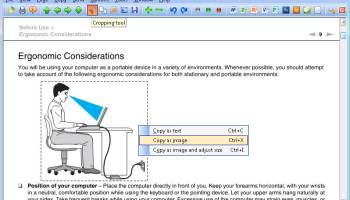
PDF files are great for exchanging formatted files across platforms and between folks who don't use the same software. But sometimes we need to be able to take images or text out of a PDF file and use it in web pages, word processing documents, PowerPoint presentations, or in desktop publishing software. PDF Copy Paste software allows you crop out the text, picture, image, photo, chart, and other graphical elements from PDF files. Simply use your cursor to draw out a rectangle around the area you want to crop, press Ctrl-C, and the text in your selected area will be copied to Windows clipboard; press Ctrl-X, and the selected area will be copied as an image to Windows clipboard. You can save your selection to a JPG, BMP, GIF, PNG, TIFF, EMF, WMF, or EPS file if you press Ctrl-S. The software brings a new cropping method to PDF professionals, Quick Save, which enables you to bypass the annoying Save-As-File dialog and save your PDF pages or cropped portion as image files in your preferred output folder. Draw a rectangle area around your desired content, click Ctrl-S, and the content will be saved as an image file in your output folder. You might as well extract text in your selected area if you specify the output format to TXT. PDF Copy Paste offers you additional features such as to send your desired portion of a PDF file to email as an attachment with just one click. Dropping your desired PDF page as a full-page image or a portion of the page as a picture to Microsoft Word, Excel, PowerPoint, Visio, Publisher, Photoshop, Illustrator, and CorelDRAW becomes easy with just a few clicks. You can adjust the DPI or dimension of your cropped portion or your whole PDF page before copying to clipboard or saving to file with the help of the Preview window. Rotation gives you better decision on how your selection or your PDF page will look like. Included with the software are other useful features such as to convert PDF files to other text or graphics formats.
Homepage: PDF Copy Paste
OS: Win2000, Windows 7 x32, Windows 7 x64, WinServer, Windows Vista, Windows Vista x64, Windows XP, Win8 x32, Win8 x64, Windows 7, Windows 8, Windows 10, Windows 11
Requirements: Pentium 4 1.6GHz CPU or higher
Add Your Review or 64-bit Compatibility Report
Top Converters & Optimizers 64-bit downloads


XnConvert 1.106.0
Powerful batch image converter and resizer with extensive format support.
Shareware | $15.00

ImageConvertPro 2.01.07
Easily adjust the size of your images, add watermark, or rename.
Shareware | $9.95


ToandFromWebP 1.0.0.0
Effortlessly convert images to and from WebP format with this intuitive tool.
Freeware

Cool Resizer 2016
Easy way to resize digital photos for web, e-mail, thumbnails and more
Shareware | $9.95

Blender for ARM64 4.3.0 Alpha
3D modeling, animation, rendering, and also features a game engine
Freeware
tags: x64 api, blender ARM64, x64 cut, x64 effects, x64 fonts, x64 import, x64 pack, x64 paint, project x64, proxy x64, support ARM64, ARM64


Potrace for Windows (x64 bit) 1.16
Utility for tracing a bitmap, which means, transforming a bitmap into a smooth
Open Source
Members area
Top 64-bit Downloads
-
Fluid Mask for Mac 3.3.14
x64 trialware download -
ICO file format x64 2.1f1
x64 open source download -
Archicad 64bit 27 B3001
x64 demo download -
TopSpice 10.26a
x64 demo download -
WellCAD x64 5.3 B625
x64 demo download -
Portable MicroDicom x64 2024.2
x64 freeware download -
Adobe Photoshop Elements 2024.3
x64 trialware download -
Potrace for Windows (x64
bit) 1.16
x64 open source download -
delaboratory x64 0.8
x64 open source download -
AcroPDF 6.2
x64 shareware download
Top Downloads
-
CorelDRAW X5 2026 v27.0.0.121
trialware download -
Tracfoil 4.12.07
trialware download -
oCam 428.0
freeware download -
Gyazo 5.9.1
demo download -
nanoCAD 5.1.2524.2017
freeware download -
MarvinSketch 23.16.0
freeware download -
MapInfo Professional 17.0.4
trialware download -
Scanahand 8.0.0.320
demo download -
iWisdom 0.0.0+2107~ga0785ce1
open source download -
CodeLoader 4.19.0
freeware download -
SeiSee 2.22.6
freeware download -
XnConvert 1.106.0
shareware download -
VueScan 9.8.53
demo download -
Topaz Simplify 4.1.1
trialware download -
World Tools 2.0.6
shareware download