
PhotoWorks - X 64-bit Download
Popular x64 Tags
- photo editor x64 download
- software x64 download
- image editor x64 download
- image editing x64 download
- photos x64 download
- photoshop x64 download
- color x64 download
- design x64 download
- jpeg x64 download
- editor x64 download
- plugin x64 download
- image enhancement x64 download
- watermark x64 download
- exif x64 download
- rotate x64 download
- batch x64 download
- pictures x64 download
- graphics x64 download
- image x64 download
- digital camera x64 download
- photo x64 download
- graphic x64 download
- images x64 download
- resize x64 download
- paint x64 download
- camera x64 download
- digital x64 download
- digital imaging x64 download
- picture x64 download
- jpg x64 download
PhotoWorks 21.0
Sponsored links:
license: Demo ($19.25)
downloads: 51
size: 26.00 MB
updated: 2025-10-16
tags: PhotoWorks, download PhotoWorks, PhotoWorks free download, photo editor, photo editing, image editor, editor, image, photo, enhance
Add to Basket

AMS Software

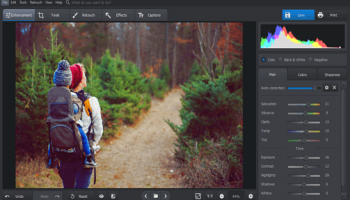
PhotoWorks, developed by AMS Software, is a sophisticated yet user-friendly photo editing tool designed to cater to both amateur photographers and seasoned professionals. This versatile software stands out for its intuitive interface and powerful features that make photo enhancement a breeze.
One of the most compelling aspects of PhotoWorks is its AI-driven technology. The software leverages artificial intelligence to automatically detect and correct common photo issues such as exposure, color balance, and sharpness. This intelligent automation allows users to achieve professional-quality results with minimal effort, making it an excellent choice for those who may not have extensive photo editing experience.
PhotoWorks also excels in its ability to offer advanced editing tools without overwhelming the user. The software includes a wide array of features such as background replacement, portrait retouching, and creative filters. The background replacement tool is particularly noteworthy, enabling users to seamlessly remove and replace backgrounds with just a few clicks. This feature is ideal for creating eye-catching images for social media, marketing materials, or personal projects.
Portrait retouching is another area where PhotoWorks shines. The software provides a suite of tools specifically designed for enhancing portraits, including skin smoothing, teeth whitening, and red-eye removal. These tools are easy to use and produce natural-looking results, ensuring that your subjects always look their best.
For those who enjoy adding artistic touches to their photos, PhotoWorks offers a variety of creative filters and effects. From vintage looks to modern, high-contrast styles, the software provides numerous options to help you achieve your desired aesthetic. Additionally, the software supports RAW files, giving professional photographers the flexibility they need to work with high-quality images.
PhotoWorks also includes a robust set of tools for fine-tuning your photos. Users can adjust parameters such as brightness, contrast, saturation, and hue with precision. The software's non-destructive editing capabilities ensure that your original images remain intact, allowing you to experiment freely without the risk of losing your original work.
Another standout feature is the software's batch processing capability. This function allows users to apply edits to multiple photos simultaneously, saving valuable time when working with large collections of images. Whether you need to resize, rename, or apply filters to a batch of photos, PhotoWorks makes the process efficient and straightforward.
In terms of usability, PhotoWorks is designed to be accessible to users of all skill levels. The interface is clean and well-organized, with clearly labeled tools and straightforward navigation. The software also includes helpful tutorials and tips, making it easy for new users to get up to speed quickly.
In conclusion, PhotoWorks by AMS Software is a powerful and versatile photo editing tool that combines advanced features with ease of use. Its AI-driven enhancements, comprehensive editing tools, and user-friendly interface make it an excellent choice for anyone looking to elevate their photo editing game. Whether you're a hobbyist looking to improve your personal photos or a professional seeking a reliable editing solution, PhotoWorks has the tools and capabilities to meet your needs.
One of the most compelling aspects of PhotoWorks is its AI-driven technology. The software leverages artificial intelligence to automatically detect and correct common photo issues such as exposure, color balance, and sharpness. This intelligent automation allows users to achieve professional-quality results with minimal effort, making it an excellent choice for those who may not have extensive photo editing experience.
PhotoWorks also excels in its ability to offer advanced editing tools without overwhelming the user. The software includes a wide array of features such as background replacement, portrait retouching, and creative filters. The background replacement tool is particularly noteworthy, enabling users to seamlessly remove and replace backgrounds with just a few clicks. This feature is ideal for creating eye-catching images for social media, marketing materials, or personal projects.
Portrait retouching is another area where PhotoWorks shines. The software provides a suite of tools specifically designed for enhancing portraits, including skin smoothing, teeth whitening, and red-eye removal. These tools are easy to use and produce natural-looking results, ensuring that your subjects always look their best.
For those who enjoy adding artistic touches to their photos, PhotoWorks offers a variety of creative filters and effects. From vintage looks to modern, high-contrast styles, the software provides numerous options to help you achieve your desired aesthetic. Additionally, the software supports RAW files, giving professional photographers the flexibility they need to work with high-quality images.
PhotoWorks also includes a robust set of tools for fine-tuning your photos. Users can adjust parameters such as brightness, contrast, saturation, and hue with precision. The software's non-destructive editing capabilities ensure that your original images remain intact, allowing you to experiment freely without the risk of losing your original work.
Another standout feature is the software's batch processing capability. This function allows users to apply edits to multiple photos simultaneously, saving valuable time when working with large collections of images. Whether you need to resize, rename, or apply filters to a batch of photos, PhotoWorks makes the process efficient and straightforward.
In terms of usability, PhotoWorks is designed to be accessible to users of all skill levels. The interface is clean and well-organized, with clearly labeled tools and straightforward navigation. The software also includes helpful tutorials and tips, making it easy for new users to get up to speed quickly.
In conclusion, PhotoWorks by AMS Software is a powerful and versatile photo editing tool that combines advanced features with ease of use. Its AI-driven enhancements, comprehensive editing tools, and user-friendly interface make it an excellent choice for anyone looking to elevate their photo editing game. Whether you're a hobbyist looking to improve your personal photos or a professional seeking a reliable editing solution, PhotoWorks has the tools and capabilities to meet your needs.
OS: Windows 11, Windows 10 32/64 bit, Windows 8 32/64 bit, Windows 7 32/64 bit
Add Your Review or 64-bit Compatibility Report
Top Editors 64-bit downloads


CorelDRAW X5 2026 v27.0.0.121
Versatile graphic design suite for vector illustration and layout creation.
Trialware | $269.00

FreeFotoWorks 2026 26.1.3
Photo editing software for beginners and pro. All well-known photo effects.
Freeware


jMonkeyEngine 3.9.0
jMonkeyEngine: Open-source 3D game development engine for Java developers.
Open Source

Adobe Photoshop Elements 2024.3
Powerful yet easy-to-use photo editing software for print, e-mail, and the Web
Trialware | $99.99
Members area
Top 64-bit Downloads
-
Fluid Mask for Mac 3.3.14
x64 trialware download -
ICO file format x64 2.1f1
x64 open source download -
Archicad 64bit 27 B3001
x64 demo download -
TopSpice 10.26a
x64 demo download -
WellCAD x64 5.3 B625
x64 demo download -
Portable MicroDicom x64 2024.2
x64 freeware download -
Adobe Photoshop Elements 2024.3
x64 trialware download -
Potrace for Windows (x64
bit) 1.16
x64 open source download -
delaboratory x64 0.8
x64 open source download -
AcroPDF 6.2
x64 shareware download
Top Downloads
-
CorelDRAW X5 2026 v27.0.0.121
trialware download -
Tracfoil 4.12.07
trialware download -
oCam 428.0
freeware download -
Gyazo 5.9.1
demo download -
VueScan 9.8.53
demo download -
nanoCAD 5.1.2524.2017
freeware download -
MarvinSketch 23.16.0
freeware download -
MapInfo Professional 17.0.4
trialware download -
Scanahand 8.0.0.320
demo download -
iWisdom 0.0.0+2107~ga0785ce1
open source download -
CodeLoader 4.19.0
freeware download -
SeiSee 2.22.6
freeware download -
XnConvert 1.106.0
shareware download -
Topaz Simplify 4.1.1
trialware download -
World Tools 2.0.6
shareware download