
Pipette - X 64-bit Download
Popular x64 Tags
- image x64 download
- design x64 download
- size x64 download
- color x64 download
- graphics x64 download
- gif x64 download
- panorama x64 download
- photoshop x64 download
- software x64 download
- jpeg x64 download
- utility x64 download
- photo x64 download
- plugin x64 download
- cover x64 download
- tool x64 download
- rgb x64 download
- png x64 download
- jpg x64 download
- pictures x64 download
- images x64 download
- vanderlee x64 download
- bmp x64 download
- photos x64 download
- vdl x64 download
- picture x64 download
- scanner x64 download
- screen x64 download
- video x64 download
- scan x64 download
- dust x64 download
Pipette 24.8.31
Sponsored links:
license: Freeware
downloads: 61
size: 2.10 MB
updated: 2024-08-31
tags: software, pick color, pick, palette, download Pipette, Pipette, Pipette free download, color code, music production, picker, color, MIDI, color picker, Stefan Trost, audio
Add to Basket

Stefan Trost

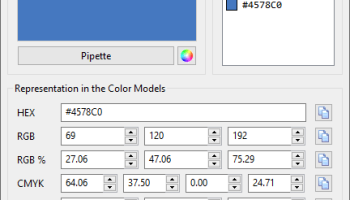
"Pipette" is an intuitive and versatile color picker software developed by Stefan Trost. Designed to cater to the needs of graphic designers, web developers, and digital artists, Pipette stands out for its simplicity and efficiency in capturing and managing color information.
At its core, Pipette allows users to effortlessly pick colors from any part of their screen. The software provides precise color values in multiple formats, including RGB, CMYK, HEX, and HSV, making it a valuable tool for various design and development tasks. This multi-format support ensures seamless integration with different design tools and platforms, enhancing workflow efficiency.
One of Pipette's standout features is its user-friendly interface. The software is lightweight and easy to navigate, allowing users to quickly access its functionalities without any steep learning curve. The main window displays a magnified view of the area around the cursor, enabling precise color selection down to the pixel level. This feature is particularly useful for tasks that require high accuracy, such as UI design and photo editing.
Pipette also includes a color history feature, which automatically saves recently picked colors. This allows users to easily revisit and reuse previous selections, streamlining the design process. Additionally, users can manually save their favorite colors in a palette for future reference, ensuring consistency across projects.
Another notable aspect of Pipette is its portability. The software does not require installation and can be run directly from a USB stick or other portable storage devices. This makes it an excellent choice for professionals who need a reliable color picker on the go, without the hassle of installing software on multiple devices.
Performance-wise, Pipette is highly efficient, with minimal system resource usage. It runs smoothly on various versions of Windows, making it accessible to a wide range of users. The software's responsiveness and low footprint ensure that it does not interfere with other applications, allowing for a seamless multitasking experience.
In summary, Pipette by Stefan Trost is a robust and user-friendly color picker software that excels in precision, versatility, and portability. Its ability to provide accurate color values in multiple formats, combined with a straightforward interface and efficient performance, makes it an indispensable tool for anyone involved in digital design and development. Whether you are a seasoned professional or a budding artist, Pipette is sure to enhance your creative workflow and ensure your color choices are always spot-on.
At its core, Pipette allows users to effortlessly pick colors from any part of their screen. The software provides precise color values in multiple formats, including RGB, CMYK, HEX, and HSV, making it a valuable tool for various design and development tasks. This multi-format support ensures seamless integration with different design tools and platforms, enhancing workflow efficiency.
One of Pipette's standout features is its user-friendly interface. The software is lightweight and easy to navigate, allowing users to quickly access its functionalities without any steep learning curve. The main window displays a magnified view of the area around the cursor, enabling precise color selection down to the pixel level. This feature is particularly useful for tasks that require high accuracy, such as UI design and photo editing.
Pipette also includes a color history feature, which automatically saves recently picked colors. This allows users to easily revisit and reuse previous selections, streamlining the design process. Additionally, users can manually save their favorite colors in a palette for future reference, ensuring consistency across projects.
Another notable aspect of Pipette is its portability. The software does not require installation and can be run directly from a USB stick or other portable storage devices. This makes it an excellent choice for professionals who need a reliable color picker on the go, without the hassle of installing software on multiple devices.
Performance-wise, Pipette is highly efficient, with minimal system resource usage. It runs smoothly on various versions of Windows, making it accessible to a wide range of users. The software's responsiveness and low footprint ensure that it does not interfere with other applications, allowing for a seamless multitasking experience.
In summary, Pipette by Stefan Trost is a robust and user-friendly color picker software that excels in precision, versatility, and portability. Its ability to provide accurate color values in multiple formats, combined with a straightforward interface and efficient performance, makes it an indispensable tool for anyone involved in digital design and development. Whether you are a seasoned professional or a budding artist, Pipette is sure to enhance your creative workflow and ensure your color choices are always spot-on.
OS: Windows 11, Windows 10 32/64 bit, Windows 8 32/64 bit, Windows 7 32/64 bit
Add Your Review or 64-bit Compatibility Report
Top Other 64-bit downloads


World Tools 2.0.6
An Adobe InDesign to work on right-to-left languages and writing scripts
Shareware | $99.00


iWisdom 0.0.0+2107~ga0785ce1
An application which helps you store small bits of wisdom, such as quotations
Open Source




Topaz DeJPEG 4.1.0
Gives you the ability to improve the quality of your JPEG images
Trialware | $29.99

Topaz DeNoise 6.0.1
A Photoshop plugin that can help you remove digital image noise
Trialware | $79.99
Members area
Top 64-bit Downloads
-
Fluid Mask for Mac 3.3.14
x64 trialware download -
ICO file format x64 2.1f1
x64 open source download -
Archicad 64bit 27 B3001
x64 demo download -
Affinity Photo 2.5.3
x64 trialware download -
Portable MicroDicom x64 2024.2
x64 freeware download -
Adobe Photoshop Elements 2024.3
x64 trialware download -
ImageJ x64 1.54i
x64 freeware download -
Volocity 64bit 6.5.1
x64 demo download -
TopSpice 10.26a
x64 demo download -
Potrace for Windows (x64
bit) 1.16
x64 open source download
Top Downloads
-
CorelDRAW X5 2026 v27.0.0.121
trialware download -
Tracfoil 4.12.07
trialware download -
oCam 428.0
freeware download -
Gyazo 5.9.1
demo download -
CodeLoader 4.19.0
freeware download -
SeiSee 2.22.6
freeware download -
MarvinSketch 23.16.0
freeware download -
MapInfo Professional 17.0.4
trialware download -
World Tools 2.0.6
shareware download -
Texmod 0.9b
freeware download -
iWisdom 0.0.0+2107~ga0785ce1
open source download -
sigTOOL 0.95
open source download -
LTpowerCAD 2.7.2
freeware download -
nanoCAD 5.1.2524.2017
freeware download -
ImageConvertPro 2.01.07
shareware download