
Pixia - X 64-bit Download
Popular x64 Tags
- photo editor x64 download
- software x64 download
- image editor x64 download
- image editing x64 download
- photos x64 download
- photoshop x64 download
- color x64 download
- design x64 download
- jpeg x64 download
- editor x64 download
- plugin x64 download
- image enhancement x64 download
- watermark x64 download
- exif x64 download
- rotate x64 download
- batch x64 download
- pictures x64 download
- graphics x64 download
- image x64 download
- digital camera x64 download
- photo x64 download
- graphic x64 download
- images x64 download
- resize x64 download
- paint x64 download
- camera x64 download
- digital x64 download
- digital imaging x64 download
- picture x64 download
- jpg x64 download
Pixia 6.62b x86
Sponsored links:
license: Freeware
downloads: 1354
size: 38.80 MB
updated: 2024-10-07
tags: Pixia, download Pixia, Pixia free download, create painting, graphic editor, image editor, paint, painter, draw, selection
Add to Basket

Isao Maruoka

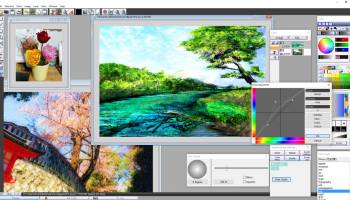
Pixia, developed by Isao Maruoka, is a versatile and robust graphics editing software that caters to both amateur and professional digital artists. Originally designed for the Japanese market, Pixia has garnered a global user base thanks to its intuitive interface and powerful features.
One of Pixia's standout qualities is its user-friendly design. The software is accessible to beginners who are just dipping their toes into the world of digital art, yet it offers a depth of functionality that can satisfy seasoned artists. The interface is clean and well-organized, allowing users to easily navigate through its various tools and features without feeling overwhelmed.
Pixia supports a wide range of file formats, making it highly compatible with other graphic design tools. This flexibility ensures that users can seamlessly integrate Pixia into their existing workflows. The software also boasts a comprehensive set of painting and drawing tools, including customizable brushes, layers, masks, and filters. These features provide artists with the creative freedom to bring their visions to life with precision and flair.
One of the most compelling aspects of Pixia is its robust layer management system. Layers are essential for complex image editing, and Pixia excels in this area by offering a variety of blending modes and opacity controls. This allows artists to experiment with different effects and compositions without permanently altering their original work.
Pixia also includes a range of advanced features such as gradient fills, pattern fills, and a variety of special effects. These tools can add depth and texture to digital artworks, making them more dynamic and visually appealing. Additionally, the software supports pressure-sensitive tablets, providing a more natural and responsive drawing experience.
Another notable feature is Pixia's scripting capabilities. Users can automate repetitive tasks and create custom scripts to enhance their workflow efficiency. This is particularly useful for professional artists who need to streamline their processes and focus more on the creative aspects of their projects.
Despite its rich feature set, Pixia is lightweight and performs efficiently even on older hardware. This makes it an excellent choice for users who may not have access to high-end computing resources but still want a powerful tool for their digital art needs.
In summary, Pixia by Isao Maruoka is a comprehensive and accessible graphics editing software that offers a wide array of tools and features suitable for both novice and experienced artists. Its intuitive interface, robust layer management, and advanced capabilities make it a valuable addition to any digital artist's toolkit. Whether you're creating intricate illustrations, detailed photo edits, or experimental digital art, Pixia provides the flexibility and power you need to bring your creative ideas to fruition.
One of Pixia's standout qualities is its user-friendly design. The software is accessible to beginners who are just dipping their toes into the world of digital art, yet it offers a depth of functionality that can satisfy seasoned artists. The interface is clean and well-organized, allowing users to easily navigate through its various tools and features without feeling overwhelmed.
Pixia supports a wide range of file formats, making it highly compatible with other graphic design tools. This flexibility ensures that users can seamlessly integrate Pixia into their existing workflows. The software also boasts a comprehensive set of painting and drawing tools, including customizable brushes, layers, masks, and filters. These features provide artists with the creative freedom to bring their visions to life with precision and flair.
One of the most compelling aspects of Pixia is its robust layer management system. Layers are essential for complex image editing, and Pixia excels in this area by offering a variety of blending modes and opacity controls. This allows artists to experiment with different effects and compositions without permanently altering their original work.
Pixia also includes a range of advanced features such as gradient fills, pattern fills, and a variety of special effects. These tools can add depth and texture to digital artworks, making them more dynamic and visually appealing. Additionally, the software supports pressure-sensitive tablets, providing a more natural and responsive drawing experience.
Another notable feature is Pixia's scripting capabilities. Users can automate repetitive tasks and create custom scripts to enhance their workflow efficiency. This is particularly useful for professional artists who need to streamline their processes and focus more on the creative aspects of their projects.
Despite its rich feature set, Pixia is lightweight and performs efficiently even on older hardware. This makes it an excellent choice for users who may not have access to high-end computing resources but still want a powerful tool for their digital art needs.
In summary, Pixia by Isao Maruoka is a comprehensive and accessible graphics editing software that offers a wide array of tools and features suitable for both novice and experienced artists. Its intuitive interface, robust layer management, and advanced capabilities make it a valuable addition to any digital artist's toolkit. Whether you're creating intricate illustrations, detailed photo edits, or experimental digital art, Pixia provides the flexibility and power you need to bring your creative ideas to fruition.
OS: Windows 11, Windows 10 32/64 bit, Windows 8 32/64 bit
Pixia Reviews
| Software: | Pixia 4.3y |
| Reviewed by: | Alain (Apr 6, 2010) |
| Rating: |   |
| Review: | Crash every time I try to load a picture on my HP vista 64 |
| Software: | Pixia 4.3y |
| Reviewed by: | Fred (Feb 9, 2010) |
| Rating: | |
| Review: | Wont work with 64 Bit Windows 7. Crash every time you try to load a picture. |
| Software: | Pixia 4.3y |
| Reviewed by: | SewMagical (Jan 29, 2010) |
| Rating: | |
| Review: | It sounded good. It seemed to install without a problem on my Win7, 64bit system, but it crashed every time I tried to load a picture. |
| Software: | Pixia 4.3y |
| Reviewed by: | Naomi Reno (Dec 5, 2009) |
| Rating: | |
| Review: | This is nice! I had to re-install this but have used it before. I have also used earlier versions of Pixia which had a bit of a learning curve to it and still does. The tuts are good so before you go off on your own, check out the tutorials and the help files for an easier experience creating graphics. I recommend Pixia highly. |
Add Your Review or 64-bit Compatibility Report
Top Editors 64-bit downloads

CorelDRAW X5 2026 v27.0.0.121
Versatile graphic design suite for vector illustration and layout creation.
Trialware | $269.00

FreeFotoWorks 2026 26.1.3
Photo editing software for beginners and pro. All well-known photo effects.
Freeware


jMonkeyEngine 3.9.0
jMonkeyEngine: Open-source 3D game development engine for Java developers.
Open Source

Adobe Photoshop Elements 2024.3
Powerful yet easy-to-use photo editing software for print, e-mail, and the Web
Trialware | $99.99
Members area
Top 64-bit Downloads
-
Fluid Mask for Mac 3.3.14
x64 trialware download -
ICO file format x64 2.1f1
x64 open source download -
Archicad 64bit 27 B3001
x64 demo download -
TopSpice 10.26a
x64 demo download -
WellCAD x64 5.3 B625
x64 demo download -
Portable MicroDicom x64 2024.2
x64 freeware download -
Adobe Photoshop Elements 2024.3
x64 trialware download -
Potrace for Windows (x64
bit) 1.16
x64 open source download -
delaboratory x64 0.8
x64 open source download -
AcroPDF 6.2
x64 shareware download
Top Downloads
-
CorelDRAW X5 2026 v27.0.0.121
trialware download -
Tracfoil 4.12.07
trialware download -
oCam 428.0
freeware download -
Gyazo 5.9.1
demo download -
nanoCAD 5.1.2524.2017
freeware download -
MarvinSketch 23.16.0
freeware download -
MapInfo Professional 17.0.4
trialware download -
Scanahand 8.0.0.320
demo download -
iWisdom 0.0.0+2107~ga0785ce1
open source download -
CodeLoader 4.19.0
freeware download -
SeiSee 2.22.6
freeware download -
XnConvert 1.106.0
shareware download -
VueScan 9.8.53
demo download -
Topaz Simplify 4.1.1
trialware download -
World Tools 2.0.6
shareware download