
Portable FastStone Capture - X 64-bit Download
Popular x64 Tags
- image x64 download
- design x64 download
- size x64 download
- color x64 download
- graphics x64 download
- gif x64 download
- panorama x64 download
- photoshop x64 download
- software x64 download
- jpeg x64 download
- utility x64 download
- photo x64 download
- plugin x64 download
- cover x64 download
- tool x64 download
- rgb x64 download
- png x64 download
- jpg x64 download
- pictures x64 download
- images x64 download
- vanderlee x64 download
- bmp x64 download
- photos x64 download
- vdl x64 download
- picture x64 download
- scanner x64 download
- screen x64 download
- video x64 download
- scan x64 download
- dust x64 download
Portable FastStone Capture 11.2
Sponsored links:
license: Trialware ($19.95)
downloads: 716
size: 13.40 MB
updated: 2025-11-29
tags: Portable FastStone Capture, download Portable FastStone Capture, Portable FastStone Capture free download, screen capture, capture window, take screenshot, capture, screenshot, snapshot, printscreen
Add to Basket

FastStone Soft

Portable FastStone Capture, developed by FastStone Soft, is a robust and versatile screen capture and screen recording tool designed to meet the needs of both casual users and professionals. This lightweight yet powerful software provides a comprehensive suite of features that make capturing, annotating, and editing screen content a breeze.
One of the standout features of Portable FastStone Capture is its portability. The software can be run directly from a USB drive or any other portable storage device, making it an ideal solution for users who need to work on multiple computers without the hassle of installation. This flexibility ensures that you can always have your screen capture tool at hand, regardless of where you are.
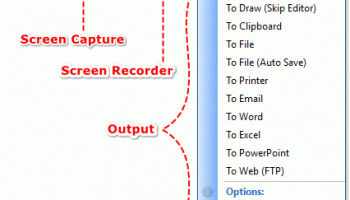
FastStone Capture offers a variety of capture modes, including full screen, active window, window object, rectangular area, freehand-selected region, and scrolling windows/web pages. This extensive range of options ensures that you can capture exactly what you need, whether it's a simple screenshot or a complex, scrolling webpage.
The software also includes a powerful screen recording feature, allowing you to create high-quality video tutorials, presentations, and demonstrations. You can record screen activities, mouse movements, and clicks, and even include audio from a microphone or speakers. The intuitive interface makes it easy to start, pause, and stop recordings, ensuring a smooth and efficient workflow.
Once you've captured your content, Portable FastStone Capture provides a robust set of annotation and editing tools. You can add text, arrows, highlights, and shapes to your screenshots, making it easy to emphasize important information. The built-in editor also includes options for cropping, resizing, and adjusting colors, ensuring that your final output is polished and professional.
In addition to its core features, Portable FastStone Capture offers several advanced options that enhance its functionality. These include automatic filename generation, support for multiple file formats (including BMP, GIF, JPEG, PCX, PNG, TGA, TIFF, and PDF), and the ability to send captures directly to email, clipboard, printer, or external editors.
The user interface is clean and intuitive, with a small, unobtrusive toolbar that provides quick access to all the main functions. This design ensures that the software is easy to use, even for those who are not tech-savvy. Despite its rich feature set, Portable FastStone Capture is remarkably light on system resources, ensuring that it runs smoothly even on older hardware.
In summary, Portable FastStone Capture is a highly effective screen capture and recording tool that combines portability, versatility, and ease of use. Whether you're a professional needing to create detailed tutorials or a casual user looking to capture and annotate screenshots, this software provides all the tools you need in a compact and portable package. FastStone Soft has once again delivered a product that stands out for its quality, functionality, and user-friendly design.
One of the standout features of Portable FastStone Capture is its portability. The software can be run directly from a USB drive or any other portable storage device, making it an ideal solution for users who need to work on multiple computers without the hassle of installation. This flexibility ensures that you can always have your screen capture tool at hand, regardless of where you are.
FastStone Capture offers a variety of capture modes, including full screen, active window, window object, rectangular area, freehand-selected region, and scrolling windows/web pages. This extensive range of options ensures that you can capture exactly what you need, whether it's a simple screenshot or a complex, scrolling webpage.
The software also includes a powerful screen recording feature, allowing you to create high-quality video tutorials, presentations, and demonstrations. You can record screen activities, mouse movements, and clicks, and even include audio from a microphone or speakers. The intuitive interface makes it easy to start, pause, and stop recordings, ensuring a smooth and efficient workflow.
Once you've captured your content, Portable FastStone Capture provides a robust set of annotation and editing tools. You can add text, arrows, highlights, and shapes to your screenshots, making it easy to emphasize important information. The built-in editor also includes options for cropping, resizing, and adjusting colors, ensuring that your final output is polished and professional.
In addition to its core features, Portable FastStone Capture offers several advanced options that enhance its functionality. These include automatic filename generation, support for multiple file formats (including BMP, GIF, JPEG, PCX, PNG, TGA, TIFF, and PDF), and the ability to send captures directly to email, clipboard, printer, or external editors.
The user interface is clean and intuitive, with a small, unobtrusive toolbar that provides quick access to all the main functions. This design ensures that the software is easy to use, even for those who are not tech-savvy. Despite its rich feature set, Portable FastStone Capture is remarkably light on system resources, ensuring that it runs smoothly even on older hardware.
In summary, Portable FastStone Capture is a highly effective screen capture and recording tool that combines portability, versatility, and ease of use. Whether you're a professional needing to create detailed tutorials or a casual user looking to capture and annotate screenshots, this software provides all the tools you need in a compact and portable package. FastStone Soft has once again delivered a product that stands out for its quality, functionality, and user-friendly design.
OS: Windows 11, Windows 10 32/64 bit, Windows 8 32/64 bit, Windows 7 32/64 bit, Windows Vista, Windows XP 32/64 bit
Add Your Review or 64-bit Compatibility Report
Top Other 64-bit downloads


iWisdom 0.0.0+2107~ga0785ce1
An application which helps you store small bits of wisdom, such as quotations
Open Source


World Tools 2.0.6
An Adobe InDesign to work on right-to-left languages and writing scripts
Shareware | $99.00




Topaz DeJPEG 4.1.0
Gives you the ability to improve the quality of your JPEG images
Trialware | $29.99

Members area
Top 64-bit Downloads
-
Fluid Mask for Mac 3.3.14
x64 trialware download -
ICO file format x64 2.1f1
x64 open source download -
Archicad 64bit 27 B3001
x64 demo download -
TopSpice 10.26a
x64 demo download -
WellCAD x64 5.3 B625
x64 demo download -
Portable MicroDicom x64 2024.2
x64 freeware download -
Adobe Photoshop Elements 2024.3
x64 trialware download -
Potrace for Windows (x64
bit) 1.16
x64 open source download -
delaboratory x64 0.8
x64 open source download -
AcroPDF 6.2
x64 shareware download
Top Downloads
-
CorelDRAW X5 2026 v27.0.0.121
trialware download -
Tracfoil 4.12.07
trialware download -
oCam 428.0
freeware download -
Gyazo 5.9.1
demo download -
nanoCAD 5.1.2524.2017
freeware download -
MarvinSketch 23.16.0
freeware download -
MapInfo Professional 17.0.4
trialware download -
Scanahand 8.0.0.320
demo download -
iWisdom 0.0.0+2107~ga0785ce1
open source download -
CodeLoader 4.19.0
freeware download -
SeiSee 2.22.6
freeware download -
XnConvert 1.106.0
shareware download -
VueScan 9.8.53
demo download -
Topaz Simplify 4.1.1
trialware download -
World Tools 2.0.6
shareware download