
Portable Simple Port Forwarding - X 64-bit Download
Popular x64 Tags
- software x64 download
- network x64 download
- download x64 download
- seo x64 download
- rss reader x64 download
- online tv x64 download
- internet x64 download
- freeware x64 download
- free x64 download
- identity management x64 download
- hardware inventory x64 download
- slow pc performance x64 download
- proxy x64 download
- utility x64 download
- satellite tv for pc x64 download
- password manager x64 download
- email x64 download
- password reset x64 download
- security x64 download
- address x64 download
- server x64 download
- web x64 download
- remote control software x64 download
- pages x64 download
- rss x64 download
- password management x64 download
- active directory x64 download
- why is my computer so slow x64 download
- software distribution x64 download
- software inventory x64 download
Portable Simple Port Forwarding 3.8.5
Sponsored links:

PCWinTech

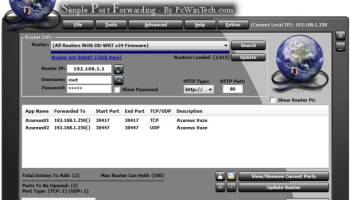
Simple Port Forwarding works with WebPages and not directly with your router. Making it a safe program to use. Its no different than using Firefox, IE or any other browser to setup port forwarding yourself.
The program works by automating the process for you. So whether you don't understand how to forward ports, or your simply looking for an easier way to forward ports then this program is for you.
Its port forwarding made simple.
The main interface of the program is small and clean. Giving options of seeing what is going to be forwarded to the router and how many entries and ports it will use in the process. You have the ability to save your list and send it to another user of the program. An example would be, lets say you have a family member who lives far from you and doesn't really understand port forwarding, so instead of spending a lot of time over the phone walking them through it you can simply have them use the program and have them load the list and update their router, then your all done. Now that's a time saver.
The program has a large database of known ports for over 670+ games and programs, so finding the port you need is made a little easier.
The program will also remember custom applications you put in, so you don't have to reenter them. The program remembers the last IP address you use to forward to, this helps not having to set it every time you load new ports!
The program has many extra tools, such as a tool to set your IP to static or back to DHCP. When port forwarding the router forwards to an IP address. When DHCP is enabled your IP address can change and thus breaking the port forwarding. By setting your IP to static it never changes. I added this tool to make setting a static IP as easy as possible for people instead of manually doing it on there systems (Which if a person has never done it before can be a little intimidating). The Program also makes adding the ports to the windows firewall as easy as a few clicks! Once you have your ports forwarded you can then test to see if they can be accessed right from with in the program using the built in port tester.
One nice thing about the program is you can see it working with your router. So if there is a problem you will know, also it feels better seeing what's going on with your router instead of just hoping the program is working. The program has other small features, such as a easy way to download and keep the router, program ports and languages up to date with a simple click of your mouse. Any questions? If you can't find the help you need drop me a line in the forums!
Features:
(*) You can learn how to port forward your router by watching the program do it for you.
(*) Brand the program with your company name or title.
(*) Change the colors of the program to better suit your preferences.
(*) Save Your Ports List To Easily Share With Friends or Family.
(*) Automatic Program Updates. (Must run as administrator in Vista and Windows 7)
(*) Easily Update Routers, Predefined Ports, and Languages with just a few clicks. (Must run as administrator in Vista and Windows 7)
(*) Since The Program Works With The Routers Web Interface Then You Can Also Connect to The Routers Remote Web Interface And Setup Port Forwarding Remotely. A Great Tool For My Fellow Techs Out There.
(*) Set Your Computers IP Address To Static or DHCP With Just One Click.
(*) Easily Add/Remove/View The Ports You Have Forwarded To The Windows Built-in Firewall.
(*) Test That Your Port Forwarding Is Working With The Built In Tester That Will Open and Listen On The Ports So The Tests Wont Fail.
(*) Advanced Tools Such as "Silent Mode" to Keep Any Webpage Scripts Errors From Popping up.
(*) Built-in Debug Mode to Let The User Control When The Program Goes to The Next Step in a Script, Helping Find Problems With Any Script.
(*) Quick Access To The Ever Growing List Of Router Guides. (Guides Such As Port Forwarding, Port Triggering and Wireless Setup)
(*) Quick Access To The Ever Growing List
The program works by automating the process for you. So whether you don't understand how to forward ports, or your simply looking for an easier way to forward ports then this program is for you.
Its port forwarding made simple.
The main interface of the program is small and clean. Giving options of seeing what is going to be forwarded to the router and how many entries and ports it will use in the process. You have the ability to save your list and send it to another user of the program. An example would be, lets say you have a family member who lives far from you and doesn't really understand port forwarding, so instead of spending a lot of time over the phone walking them through it you can simply have them use the program and have them load the list and update their router, then your all done. Now that's a time saver.
The program has a large database of known ports for over 670+ games and programs, so finding the port you need is made a little easier.
The program will also remember custom applications you put in, so you don't have to reenter them. The program remembers the last IP address you use to forward to, this helps not having to set it every time you load new ports!
The program has many extra tools, such as a tool to set your IP to static or back to DHCP. When port forwarding the router forwards to an IP address. When DHCP is enabled your IP address can change and thus breaking the port forwarding. By setting your IP to static it never changes. I added this tool to make setting a static IP as easy as possible for people instead of manually doing it on there systems (Which if a person has never done it before can be a little intimidating). The Program also makes adding the ports to the windows firewall as easy as a few clicks! Once you have your ports forwarded you can then test to see if they can be accessed right from with in the program using the built in port tester.
One nice thing about the program is you can see it working with your router. So if there is a problem you will know, also it feels better seeing what's going on with your router instead of just hoping the program is working. The program has other small features, such as a easy way to download and keep the router, program ports and languages up to date with a simple click of your mouse. Any questions? If you can't find the help you need drop me a line in the forums!
Features:
(*) You can learn how to port forward your router by watching the program do it for you.
(*) Brand the program with your company name or title.
(*) Change the colors of the program to better suit your preferences.
(*) Save Your Ports List To Easily Share With Friends or Family.
(*) Automatic Program Updates. (Must run as administrator in Vista and Windows 7)
(*) Easily Update Routers, Predefined Ports, and Languages with just a few clicks. (Must run as administrator in Vista and Windows 7)
(*) Since The Program Works With The Routers Web Interface Then You Can Also Connect to The Routers Remote Web Interface And Setup Port Forwarding Remotely. A Great Tool For My Fellow Techs Out There.
(*) Set Your Computers IP Address To Static or DHCP With Just One Click.
(*) Easily Add/Remove/View The Ports You Have Forwarded To The Windows Built-in Firewall.
(*) Test That Your Port Forwarding Is Working With The Built In Tester That Will Open and Listen On The Ports So The Tests Wont Fail.
(*) Advanced Tools Such as "Silent Mode" to Keep Any Webpage Scripts Errors From Popping up.
(*) Built-in Debug Mode to Let The User Control When The Program Goes to The Next Step in a Script, Helping Find Problems With Any Script.
(*) Quick Access To The Ever Growing List Of Router Guides. (Guides Such As Port Forwarding, Port Triggering and Wireless Setup)
(*) Quick Access To The Ever Growing List
OS: Windows 2000, Windows 2003, Windows XP, Windows Vista, Windows Vista x64, Windows 7, Windows 7 x64, Windows 8, Windows 8 x64
Add Your Review or 64-bit Compatibility Report
Top Other 64-bit downloads


Adobe Flash Player 10 for 64-bit Windows Preview 2
Enables native 64-bit support on Linux operating systems
Freeware


Advanced TCP IP Data Logger 5.1.3 Build 310

Log data from one or more Terminal Servers to disk
Demo | $100.00


Virtual World 4.7.4
An interactive 3D Virtual World chat with live webcam and avatars support.
Commercial | $1 500.00

Octoparse 8.9.0
Powerful web scraping tool for data extraction without coding skills.
Trialware | $83.00

miTaggedMarks 2.01.4
Use tags to organize and access your local collection of bookmarks
Trialware | $20.00

Skyfiles 4.0
A client for Google Docs which enables folder drag and drop uploading.
Shareware | $29.00

eToolz 4.5.2
A collection of networking tools such as NS-Lookup, Ping, TraceRoute and Whois
Freeware
Members area
Top 64-bit Downloads
-
Adobe Flash Player 10
for 64-bit Windows Preview 2
x64 freeware download -
SoftPerfect Bandwidth
Manager 3.3.0
x64 shareware download -
Internet Explorer 8 for
Windows Vista 64-bit and
Windows Server 2008
64-bit
x64 freeware download -
FileZilla Server 1.8.1
x64 open source download -
SoftPerfect Connection
Emulator 1.9
x64 shareware download -
Angry IP Scanner 64bit 3.9.1
x64 open source download -
HTTPNetworkSniffer
64-bit 1.63
x64 freeware download -
WatchFTP x64 4.2.1.0
x64 trialware download -
DameWare Mini Remote
Control 64bit 12.3.0.12
x64 trialware download -
Hitman Pro x64 3.8.34.330
x64 trialware download
Top Downloads
-
TheWorld Browser 7.0.0.108
freeware download -
MusicFab 1.0.6.6
demo download -
Adobe Flash Player 10
for 64-bit Windows Preview 2
freeware download -
Open With Photoshop 63.0
open source download -
BiglyBT 4.0.0.0
open source download -
NetShareWatcher 1.5.8
shareware download -
Profile Migrator 1.1
trialware download -
MetaMask for Chrome 13.22.0
open source download -
Web Archives for Opera 7.3.0
open source download -
Dooble 2024.12.31
open source download -
GetRight 6.5
shareware download -
MP4 Downloader 6.2.3
trialware download -
Vuze 5.7.7.0
freeware download -
VNC for Mac and Linux 7.16.0 (r14)
demo download -
Advanced TCP IP Data
Logger 5.1.3 Build 310
demo download